
> ## Documentation Index
> Fetch the complete documentation index at: https://www.krea.ai/docs/llms.txt
> Use this file to discover all available pages before exploring further.

# स्टाइल ट्रांसफर

> Krea 2 जनरेशन की स्टाइल को संचालित करने के लिए एक या अधिक रेफरेंस इमेज का उपयोग करें, और प्रत्येक रेफरेंस के लिए ट्यून करने योग्य स्ट्रेंथ सेट करें।

Krea 2 बाज़ार के सबसे शक्तिशाली स्टाइल ट्रांसफर सिस्टम के साथ आता है। एक रेफरेंस इमेज पास करें या कई को मिलाएँ, और Krea 2 स्टाइल निकालकर उसे आपके आउटपुट पर लागू कर देगा — और आप यह तय करेंगे कि प्रत्येक रेफरेंस अंतिम इमेज को कितनी प्रबलता से आकार दे।

## उदाहरण

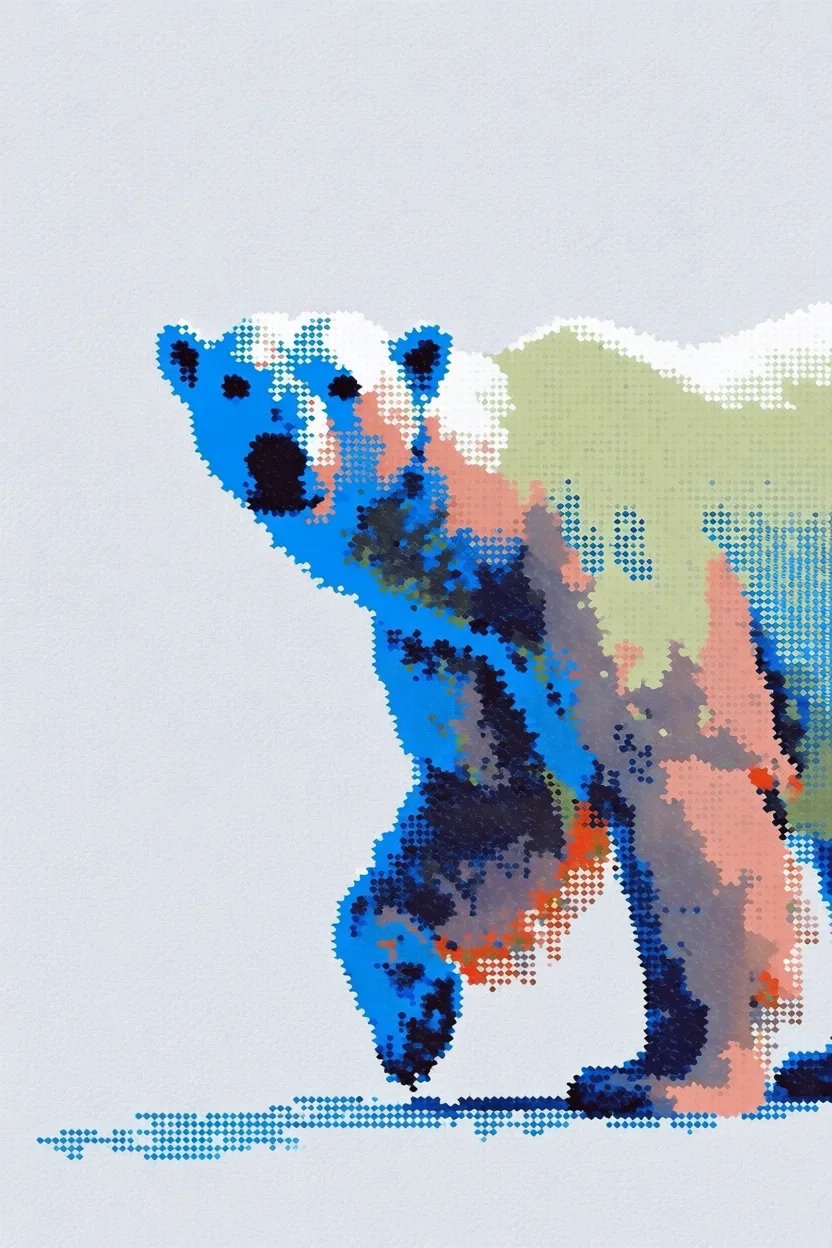
प्रत्येक उदाहरण में बाईं ओर **स्टाइल रेफरेंस** और दाईं ओर **जनरेट किया गया आउटपुट** दिखाया गया है।

<div className="not-prose space-y-8">
  <div>
    <div className="grid grid-cols-2 gap-3">
      <img src="https://s.krea.ai/docs/krea-2/style-transfer-cat-ref.webp" alt="स्टाइल रेफरेंस: घास में दौड़ता हुआ कार्टून" className="rounded-lg w-full object-cover m-0" style={{ aspectRatio: "4/3" }} />

      <img src="https://s.krea.ai/docs/krea-2/style-transfer-cat-out.webp" alt="आउटपुट: बगल की ओर कूदती हुई एक बिल्ली" className="rounded-lg w-full object-cover m-0" style={{ aspectRatio: "4/3" }} />
    </div>

    <p className="mt-2 text-sm text-gray-600 dark:text-gray-400">प्रॉम्प्ट: <em>a cat jumping sideways</em></p>
  </div>

  <div>
    <div className="grid grid-cols-2 gap-3">
      <img src="https://s.krea.ai/docs/krea-2/style-transfer-polar-bear-ref.webp" alt="स्टाइल रेफरेंस: 8-बिट पिक्सेल-आर्ट ग्रिड" className="rounded-lg w-full object-cover m-0" style={{ aspectRatio: "4/3" }} />

      <img src="https://s.krea.ai/docs/krea-2/style-transfer-polar-bear-out.webp" alt="आउटपुट: एक ध्रुवीय भालू" className="rounded-lg w-full object-cover m-0" style={{ aspectRatio: "4/3" }} />
    </div>

    <p className="mt-2 text-sm text-gray-600 dark:text-gray-400">प्रॉम्प्ट: <em>a polar bear</em></p>
  </div>

  <div>
    <div className="grid grid-cols-2 gap-3">
      <img src="https://s.krea.ai/docs/krea-2/style-transfer-cowboy-ref.webp" alt="स्टाइल रेफरेंस: Krea 1 स्टाइल स्केच" className="rounded-lg w-full object-cover m-0" style={{ aspectRatio: "4/3" }} />

      <img src="https://s.krea.ai/docs/krea-2/style-transfer-cowboy-out.webp" alt="आउटपुट: एक काउबॉय" className="rounded-lg w-full object-cover m-0" style={{ aspectRatio: "4/3" }} />
    </div>

    <p className="mt-2 text-sm text-gray-600 dark:text-gray-400">प्रॉम्प्ट: <em>a cowboy</em></p>
  </div>

  <div>
    <div className="grid grid-cols-2 gap-3">
      <img src="https://s.krea.ai/docs/krea-2/style-transfer-muppet-ref.webp" alt="स्टाइल रेफरेंस: Sesame Street स्टाइल का घोड़ा" className="rounded-lg w-full object-cover m-0" style={{ aspectRatio: "4/3" }} />

      <img src="https://s.krea.ai/docs/krea-2/style-transfer-muppet-out.webp" alt="आउटपुट: muppets-स्टाइल की बिल्ली और कुत्ता" className="rounded-lg w-full object-cover m-0" style={{ aspectRatio: "4/3" }} />
    </div>

    <p className="mt-2 text-sm text-gray-600 dark:text-gray-400">प्रॉम्प्ट: <em>a scene from the live-action Muppets movie featuring a grey cat muppet and his dog friend</em></p>
  </div>
</div>

## यह कैसे काम करता है

<Steps>
  <Step title="अपना रेफरेंस प्रदान करें">
    आप किसी इमेज को तीन तरीकों से रेफरेंस कर सकते हैं: इमेज को `/assets` पर `POST` करें और लौटाए गए URL का उपयोग करें, सीधे एक बाहरी URL पास करें, या एक data URI प्रदान करें।
  </Step>

  <Step title="URL द्वारा रेफरेंस करें">
    अपने `krea-2/medium` या `krea-2/large` रिक्वेस्ट की `image_style_references` ऐरे में इमेज URL या data URI शामिल करें।
  </Step>

  <Step title="स्ट्रेंथ ट्यून करें">
    प्रत्येक रेफरेंस के लिए `strength` को -2 और 2 के बीच सेट करें। शुरुआत के लिए \~0.6 एक उचित बिंदु है — स्टाइल को प्रमुख बनाने के लिए इसे बढ़ाएँ, सूक्ष्म प्रभाव के लिए इसे घटाएँ।
  </Step>
</Steps>

## एंड-टू-एंड उदाहरण

यह उदाहरण एक स्थानीय फ़ाइल को स्टाइल रेफरेंस के रूप में अपलोड करता है और इसे Krea 2 Medium जनरेशन में उपयोग करता है।

<CodeGroup>
  ```javascript Node.js theme={null}
  // npm install @krea-ai/sdk
  import { openAsBlob } from "node:fs";
  import { Krea } from "@krea-ai/sdk";

  const krea = new Krea({ apiKey: process.env.KREA_API_KEY });

  // 1. Upload the style reference
  const file = await openAsBlob("./style-reference.png", { type: "image/png" });
  const asset = await krea.assets.upload(file, {
    filename: "style-reference.png",
    description: "Style reference for Krea 2",
  });

  // 2. Generate with the reference
  const result = await krea.subscribe("image/krea/krea-2/medium", {
    input: {
      prompt: "A portrait of a dancer in a quiet studio",
      aspect_ratio: "4:3",
      resolution: "1K",
      creativity: "medium",
      image_style_references: [{ url: asset.image_url, strength: 0.6 }],
    },
  });

  console.log(result.data?.urls[0]);
  ```

  ```bash cURL theme={null}
  # 1. Upload the style reference
  curl -X POST https://api.krea.ai/assets \
    -H "Authorization: Bearer $KREA_API_TOKEN" \
    -F "file=@./style-reference.png" \
    -F "description=Style reference for Krea 2"
  # Response includes { "image_url": "https://..." }

  # 2. Generate with the reference (replace IMAGE_URL with the response above)
  curl -X POST https://api.krea.ai/generate/image/krea/krea-2/medium \
    -H "Authorization: Bearer $KREA_API_TOKEN" \
    -H "Content-Type: application/json" \
    -d '{
      "prompt": "A portrait of a dancer in a quiet studio",
      "aspect_ratio": "4:3",
      "resolution": "1K",
      "creativity": "medium",
      "image_style_references": [
        { "url": "IMAGE_URL", "strength": 0.6 }
      ]
    }'
  ```

  ```python Python theme={null}
  import os
  import requests

  API_BASE = "https://api.krea.ai"
  API_TOKEN = os.environ["KREA_API_TOKEN"]
  headers = {"Authorization": f"Bearer {API_TOKEN}"}

  # 1. Upload the style reference
  with open("style-reference.png", "rb") as f:
      upload = requests.post(
          f"{API_BASE}/assets",
          headers=headers,
          files={"file": ("style-reference.png", f, "image/png")},
          data={"description": "Style reference for Krea 2"},
      )
  upload.raise_for_status()
  asset = upload.json()

  # 2. Generate with the reference
  generation = requests.post(
      f"{API_BASE}/generate/image/krea/krea-2/medium",
      headers={**headers, "Content-Type": "application/json"},
      json={
          "prompt": "A portrait of a dancer in a quiet studio",
          "aspect_ratio": "4:3",
          "resolution": "1K",
          "creativity": "medium",
          "image_style_references": [
              {"url": asset["image_url"], "strength": 0.6},
          ],
      },
  )
  generation.raise_for_status()
  print(generation.json())  # { "job_id": "..." } — poll /jobs/{id} for the result
  ```
</CodeGroup>

<Note>
  REST उदाहरण एसिंक्रोनस हैं — `POST /generate/...` तुरंत एक `job_id` लौटाता है। Node.js SDK उदाहरण `subscribe(...)` का उपयोग करता है, जो पूर्ण परिणाम की प्रतीक्षा करता है। पोलिंग पैटर्न के लिए [Job lifecycle](/developers/job-lifecycle) देखें, या पोलिंग को पूरी तरह से छोड़ने के लिए [webhook](/developers/webhooks) का उपयोग करें।
</Note>

## स्ट्रेंथ ट्यूनिंग

`strength` का दायरा `-2` से `2` तक है। कुछ मार्गदर्शक नियम:

* **\~0.3–0.5** — सूक्ष्म प्रभाव; तब उपयोगी जब आप चाहते हैं कि प्रॉम्प्ट मुख्य भूमिका निभाए और रेफरेंस केवल चरित्र जोड़े।
* **\~0.6** — अधिकांश उपयोग के मामलों के लिए संतुलित प्रारंभिक बिंदु।
* **\~0.8–1.0** — रेफरेंस स्टाइल हावी हो जाती है; तब उपयोगी जब प्रॉम्प्ट सामान्य हो और विज़ुअल पहचान रेफरेंस से आनी चाहिए।
* **ऋणात्मक मान** — आउटपुट को किसी रेफरेंस स्टाइल से दूर ले जाते हैं।

यदि आउटपुट या तो अत्यधिक शाब्दिक लगे (रेफरेंस बहुत प्रबल है) या बहुत सामान्य लगे (रेफरेंस बहुत कमज़ोर है), तो एक बार में 0.1 का समायोजन करें।

## कई रेफरेंस को जोड़ना

स्टाइल मिश्रित करने के लिए `image_style_references` में कई ऑब्जेक्ट पास करें। प्रत्येक रेफरेंस की अपनी `strength` हो सकती है।

```javascript Node.js theme={null}
const result = await krea.subscribe("image/krea/krea-2/medium", {
  input: {
    prompt: "A portrait of a dancer in a quiet studio",
    aspect_ratio: "4:3",
    resolution: "1K",
    image_style_references: [
      { url: assetA.image_url, strength: 0.6 },
      { url: assetB.image_url, strength: 0.4 },
    ],
  },
});
```

रेफरेंस योगात्मक रूप से मिश्रित होते हैं — ऐसी स्ट्रेंथ से शुरू करें जिनका योग `1.0` के पास हो और वहाँ से ट्यून करें।