

> ## Documentation Index
> Fetch the complete documentation index at: https://www.krea.ai/docs/llms.txt
> Use this file to discover all available pages before exploring further.

# 스타일 트랜스퍼

> 하나 이상의 참조 이미지로 Krea 2 생성의 스타일을 제어하고, 참조별로 강도를 조정할 수 있습니다.

Krea 2는 시장에서 가장 강력한 스타일 트랜스퍼 시스템을 제공합니다. 단일 참조 이미지를 전달하거나 여러 장을 조합하면, Krea 2가 스타일을 추출하여 출력에 적용합니다. 각 참조가 최종 이미지에 얼마나 강하게 반영될지 직접 결정할 수 있습니다.

## 예시

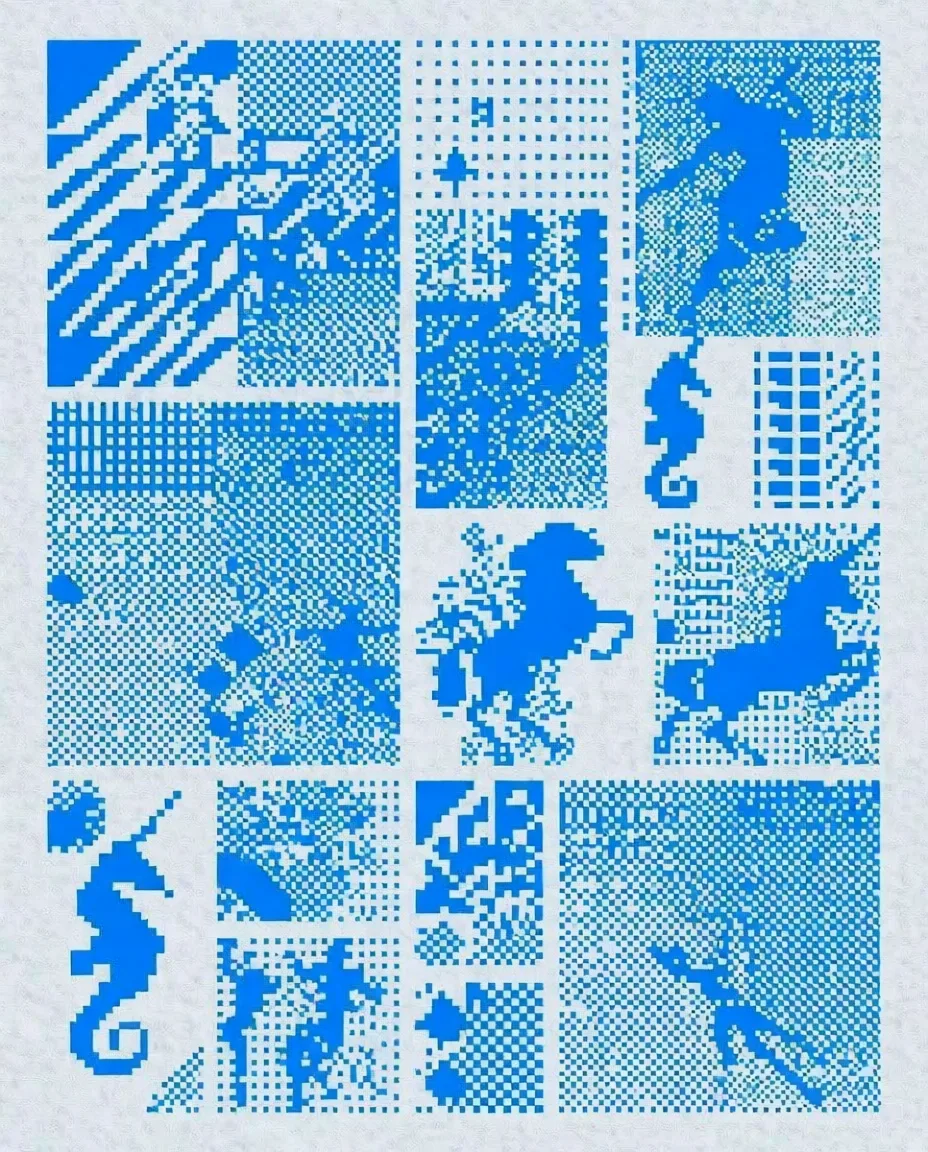
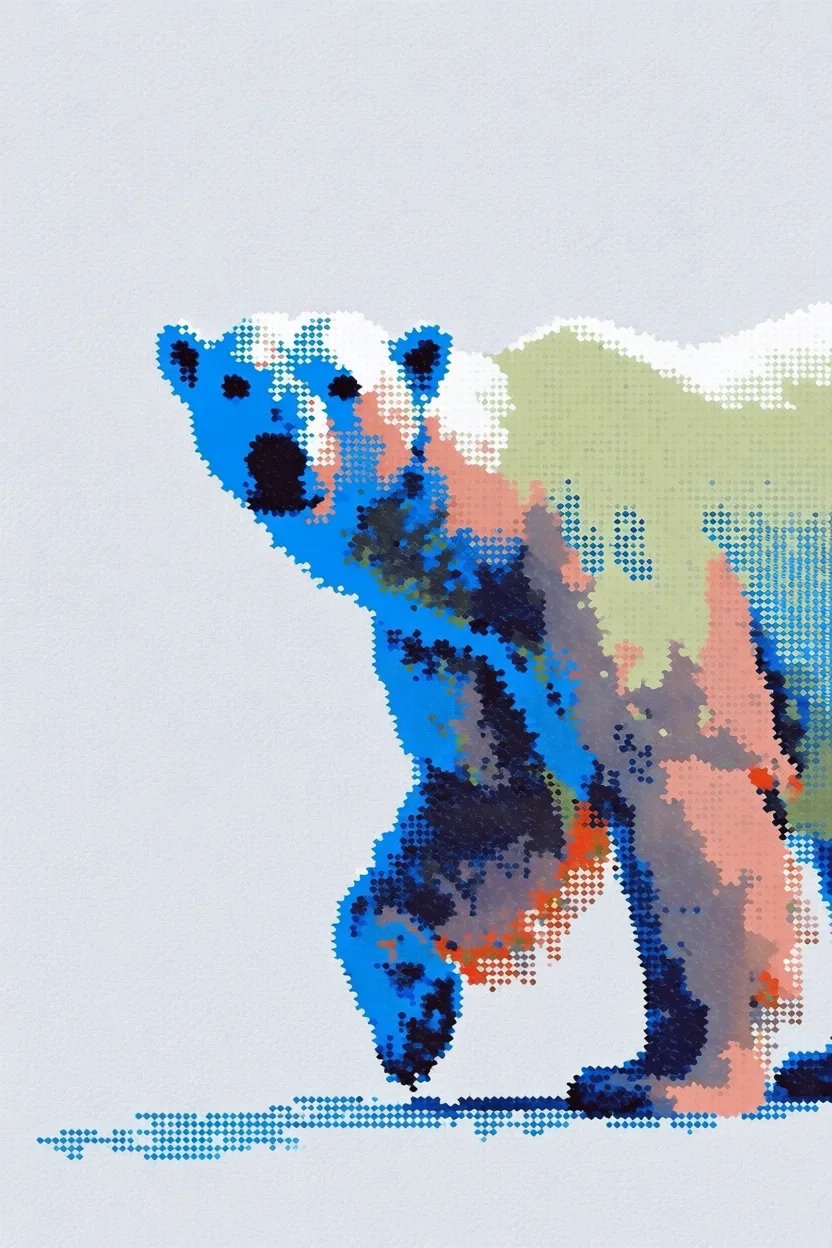
각 예시는 왼쪽에 **스타일 참조**, 오른쪽에 **생성된 출력**을 보여줍니다.

<div className="not-prose space-y-8">
  <div>
    <div className="grid grid-cols-2 gap-3">
      <img src="https://s.krea.ai/docs/krea-2/style-transfer-cat-ref.webp" alt="스타일 참조: 풀밭을 달리는 카툰" className="rounded-lg w-full object-cover m-0" style={{ aspectRatio: "4/3" }} />

      <img src="https://s.krea.ai/docs/krea-2/style-transfer-cat-out.webp" alt="출력: 옆으로 뛰는 고양이" className="rounded-lg w-full object-cover m-0" style={{ aspectRatio: "4/3" }} />
    </div>

    <p className="mt-2 text-sm text-gray-600 dark:text-gray-400">프롬프트: <em>옆으로 뛰는 고양이</em></p>
  </div>

  <div>
    <div className="grid grid-cols-2 gap-3">
      <img src="https://s.krea.ai/docs/krea-2/style-transfer-polar-bear-ref.webp" alt="스타일 참조: 8비트 픽셀 아트 그리드" className="rounded-lg w-full object-cover m-0" style={{ aspectRatio: "4/3" }} />

      <img src="https://s.krea.ai/docs/krea-2/style-transfer-polar-bear-out.webp" alt="출력: 북극곰" className="rounded-lg w-full object-cover m-0" style={{ aspectRatio: "4/3" }} />
    </div>

    <p className="mt-2 text-sm text-gray-600 dark:text-gray-400">프롬프트: <em>북극곰</em></p>
  </div>

  <div>
    <div className="grid grid-cols-2 gap-3">
      <img src="https://s.krea.ai/docs/krea-2/style-transfer-cowboy-ref.webp" alt="스타일 참조: Krea 1 스타일 스케치" className="rounded-lg w-full object-cover m-0" style={{ aspectRatio: "4/3" }} />

      <img src="https://s.krea.ai/docs/krea-2/style-transfer-cowboy-out.webp" alt="출력: 카우보이" className="rounded-lg w-full object-cover m-0" style={{ aspectRatio: "4/3" }} />
    </div>

    <p className="mt-2 text-sm text-gray-600 dark:text-gray-400">프롬프트: <em>카우보이</em></p>
  </div>

  <div>
    <div className="grid grid-cols-2 gap-3">
      <img src="https://s.krea.ai/docs/krea-2/style-transfer-muppet-ref.webp" alt="스타일 참조: 세서미 스트리트 스타일 말" className="rounded-lg w-full object-cover m-0" style={{ aspectRatio: "4/3" }} />

      <img src="https://s.krea.ai/docs/krea-2/style-transfer-muppet-out.webp" alt="출력: 머펫 스타일 고양이와 강아지" className="rounded-lg w-full object-cover m-0" style={{ aspectRatio: "4/3" }} />
    </div>

    <p className="mt-2 text-sm text-gray-600 dark:text-gray-400">프롬프트: <em>실사판 머펫 영화의 한 장면, 회색 고양이 머펫과 강아지 친구가 등장</em></p>
  </div>
</div>

## 작동 방식

<Steps>
  <Step title="참조 제공">
    이미지는 세 가지 방법으로 참조할 수 있습니다. `/assets`에 이미지를 `POST`하고 반환된 URL을 사용하거나, 외부 URL을 직접 전달하거나, 데이터 URI를 제공하면 됩니다.
  </Step>

  <Step title="URL로 참조">
    `krea-2/medium` 또는 `krea-2/large` 요청의 `image_style_references` 배열에 이미지 URL 또는 데이터 URI를 포함하세요.
  </Step>

  <Step title="강도 조정">
    각 참조에 대해 `strength`를 -2에서 2 사이로 설정하세요. \~0.6이 합리적인 시작점입니다. 스타일을 더 강하게 반영하려면 값을 높이고, 영향을 미묘하게 하려면 낮추세요.
  </Step>
</Steps>

## 엔드 투 엔드 예제

이 예제는 로컬 파일을 스타일 참조로 업로드하고 Krea 2 Medium 생성에 사용합니다.

<CodeGroup>
  ```javascript Node.js theme={null}
  // npm install @krea-ai/sdk
  import { openAsBlob } from "node:fs";
  import { Krea } from "@krea-ai/sdk";

  const krea = new Krea({ apiKey: process.env.KREA_API_KEY });

  // 1. Upload the style reference
  const file = await openAsBlob("./style-reference.png", { type: "image/png" });
  const asset = await krea.assets.upload(file, {
    filename: "style-reference.png",
    description: "Style reference for Krea 2",
  });

  // 2. Generate with the reference
  const result = await krea.subscribe("image/krea/krea-2/medium", {
    input: {
      prompt: "A portrait of a dancer in a quiet studio",
      aspect_ratio: "4:3",
      resolution: "1K",
      creativity: "medium",
      image_style_references: [{ url: asset.image_url, strength: 0.6 }],
    },
  });

  console.log(result.data?.urls[0]);
  ```

  ```bash cURL theme={null}
  # 1. Upload the style reference
  curl -X POST https://api.krea.ai/assets \
    -H "Authorization: Bearer $KREA_API_TOKEN" \
    -F "file=@./style-reference.png" \
    -F "description=Style reference for Krea 2"
  # Response includes { "image_url": "https://..." }

  # 2. Generate with the reference (replace IMAGE_URL with the response above)
  curl -X POST https://api.krea.ai/generate/image/krea/krea-2/medium \
    -H "Authorization: Bearer $KREA_API_TOKEN" \
    -H "Content-Type: application/json" \
    -d '{
      "prompt": "A portrait of a dancer in a quiet studio",
      "aspect_ratio": "4:3",
      "resolution": "1K",
      "creativity": "medium",
      "image_style_references": [
        { "url": "IMAGE_URL", "strength": 0.6 }
      ]
    }'
  ```

  ```python Python theme={null}
  import os
  import requests

  API_BASE = "https://api.krea.ai"
  API_TOKEN = os.environ["KREA_API_TOKEN"]
  headers = {"Authorization": f"Bearer {API_TOKEN}"}

  # 1. Upload the style reference
  with open("style-reference.png", "rb") as f:
      upload = requests.post(
          f"{API_BASE}/assets",
          headers=headers,
          files={"file": ("style-reference.png", f, "image/png")},
          data={"description": "Style reference for Krea 2"},
      )
  upload.raise_for_status()
  asset = upload.json()

  # 2. Generate with the reference
  generation = requests.post(
      f"{API_BASE}/generate/image/krea/krea-2/medium",
      headers={**headers, "Content-Type": "application/json"},
      json={
          "prompt": "A portrait of a dancer in a quiet studio",
          "aspect_ratio": "4:3",
          "resolution": "1K",
          "creativity": "medium",
          "image_style_references": [
              {"url": asset["image_url"], "strength": 0.6},
          ],
      },
  )
  generation.raise_for_status()
  print(generation.json())  # { "job_id": "..." } — poll /jobs/{id} for the result
  ```
</CodeGroup>

<Note>
  REST 예제는 비동기 방식입니다. `POST /generate/...`는 즉시 `job_id`를 반환합니다. Node.js SDK 예제는 완료된 결과를 기다리는 `subscribe(...)`를 사용합니다. 폴링 패턴은 [작업 라이프사이클](/developers/job-lifecycle)을 참조하거나, 폴링을 완전히 건너뛰려면 [웹훅](/developers/webhooks)을 사용하세요.
</Note>

## 강도 조정

`strength`는 `-2`에서 `2` 사이의 값을 가집니다. 몇 가지 기준은 다음과 같습니다.

* **\~0.3–0.5** — 미묘한 영향. 프롬프트가 주도하고 참조가 개성을 더하길 원할 때 유용합니다.
* **\~0.6** — 대부분의 사용 사례에 균형 잡힌 시작점입니다.
* **\~0.8–1.0** — 참조 스타일이 지배적입니다. 프롬프트가 일반적이고 시각적 정체성을 참조에서 가져와야 할 때 유용합니다.
* **음수 값** — 출력이 참조 스타일에서 멀어지도록 합니다.

출력이 너무 직설적(참조가 너무 강함)이거나 너무 일반적(참조가 너무 약함)으로 느껴지면 0.1씩 조정해 보세요.

## 여러 참조 결합

`image_style_references`에 여러 객체를 전달하여 스타일을 혼합할 수 있습니다. 각 참조는 자체 `strength`를 가질 수 있습니다.

```javascript Node.js theme={null}
const result = await krea.subscribe("image/krea/krea-2/medium", {
  input: {
    prompt: "A portrait of a dancer in a quiet studio",
    aspect_ratio: "4:3",
    resolution: "1K",
    image_style_references: [
      { url: assetA.image_url, strength: 0.6 },
      { url: assetB.image_url, strength: 0.4 },
    ],
  },
});
```

참조는 가산적으로 혼합됩니다. 합이 `1.0`에 가까워지는 강도로 시작한 다음 거기서부터 조정하세요.