
> ## Documentation Index
> Fetch the complete documentation index at: https://www.krea.ai/docs/llms.txt
> Use this file to discover all available pages before exploring further.

# Stil aktarımı

> Bir Krea 2 üretiminin stilini yönlendirmek için bir veya daha fazla referans görsel kullanın; her referans için ayarlanabilir güç değeriyle.

Krea 2, pazardaki en güçlü stil aktarım sistemiyle birlikte gelir. Tek bir referans görsel iletin veya birkaçını birleştirin; Krea 2 stili çıkarıp çıktınıza uygular ve her referansın nihai görseli ne kadar güçlü şekillendireceğine siz karar verirsiniz.

## Örnekler

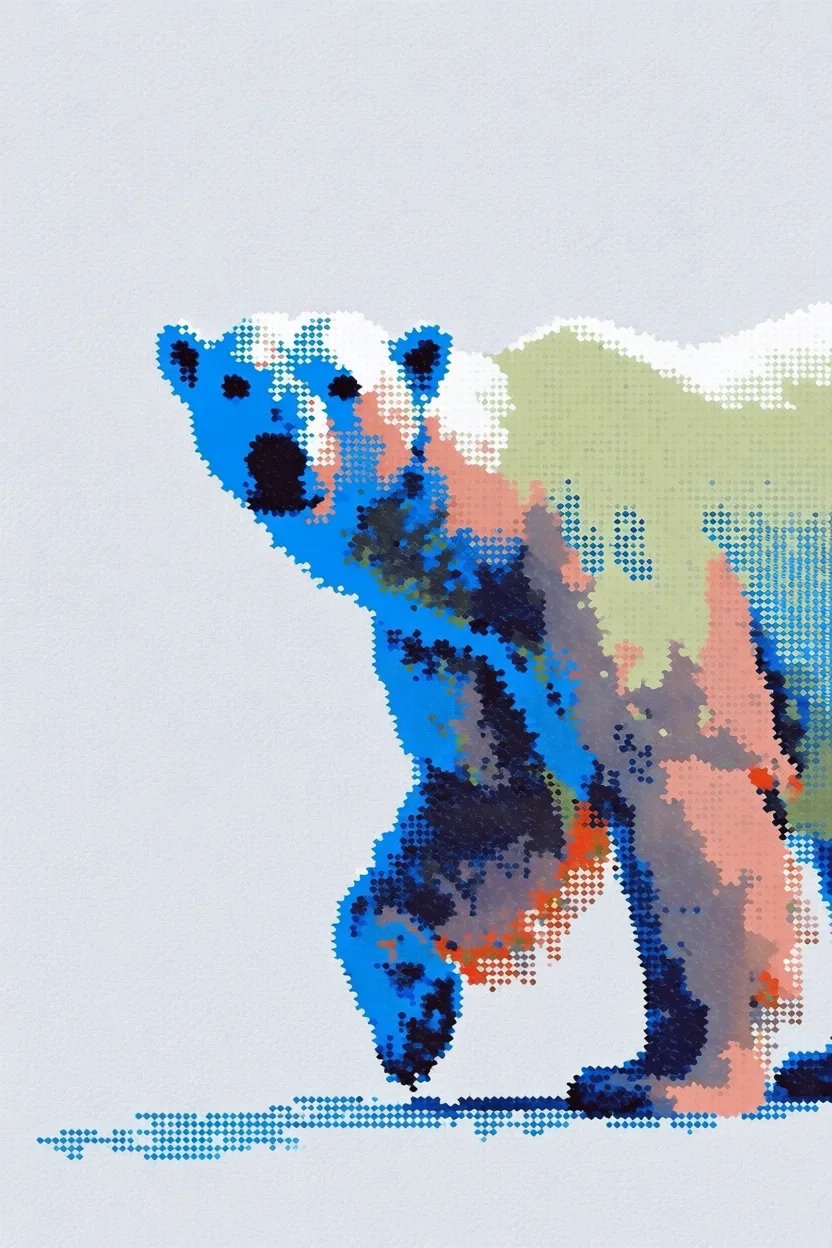
Her örnekte solda **stil referansı**, sağda **üretilen çıktı** gösterilir.

<div className="not-prose space-y-8">
  <div>
    <div className="grid grid-cols-2 gap-3">
      <img src="https://s.krea.ai/docs/krea-2/style-transfer-cat-ref.webp" alt="Stil referansı: çimenlerin arasında koşan çizgi film karakteri" className="rounded-lg w-full object-cover m-0" style={{ aspectRatio: "4/3" }} />

      <img src="https://s.krea.ai/docs/krea-2/style-transfer-cat-out.webp" alt="Çıktı: yana doğru zıplayan bir kedi" className="rounded-lg w-full object-cover m-0" style={{ aspectRatio: "4/3" }} />
    </div>

    <p className="mt-2 text-sm text-gray-600 dark:text-gray-400">Prompt: <em>yana doğru zıplayan bir kedi</em></p>
  </div>

  <div>
    <div className="grid grid-cols-2 gap-3">
      <img src="https://s.krea.ai/docs/krea-2/style-transfer-polar-bear-ref.webp" alt="Stil referansı: 8-bit piksel sanatı ızgarası" className="rounded-lg w-full object-cover m-0" style={{ aspectRatio: "4/3" }} />

      <img src="https://s.krea.ai/docs/krea-2/style-transfer-polar-bear-out.webp" alt="Çıktı: bir kutup ayısı" className="rounded-lg w-full object-cover m-0" style={{ aspectRatio: "4/3" }} />
    </div>

    <p className="mt-2 text-sm text-gray-600 dark:text-gray-400">Prompt: <em>bir kutup ayısı</em></p>
  </div>

  <div>
    <div className="grid grid-cols-2 gap-3">
      <img src="https://s.krea.ai/docs/krea-2/style-transfer-cowboy-ref.webp" alt="Stil referansı: Krea 1 stili eskiz" className="rounded-lg w-full object-cover m-0" style={{ aspectRatio: "4/3" }} />

      <img src="https://s.krea.ai/docs/krea-2/style-transfer-cowboy-out.webp" alt="Çıktı: bir kovboy" className="rounded-lg w-full object-cover m-0" style={{ aspectRatio: "4/3" }} />
    </div>

    <p className="mt-2 text-sm text-gray-600 dark:text-gray-400">Prompt: <em>bir kovboy</em></p>
  </div>

  <div>
    <div className="grid grid-cols-2 gap-3">
      <img src="https://s.krea.ai/docs/krea-2/style-transfer-muppet-ref.webp" alt="Stil referansı: Susam Sokağı tarzı at" className="rounded-lg w-full object-cover m-0" style={{ aspectRatio: "4/3" }} />

      <img src="https://s.krea.ai/docs/krea-2/style-transfer-muppet-out.webp" alt="Çıktı: muppet tarzı kedi ve köpek" className="rounded-lg w-full object-cover m-0" style={{ aspectRatio: "4/3" }} />
    </div>

    <p className="mt-2 text-sm text-gray-600 dark:text-gray-400">Prompt: <em>gri bir kedi muppet ve onun köpek arkadaşının yer aldığı, canlı çekim Muppets filminden bir sahne</em></p>
  </div>
</div>

## Nasıl çalışır

<Steps>
  <Step title="Referansınızı sağlayın">
    Bir görsele üç şekilde referans verebilirsiniz: görseli `/assets` adresine `POST` edip dönen URL'yi kullanın, doğrudan harici bir URL iletin veya bir data URI sağlayın.
  </Step>

  <Step title="URL ile referans verin">
    Görsel URL'sini veya data URI'sini `krea-2/medium` veya `krea-2/large` isteğinizin `image_style_references` dizisine ekleyin.
  </Step>

  <Step title="Gücü ayarlayın">
    Her referans için `strength` değerini -2 ile 2 arasında belirleyin. \~0,6 makul bir başlangıç noktasıdır — stili baskın kılmak için artırın, daha ince bir etki için azaltın.
  </Step>
</Steps>

## Uçtan uca örnek

Bu örnek, yerel bir dosyayı stil referansı olarak yükler ve bir Krea 2 Medium üretiminde kullanır.

<CodeGroup>
  ```javascript Node.js theme={null}
  // npm install @krea-ai/sdk
  import { openAsBlob } from "node:fs";
  import { Krea } from "@krea-ai/sdk";

  const krea = new Krea({ apiKey: process.env.KREA_API_KEY });

  // 1. Upload the style reference
  const file = await openAsBlob("./style-reference.png", { type: "image/png" });
  const asset = await krea.assets.upload(file, {
    filename: "style-reference.png",
    description: "Style reference for Krea 2",
  });

  // 2. Generate with the reference
  const result = await krea.subscribe("image/krea/krea-2/medium", {
    input: {
      prompt: "A portrait of a dancer in a quiet studio",
      aspect_ratio: "4:3",
      resolution: "1K",
      creativity: "medium",
      image_style_references: [{ url: asset.image_url, strength: 0.6 }],
    },
  });

  console.log(result.data?.urls[0]);
  ```

  ```bash cURL theme={null}
  # 1. Upload the style reference
  curl -X POST https://api.krea.ai/assets \
    -H "Authorization: Bearer $KREA_API_TOKEN" \
    -F "file=@./style-reference.png" \
    -F "description=Style reference for Krea 2"
  # Response includes { "image_url": "https://..." }

  # 2. Generate with the reference (replace IMAGE_URL with the response above)
  curl -X POST https://api.krea.ai/generate/image/krea/krea-2/medium \
    -H "Authorization: Bearer $KREA_API_TOKEN" \
    -H "Content-Type: application/json" \
    -d '{
      "prompt": "A portrait of a dancer in a quiet studio",
      "aspect_ratio": "4:3",
      "resolution": "1K",
      "creativity": "medium",
      "image_style_references": [
        { "url": "IMAGE_URL", "strength": 0.6 }
      ]
    }'
  ```

  ```python Python theme={null}
  import os
  import requests

  API_BASE = "https://api.krea.ai"
  API_TOKEN = os.environ["KREA_API_TOKEN"]
  headers = {"Authorization": f"Bearer {API_TOKEN}"}

  # 1. Upload the style reference
  with open("style-reference.png", "rb") as f:
      upload = requests.post(
          f"{API_BASE}/assets",
          headers=headers,
          files={"file": ("style-reference.png", f, "image/png")},
          data={"description": "Style reference for Krea 2"},
      )
  upload.raise_for_status()
  asset = upload.json()

  # 2. Generate with the reference
  generation = requests.post(
      f"{API_BASE}/generate/image/krea/krea-2/medium",
      headers={**headers, "Content-Type": "application/json"},
      json={
          "prompt": "A portrait of a dancer in a quiet studio",
          "aspect_ratio": "4:3",
          "resolution": "1K",
          "creativity": "medium",
          "image_style_references": [
              {"url": asset["image_url"], "strength": 0.6},
          ],
      },
  )
  generation.raise_for_status()
  print(generation.json())  # { "job_id": "..." } — poll /jobs/{id} for the result
  ```
</CodeGroup>

<Note>
  REST örnekleri eşzamansızdır — `POST /generate/...` anında bir `job_id` döndürür. Node.js SDK örneği, tamamlanan sonucu bekleyen `subscribe(...)` kullanır. Yoklama deseni için [İş yaşam döngüsü](/developers/job-lifecycle) sayfasına bakın veya yoklamayı tamamen atlamak için bir [webhook](/developers/webhooks) kullanın.
</Note>

## Gücü ayarlama

`strength` değeri `-2` ile `2` arasında değişir. Birkaç pratik kural:

* **\~0,3–0,5** — ince etki; prompt'un yönlendirmesini ve referansın karakter katmasını istediğinizde kullanışlıdır.
* **\~0,6** — çoğu kullanım durumu için dengeli bir başlangıç noktası.
* **\~0,8–1,0** — referans stili baskındır; prompt geneksel olduğunda ve görsel kimliğin referanstan gelmesi gerektiğinde kullanışlıdır.
* **Negatif değerler** — çıktıyı bir referans stilden uzaklaştırır.

Çıktılar fazla harfi harfine (referans çok güçlü) ya da fazla genel (referans çok zayıf) hissettirirse, her seferinde 0,1 oranında ayarlayın.

## Birden çok referansı birleştirme

Stilleri harmanlamak için `image_style_references` içine birden çok nesne iletin. Her referansın kendi `strength` değeri olabilir.

```javascript Node.js theme={null}
const result = await krea.subscribe("image/krea/krea-2/medium", {
  input: {
    prompt: "A portrait of a dancer in a quiet studio",
    aspect_ratio: "4:3",
    resolution: "1K",
    image_style_references: [
      { url: assetA.image_url, strength: 0.6 },
      { url: assetB.image_url, strength: 0.4 },
    ],
  },
});
```

Referanslar toplamalı olarak harmanlanır — toplamı `1,0`'a yakın güç değerleriyle başlayın ve oradan ince ayar yapın.