> ## Documentation Index
> Fetch the complete documentation index at: https://www.krea.ai/docs/llms.txt
> Use this file to discover all available pages before exploring further.
# Krea 2
> Krea 2 is our first foundation image model, built from scratch for full creative control over style, composition, aesthetics, and reference-driven results.
 ## Overview
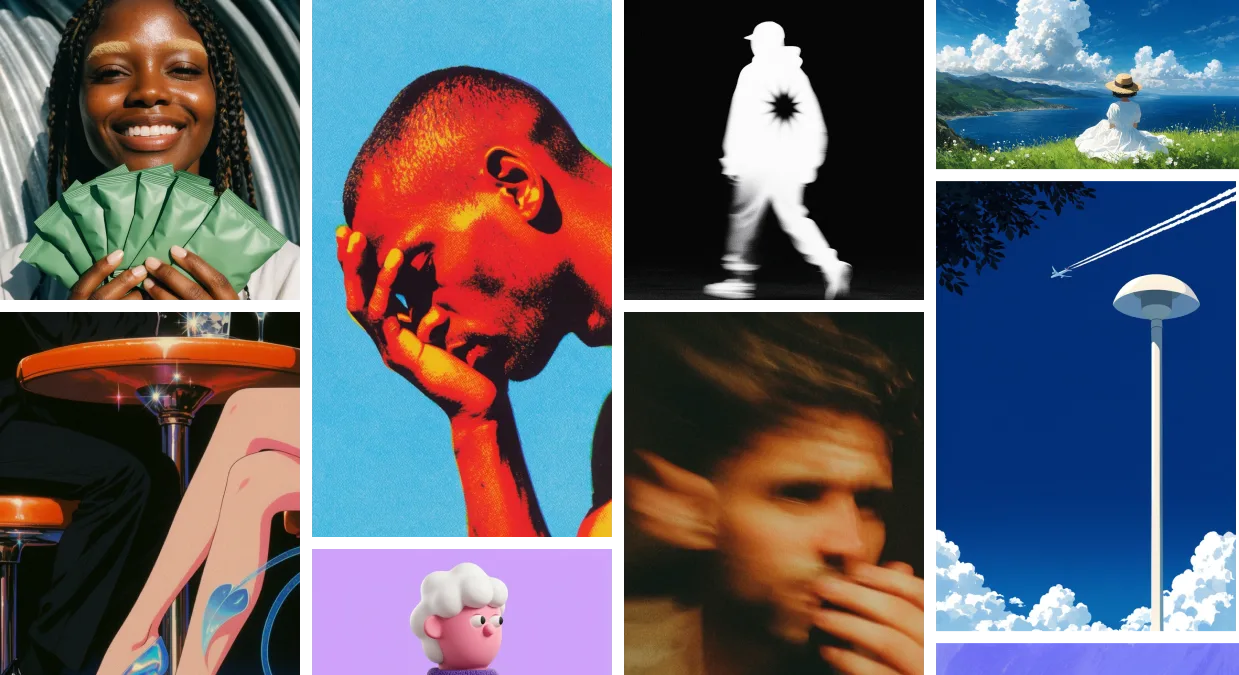
Krea 2 is Krea's first foundation image model, trained from scratch to give you full control over the look, feel, and creative direction of every image you generate. It ships in three variants — **Medium**, **Large**, and **Medium Turbo** — and supports the most advanced style-transfer system on the market, moodboards, and Generative Sliders.
Use Krea 2 when you want expressive, aesthetic results that don't look like generic AI output: editorial illustration, photorealism with real texture, character work, fashion, worlds, posters, and any project where style and creative direction matter.
## Variants
| Variant | Best for | Speed | Where to use |
| ----------------- | --------------------------------------------------------------------------------- | -------- | -------------------------------------------------------------- |
| **Krea 2 Medium** | Stable, general-purpose output. Illustration, anime, painting, expressive styles. | Standard | [krea.ai/image](https://krea.ai/image) |
| **Krea 2 Large** | Photorealism, raw textures, motion blur, the richest output. | Slower | [krea.ai/image](https://krea.ai/image) |
| **Krea 2 Turbo** | Fast, low-cost iteration on expressive illustration and concepts. | Fastest | See the [Krea 2 Turbo](/user-guide/features/krea-2-turbo) page |
Start with **Krea 2 Medium** for everyday work. Move up to **Krea 2 Large** when you want the richest texture or full photorealism. Use **Krea 2 Turbo** to explore prompts and visual directions quickly before committing to a polished pass.
## At a Glance
| Feature | Detail |
| ---------------------------- | ----------------------------------------- |
| **Models** | Krea 2 Medium, Krea 2 Large, Krea 2 Turbo |
| **Resolution** | 1K |
| **Batch size** | Up to 4 images |
| **Style references (Srefs)** | Yes — up to 4 image style references |
| **Moodboards** | Yes |
| **Generative Sliders** | Yes — Intensity, Complexity, Movement |
| **Creativity modes** | Raw, Low, Medium, High |
| **Krea styles (LoRAs)** | Yes |
| **Seed support** | Yes |
## Getting Started
1. **Go to Image Generation** — Navigate to [krea.ai/image](https://krea.ai/image).
2. **Select a Krea 2 variant** — Open the model picker and choose Krea 2 Medium, Krea 2 Large, or Krea 2 Turbo.
3. **Write your prompt** — Describe the subject, setting, mood, and any specific style direction.
4. **Choose an aspect ratio** — Pick from square, portrait, landscape, cinematic, or mobile formats.
5. **Add visual direction** — Drop in style references, attach a moodboard, or apply a Krea style.
6. **Tune with Generative Sliders** — Open the controls panel and adjust Intensity, Complexity, Movement, and Creativity to shape the result before generating.
7. **Generate** — Compare outputs and re-roll with different slider values, references, or prompts.
## Style controls
Krea 2 gives you four complementary ways to direct the visual outcome. All four work on every Krea 2 variant.
### Style references (Srefs)
Upload up to **4 reference images** to extract a style and apply it to your output. Each reference has a strength slider so you can dial in how strongly it shapes the result.
Krea 2 ships with the most powerful style-transfer system on the market — see the [developer guide](/developers/krea-2/style-transfer) for examples and how to call it from the API.
### Moodboards
A **moodboard** is a saved collection of images that share an overall creative direction — palette, texture, style, mood, or composition. Build a moodboard in the Krea webapp at [krea.ai/moodboards](https://krea.ai/moodboards), then reference it in Krea 2 to steer the entire generation toward that visual world.
Moodboards are the most precise way to set a visual direction in Krea 2.
### Krea styles (LoRAs)
Apply compatible trained styles from your Krea style library to lock the output to a specific aesthetic or character.
### Creativity
Pick how literally Krea 2 should follow your prompt:
* **Raw** — No expansion. Renders only what you've explicitly described.
* **Low** — Stays close to the literal prompt, fills only obvious gaps.
* **Medium** (default) — Balanced. Reasonable interpretation without straying.
* **High** — Strong expansion. Takes meaningful creative liberty with style, mood, and aesthetics.
## Generative Sliders
Generative Sliders are three numeric controls — **Intensity**, **Complexity**, and **Movement** — that shape *how* Krea 2 interprets your prompt without rewriting it. They're available in the controls panel for every Krea 2 variant (Medium, Large, and Turbo).
Each slider runs from **−100 to 100**, with **0 as neutral** (no effect).
| Slider | Negative direction | Positive direction |
| -------------- | --------------------------- | ------------------------------- |
| **Intensity** | Bland, muted images | Intensely stylized images |
| **Complexity** | Minimal, clean compositions | Chaotic, dense compositions |
| **Movement** | Static images | Strong pose and camera movement |
### How to use them
Keep your prompt steady and change one slider at a time so you can attribute each visual shift to a specific control.
| You want... | Try |
| ------------------------------------------- | --------------------------------------------------------------------------------------------------- |
| Clean design, icons, editorial illustration | Lower **Complexity** (e.g. −60), keep **Movement** near 0. |
| Cinematic / fashion / character work | Raise **Intensity** (e.g. +60), add a touch of **Movement** (e.g. +30). |
| Expressive worlds and scenes | Push **Intensity** and **Complexity** positive; add **Movement** for kinetic energy. |
| Quick exploration | Turn on **Random mode** to vary all sliders each generation, then commit once you find a direction. |
Generative Sliders are independent of **Creativity**. Creativity changes how literally Krea 2 reads your prompt; the sliders shape the visual character of the output. They compose well — apply a moodboard for direction, then use the sliders to fine-tune how strongly that direction is expressed.
For the API version of this feature, see the [Generative sliders developer guide](/developers/krea-2/generative-sliders).
## Supported Aspect Ratios
| Category | Aspect Ratio | Output Size |
| --------- | ------------ | ----------- |
| Square | 1:1 | 1024 x 1024 |
| Landscape | 4:3 | 1184 x 896 |
| Landscape | 3:2 | 1248 x 832 |
| Landscape | 16:9 | 1376 x 768 |
| Landscape | 2.35:1 | 1568 x 672 |
| Portrait | 4:5 | 928 x 1152 |
| Portrait | 2:3 | 832 x 1248 |
| Portrait | 9:16 | 768 x 1376 |
## API
All three Krea 2 variants are available via the Krea API. See the [Krea 2 developer guide](/developers/krea-2/overview) for the full request shape, pricing, and per-variant endpoints, plus deep dives on [style transfer](/developers/krea-2/style-transfer), [moodboards](/developers/krea-2/moodboards), and [Generative Sliders](/developers/krea-2/generative-sliders).
## Open source
Krea 2 is also available as an open-source release, so you can self-host, fine-tune, and train LoRAs on the same models that power Krea's hosted image generation. Two checkpoints are published:
* **Krea 2 RAW** — the undistilled base checkpoint. Diverse and highly malleable, designed for fine-tuning, post-training, and LoRA training.
* **Krea 2 Turbo** — an 8-step distilled checkpoint built for fast, high-quality text-to-image inference.
The two are designed to work together: train LoRAs on RAW and apply them on Turbo for fast, polished generation.
| Resource | Link |
| --------------------------- | -------------------------------------------------------------------- |
| Checkpoints on Hugging Face | [huggingface.co/krea/Krea-2-Raw](https://krea.ai/krea-2/huggingface) |
| Model code on GitHub | [github.com/krea-ai/krea-2](https://krea.ai/krea-2/github) |
| Technical report | [Krea 2 technical report](https://krea.ai/krea-2/technical-report) |
### Licensing
Krea 2 is released under two license tracks. Use the one that matches what you're building:
| License | Who it's for | What it covers |
| ------------------------------------------------------------------- | ------------------------------------------------------------------------------------------------------------------------------------------------------------- | ------------------------------------------------------------------------------------------------------------------------------------------------------- |
| **[Community License](https://krea.ai/krea-2-licensing)** | Researchers, hobbyists, and small teams using Krea 2 for research, personal projects, or non-commercial work — plus commercial use under a revenue threshold. | Free, non-exclusive use of the Krea 2 checkpoints, derivatives, and outputs. Subject to the [Acceptable Use Policy](https://krea.ai/krea-2-use-policy). |
| **[Commercial License](https://krea.ai/krea-2-commercial-license)** | Companies whose commercial use exceeds the Community License revenue threshold, or that need enterprise terms. | Paid enterprise terms for production commercial deployments. Contact `opensource@krea.ai`. |
If you only want to call the hosted model, you don't need to download checkpoints or accept the open-source license — use the [Krea API](/developers/krea-2/overview) and the standard [API terms](/developers/api-keys-and-billing) apply.
## Overview
Krea 2 is Krea's first foundation image model, trained from scratch to give you full control over the look, feel, and creative direction of every image you generate. It ships in three variants — **Medium**, **Large**, and **Medium Turbo** — and supports the most advanced style-transfer system on the market, moodboards, and Generative Sliders.
Use Krea 2 when you want expressive, aesthetic results that don't look like generic AI output: editorial illustration, photorealism with real texture, character work, fashion, worlds, posters, and any project where style and creative direction matter.
## Variants
| Variant | Best for | Speed | Where to use |
| ----------------- | --------------------------------------------------------------------------------- | -------- | -------------------------------------------------------------- |
| **Krea 2 Medium** | Stable, general-purpose output. Illustration, anime, painting, expressive styles. | Standard | [krea.ai/image](https://krea.ai/image) |
| **Krea 2 Large** | Photorealism, raw textures, motion blur, the richest output. | Slower | [krea.ai/image](https://krea.ai/image) |
| **Krea 2 Turbo** | Fast, low-cost iteration on expressive illustration and concepts. | Fastest | See the [Krea 2 Turbo](/user-guide/features/krea-2-turbo) page |
Start with **Krea 2 Medium** for everyday work. Move up to **Krea 2 Large** when you want the richest texture or full photorealism. Use **Krea 2 Turbo** to explore prompts and visual directions quickly before committing to a polished pass.
## At a Glance
| Feature | Detail |
| ---------------------------- | ----------------------------------------- |
| **Models** | Krea 2 Medium, Krea 2 Large, Krea 2 Turbo |
| **Resolution** | 1K |
| **Batch size** | Up to 4 images |
| **Style references (Srefs)** | Yes — up to 4 image style references |
| **Moodboards** | Yes |
| **Generative Sliders** | Yes — Intensity, Complexity, Movement |
| **Creativity modes** | Raw, Low, Medium, High |
| **Krea styles (LoRAs)** | Yes |
| **Seed support** | Yes |
## Getting Started
1. **Go to Image Generation** — Navigate to [krea.ai/image](https://krea.ai/image).
2. **Select a Krea 2 variant** — Open the model picker and choose Krea 2 Medium, Krea 2 Large, or Krea 2 Turbo.
3. **Write your prompt** — Describe the subject, setting, mood, and any specific style direction.
4. **Choose an aspect ratio** — Pick from square, portrait, landscape, cinematic, or mobile formats.
5. **Add visual direction** — Drop in style references, attach a moodboard, or apply a Krea style.
6. **Tune with Generative Sliders** — Open the controls panel and adjust Intensity, Complexity, Movement, and Creativity to shape the result before generating.
7. **Generate** — Compare outputs and re-roll with different slider values, references, or prompts.
## Style controls
Krea 2 gives you four complementary ways to direct the visual outcome. All four work on every Krea 2 variant.
### Style references (Srefs)
Upload up to **4 reference images** to extract a style and apply it to your output. Each reference has a strength slider so you can dial in how strongly it shapes the result.
Krea 2 ships with the most powerful style-transfer system on the market — see the [developer guide](/developers/krea-2/style-transfer) for examples and how to call it from the API.
### Moodboards
A **moodboard** is a saved collection of images that share an overall creative direction — palette, texture, style, mood, or composition. Build a moodboard in the Krea webapp at [krea.ai/moodboards](https://krea.ai/moodboards), then reference it in Krea 2 to steer the entire generation toward that visual world.
Moodboards are the most precise way to set a visual direction in Krea 2.
### Krea styles (LoRAs)
Apply compatible trained styles from your Krea style library to lock the output to a specific aesthetic or character.
### Creativity
Pick how literally Krea 2 should follow your prompt:
* **Raw** — No expansion. Renders only what you've explicitly described.
* **Low** — Stays close to the literal prompt, fills only obvious gaps.
* **Medium** (default) — Balanced. Reasonable interpretation without straying.
* **High** — Strong expansion. Takes meaningful creative liberty with style, mood, and aesthetics.
## Generative Sliders
Generative Sliders are three numeric controls — **Intensity**, **Complexity**, and **Movement** — that shape *how* Krea 2 interprets your prompt without rewriting it. They're available in the controls panel for every Krea 2 variant (Medium, Large, and Turbo).
Each slider runs from **−100 to 100**, with **0 as neutral** (no effect).
| Slider | Negative direction | Positive direction |
| -------------- | --------------------------- | ------------------------------- |
| **Intensity** | Bland, muted images | Intensely stylized images |
| **Complexity** | Minimal, clean compositions | Chaotic, dense compositions |
| **Movement** | Static images | Strong pose and camera movement |
### How to use them
Keep your prompt steady and change one slider at a time so you can attribute each visual shift to a specific control.
| You want... | Try |
| ------------------------------------------- | --------------------------------------------------------------------------------------------------- |
| Clean design, icons, editorial illustration | Lower **Complexity** (e.g. −60), keep **Movement** near 0. |
| Cinematic / fashion / character work | Raise **Intensity** (e.g. +60), add a touch of **Movement** (e.g. +30). |
| Expressive worlds and scenes | Push **Intensity** and **Complexity** positive; add **Movement** for kinetic energy. |
| Quick exploration | Turn on **Random mode** to vary all sliders each generation, then commit once you find a direction. |
Generative Sliders are independent of **Creativity**. Creativity changes how literally Krea 2 reads your prompt; the sliders shape the visual character of the output. They compose well — apply a moodboard for direction, then use the sliders to fine-tune how strongly that direction is expressed.
For the API version of this feature, see the [Generative sliders developer guide](/developers/krea-2/generative-sliders).
## Supported Aspect Ratios
| Category | Aspect Ratio | Output Size |
| --------- | ------------ | ----------- |
| Square | 1:1 | 1024 x 1024 |
| Landscape | 4:3 | 1184 x 896 |
| Landscape | 3:2 | 1248 x 832 |
| Landscape | 16:9 | 1376 x 768 |
| Landscape | 2.35:1 | 1568 x 672 |
| Portrait | 4:5 | 928 x 1152 |
| Portrait | 2:3 | 832 x 1248 |
| Portrait | 9:16 | 768 x 1376 |
## API
All three Krea 2 variants are available via the Krea API. See the [Krea 2 developer guide](/developers/krea-2/overview) for the full request shape, pricing, and per-variant endpoints, plus deep dives on [style transfer](/developers/krea-2/style-transfer), [moodboards](/developers/krea-2/moodboards), and [Generative Sliders](/developers/krea-2/generative-sliders).
## Open source
Krea 2 is also available as an open-source release, so you can self-host, fine-tune, and train LoRAs on the same models that power Krea's hosted image generation. Two checkpoints are published:
* **Krea 2 RAW** — the undistilled base checkpoint. Diverse and highly malleable, designed for fine-tuning, post-training, and LoRA training.
* **Krea 2 Turbo** — an 8-step distilled checkpoint built for fast, high-quality text-to-image inference.
The two are designed to work together: train LoRAs on RAW and apply them on Turbo for fast, polished generation.
| Resource | Link |
| --------------------------- | -------------------------------------------------------------------- |
| Checkpoints on Hugging Face | [huggingface.co/krea/Krea-2-Raw](https://krea.ai/krea-2/huggingface) |
| Model code on GitHub | [github.com/krea-ai/krea-2](https://krea.ai/krea-2/github) |
| Technical report | [Krea 2 technical report](https://krea.ai/krea-2/technical-report) |
### Licensing
Krea 2 is released under two license tracks. Use the one that matches what you're building:
| License | Who it's for | What it covers |
| ------------------------------------------------------------------- | ------------------------------------------------------------------------------------------------------------------------------------------------------------- | ------------------------------------------------------------------------------------------------------------------------------------------------------- |
| **[Community License](https://krea.ai/krea-2-licensing)** | Researchers, hobbyists, and small teams using Krea 2 for research, personal projects, or non-commercial work — plus commercial use under a revenue threshold. | Free, non-exclusive use of the Krea 2 checkpoints, derivatives, and outputs. Subject to the [Acceptable Use Policy](https://krea.ai/krea-2-use-policy). |
| **[Commercial License](https://krea.ai/krea-2-commercial-license)** | Companies whose commercial use exceeds the Community License revenue threshold, or that need enterprise terms. | Paid enterprise terms for production commercial deployments. Contact `opensource@krea.ai`. |
If you only want to call the hosted model, you don't need to download checkpoints or accept the open-source license — use the [Krea API](/developers/krea-2/overview) and the standard [API terms](/developers/api-keys-and-billing) apply.