A strong MiniMax H3 (Hailuo 3) prompt works like a compact production brief: one clear job for the clip, a defined role for every reference file, time-coded beats, and explicit audio direction. This guide shows how to structure that brief, then gives you 10 copy-paste prompts for AI film, influencer continuity, and omni-reference control. H3 is a native multi-modal model with omni-reference and omni-output: it can generate video from input audio and generate video with its own soundtrack.
Each 4-to-15-second H3 generation requires a defined production decision before the clip can hold together. A filmmaker may need a transition, a creator team may need the same face and voice, and a product marketer may need a clean reveal before building a longer sequence.
We first show sample prompts with text-only direction to multi-input briefs, assigning each reference a clear production purpose for continuity, movement, or finishing. We then show how prompts can use reference images, motion directives, and audio directions.
How to Write a MiniMax H3 Prompt
Every prompt in this guide follows the same five-part structure. If you only take one thing from this page, take this:
- Give the clip one job. Identity lock, a designed transition, a protected object edit — pick the single decision that would invalidate the clip if it fails, and build the prompt around it.
- Assign every reference file a role. “Use Image 1 only for the creator’s face and identity. Use Audio 1 only for the voice.” Overlapping roles create an undefined contest between inputs.
- Time-code the beats.
[0-3s] ... [3-7s] ...— H3’s roughly 7,000-character limit leaves room for a full timed shot list. - Direct the audio explicitly. H3 generates picture and native stereo audio in the same pass; name the sounds you want (“rain ambience, one soft shutter rattle, no dialogue”) or the mix is left to chance.
- Close with negatives. “No text, no logos, no extra people” — the constraints protect the frame as much as the direction fills it.
The 10 prompts below apply this structure to specific production jobs, from a single-shot film brief to a 12-file omni-reference commercial.
Direct MiniMax H3 on Krea
Open the Krea video generator, select Hailuo 3, and run your first production brief.
Try MiniMax H3How We Chose These Prompts
A strong MiniMax H3 prompt reads like compact production paperwork: direction, timing, and constraints. Useful H3 briefs assign every reference a purpose, mark shot timing, and describe the audio; fal.ai’s prompting guide recommends these details for creator prompts. Each selection below gives the model one primary job and names the decisions that must survive it, so you can judge a result against a concrete brief rather than a vague request for something cinematic.
At a Glance: The 10 Prompt Jobs
| # | Prompt | Best for | Control that matters most |
|---|---|---|---|
| 1 | Director’s single-shot brief | Establishing a film scene | Camera, action, and visual limits |
| 2 | Timed three-beat teaser | Short multi-shot narratives | Time-coded shot changes |
| 3 | First-to-last-frame passage | Designed transitions | Start and end composition |
| 4 | Influencer identity and voice lock | Recurring creators | Separate identity and vocal roles |
| 5 | Reference-motion performance | Reusing a movement style | Motion source versus character source |
| 6 | Native-audio product reveal | Social product films | Sound as an event timeline |
| 7 | Brand-title reveal | Copy-sensitive campaign clips | Exact required text and negatives |
| 8 | Protected-frame object swap | Revising finished footage | Edited object versus preserved frame |
| 9 | UI walkthrough | Product and game demos | Screen sequence and legible actions |
| 10 | Omni-reference director brief | High-control commercial shots | Every file’s assigned role |
Film Direction Prompts
1. Director’s Single-Shot Brief - Best for Establishing a Film Scene
Prompt:
A lone bicycle mechanic closes a narrow workshop during blue hour. One continuous 8-second shot: begin in a medium-wide frame from the doorway as the mechanic lowers the metal shutter, then make a slow dolly-in as warm tungsten light spills across scattered tools and rain-dark pavement outside. The mechanic pauses, looks toward the street, and switches off the bench lamp. Natural rain ambience, distant tires on wet asphalt, one soft shutter rattle, no dialogue, no subtitles, no logos, no extra people. Grounded contemporary drama, restrained cool-blue and amber palette, realistic materials, 16:9.Variation tips: For alternate versions, recast the mechanic as a florist.
Start with one human action that the camera and sound can share. MiniMax H3 supports text-to-video, first-and-last-frame, and reference-led generation, so this text-only brief gives you a clean baseline before references complicate the shot. Lowering a shutter gives the dolly-in, the rain ambience, and the final lamp switch-off one physical sequence to follow. Keep the action small.
2. Timed Three-Beat Teaser - Best for Short Multi-Shot Narratives
Prompt:
Create a 12-second teaser for an original science-fiction thriller.
[0-3s] Extreme close-up of a gloved hand brushing frost from a cracked spacecraft window; a low electrical hum begins.
[3-7s] Hard cut to a wide interior view: the same astronaut stands alone in a dark observation deck as a red warning light sweeps across the room; slow camera push forward.
[7-10s] Hard cut to the window: an enormous silent object drifts past the glass, eclipsing the stars.
[10-12s] Cut to black. One deep impact sound, then silence. No readable text, no logos, no comedy, no extra crew members. High-contrast practical lighting, cinematic 21:9.
Variation tips: A more wondrous version uses match cuts from deck to window, trims black to one second, and lets the eclipse inspire awe.
The timed beats carry the viewer from a close observation through isolation to cosmic scale, then seal the sequence with darkness and a single impact. H3’s roughly 7,000-character limit accommodates a timed shot list with audio direction, giving the sequence enough space to specify each beat by time range. The escalating reveals make the last silent frame feel final. The hard cuts create decisive reveals, while the black frame turns the final impact into an ending instead of background noise. The time ranges make the teaser’s cuts and final blackout legible as one continuous progression.
3. First-to-Last-Frame Passage - Best for Designed Transitions
Prompt:
Use the first frame as the opening composition and the last frame as the required final composition. Create a 7-second transition: a hand-held 35mm camera follows a woman in a bright yellow coat as she walks through a crowded subway car. As the doors close, the interior lights flicker once; the camera pushes toward the yellow coat until the frame fills with yellow fabric. Continue the motion into the final frame, where the yellow fabric has become a sunlit desert dune seen from above. Carry the train rumble into a dry wind sound. Preserve the subject’s forward motion. No text, no logos, no extra cuts.Variation tips: Bridge the cut with the shared yellow, the dune-like curve, or a foreground passer crossing the frame.
A transition becomes easier to cut when both approved compositions control it. H3’s first-and-last-frame mode lets you supply the opening or ending frame, and this brief adds the missing middle: forward movement, a yellow match point, and a train-rumble-to-wind handoff. Give one visual property the whole job. Here, the coat color creates a readable reason for the dune to appear.
Influencer and Performance Prompts
4. Influencer Identity and Voice Lock - Best for Recurring Creators
Prompt:
Use Image 1 only for the creator’s face, hair, body proportions, and identity. Use Audio 1 only for the creator’s speaking voice and vocal character. Create a 10-second vertical creator video in a bright home studio: the creator holds a small sketchbook toward the camera, smiles, and says, “Three thumbnails, one clear idea.” Begin with a medium shot, then make a gentle handheld step closer as the sketchbook enters the foreground. Soft window light, believable room tone, subtle paper movement, natural lip sync. Preserve Image 1 identity throughout. Do not change the voice, do not add captions, do not add other people, 9:16.Variation tips: Try a seated desk take with a new prop, or keep the delivery standing and move it to a workshop.
Recurring creator videos depend on separating the face from the voice. H3 generates picture and native stereo audio together, and audio references can transfer a voice while preserving performance, so the named image and audio roles prevent an undefined contest between inputs. The exact line gives lip sync a target, while the sketchbook gives the camera a reason to close distance. That turns a talking-head clip into a repeatable format.
5. Reference-Motion Performance - Best for Reusing a Movement Style
Prompt:
Use Video 1 only for the camera movement and body rhythm: match its low, circular tracking move and its single turn. Use Image 1 only for the performer’s identity, clothing, and facial features. Create a 9-second music-performance clip in an empty concrete rehearsal room. The performer begins facing away from camera, turns once on the beat, and ends facing camera without changing identity or wardrobe. One continuous circular camera move, side light through high windows, dust in the air, sparse electronic beat and shoe scuff sounds. No crowd, no mirrors, no text, no costume changes, 16:9.Variation tips: Try a forward walk instead, shift the scene outdoors, or stretch the beat into a slower rhythm.
Motion transfer holds up when the movement source and character source stay separate. MiniMax describes H3 as supporting video-to-video motion transfer and natural-language relationships between references, including taking camera movement from a video and a character from an image. This request limits the performance to one turn instead of a long dance routine, which gives you a dependable insert with a clear start and finish.
6. Native-Audio Product Reveal - Best for Social Product Films
Prompt:
Create a 9-second vertical product reveal for a matte cobalt-blue insulated bottle on a black stone counter.
[0-2s] Condensation beads slide down the bottle in near silence; macro camera move from cap to logo-free body.
[2-6s] A hand lifts the bottle, twists the cap, and pours sparkling water into a clear glass; capture the cap twist, fizz, and pour as close stereo sound.
[6-9s] The hand sets the bottle beside the filled glass as morning light creates a clean edge highlight. Minimal dark kitchen, crisp product focus, realistic water and metal, no brand name, no labels, no voiceover, 9:16.
Variation tips: For an alternate take, give the cobalt-blue bottle a soft-touch finish and close on an overhead composition beside the glass.
Physical sound makes a product look handled rather than merely displayed. H3 generates audio and picture in the same denoising pass, tracking the hand from the cap twist through the fizzing pour. Save the final seconds for stillness. The bottle’s silhouette, condensation, and finish can then read without competing movement.
Brand, Edit, and Interface Prompts
7. Brand-Title Reveal - Best for Copy-Sensitive Campaign Clips
Prompt:
Create an 8-second title reveal for a premium outdoor campaign.
[0-3s] A black hiking boot steps onto wet slate in a misty mountain pass; close, low-angle camera, rain and boot tread sounds.
[3-6s] The camera rises with the boot as mist clears to reveal a wide ridge at dawn.
[6-8s] Center the exact title “FIND YOUR LINE” in clean white uppercase letters against the dark ridge, then hold it still. Render only that exact title. No other text, no misspellings, no logos, no additional letters, no subtitles. Restrained cinematic color, 16:9.
Variation tips: Reveal “SUMMIT SILENCE” or “ALPINE TRACE” on the final card after snowfall replaces the rain.
Copy gets a better chance of rendering cleanly when it has one quiet frame and one short job. MiniMax says H3 handles text and brand rendering accurately, while fal.ai still recommends negatives such as “do not misspell” and “no extra text.” Place the exact title at the end, exclude every competing text element, and inspect that single phrase before adding more campaign copy.
8. Protected-Frame Object Swap - Best for Revising Finished Footage
Prompt:
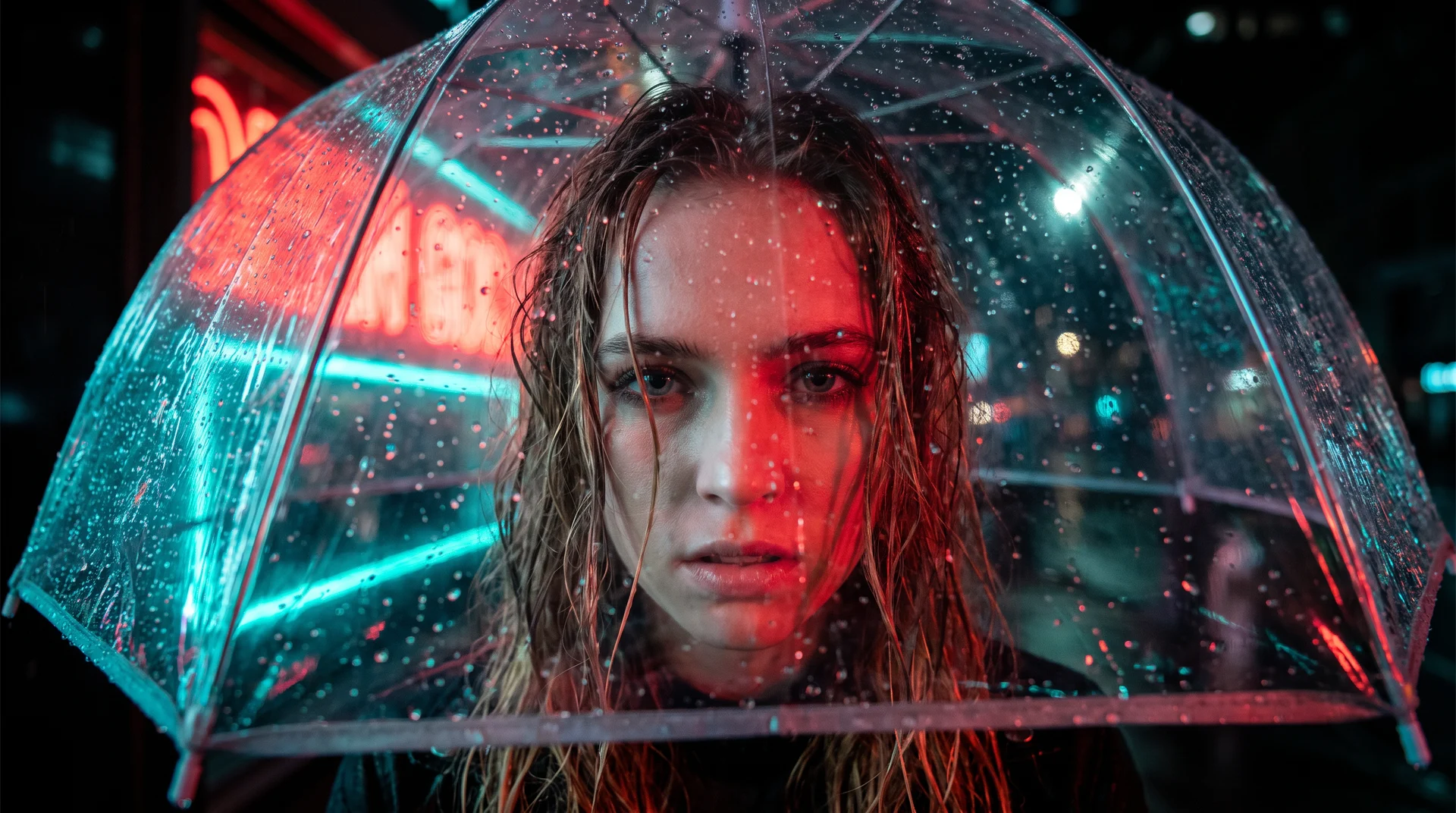
Using the uploaded video, preserve the original camera movement, actor, lighting direction, background, framing, color grade, sound bed, and timing. Change only the red umbrella carried by the actor into a transparent umbrella with visible raindrops and realistic edge reflections. Keep the actor’s grip, walking pace, shadow, and the umbrella’s position unchanged. Do not alter the actor’s face, coat, street, rain intensity, storefronts, or any text already present. The replacement must follow the original motion for the full clip.Variation tips: For this umbrella edit, change the canopy while preserving the approved shot.
The protected-frame prompt isolates the umbrella replacement while retaining the approved shot’s composition, motion, and performance. H3 applies the swap inside those boundaries, keeping review focused on the revised prop. The resulting clip remains recognizable from frame to frame. H3 supports instruction-based object swaps that isolate one specified prop from the rest of the shot. A prompt can replace a coffee cup with a folded map while retaining the hand pose, camera path, and ambient lighting. The protected list keeps a transparent umbrella attached to the actor’s established motion instead of inviting a new street scene. Begin with one edit target so the next feedback round has a stable baseline.
9. UI Walkthrough - Best for Product and Game Demos
Prompt:
Create a 10-second 16:9 product-demo clip for a fictional strategy game inventory interface.
[0-3s] A cursor opens a dark slate equipment panel with three clearly separated item slots; subtle interface click sounds.
[3-7s] The cursor drags a bronze compass from the left slot to the center slot; the center slot gains a soft blue active outline.
[7-10s] The panel closes into a clean in-game view of a traveler holding the bronze compass at sunset. Render the interface labels exactly as “MAP”, “GEAR”, and “COMPASS”. No extra menus, no unreadable text, no overlapping panels, no hands on keyboard. Controlled screen-recording camera, crisp UI edges, restrained motion.
Variation tips: A settings toggle or one slot reassignment can carry the inventory demo with only essential labels on screen.
An interface demo must show a sequence a viewer can parse in seconds. A single drag carries the feature into its in-world payoff, matching MiniMax’s listing of UI/UX demos and gaming assets as H3 commercial use cases. Remove labels that do not explain the interaction. Fewer screen decisions leave room for the compass move to communicate the feature.
10. Omni-Reference Director Brief - Best for High-Control Commercial Shots
Prompt:
Use Image 1 only for the athlete’s face, hair, body proportions, and identity. Use Images 2 and 3 only for the cobalt running jacket, shoes, and product details. Use Video 1 only for the low side-tracking camera movement. Use Audio 1 only for the runner’s breathing and the spoken line, “Keep moving.”
Create a 12-second 16:9 running-shoe campaign clip.
[0-4s] Track beside the athlete running alone along a wet city bridge before sunrise; preserve the low side-tracking movement from Video 1.
[4-8s] Move into a close side profile as the athlete says, “Keep moving,” matching Audio 1.
[8-12s] Cut to the shoe landing in a shallow puddle, then return to the athlete running into pale morning light.
Use Images 2 and 3 only for accurate wardrobe and shoe details. Preserve Image 1 identity. Wet footfalls, controlled breathing, distant traffic, no logos, no other runners, no extra dialogue, no text.
Variation tips: A second version can name the bridge, use a brief laugh in place of the spoken line, and draw a sole-level splash shot from either a shoe-detail image or a product-angle clip.
Omni-reference earns its complexity only when every file has a non-overlapping job. MiniMax’s H3 announcement says one generation can condition on up to nine images, three video clips, and three audio files, with a maximum of 12 files and a combined video-and-audio duration of 15 seconds. This brief groups the references into three production roles: identity and wardrobe, camera movement, and voice with timed performance beats; each file supplies a distinct decision. Overlapping roles blur the assignment of the clip’s controls across camera, identity, and performance decisions.
How to Use MiniMax H3 Prompts on Krea
Use Krea to test the controlling decision before you scale a sequence. Krea offers Hailuo 3 in its video model selector, supports director-style prompting, and lets you compare video models side by side. Start with the one decision that would invalidate the clip if it fails: identity, a frame transition, or a protected object edit. Then add time-coded beats and sound after the base shot works.
Artificial Analysis ranked MiniMax H3 first for Video Editing with Audio at Elo 1,130 in its late-July and early-August 2026 snapshot, while text-to-video sat near the top tier rather than holding undisputed first place. That contrast makes comparison useful when your brief depends on a particular capability rather than a general impression of quality. Repeated 2K iterations still accumulate meaningful costs, even at MiniMax’s stated per-second price of less than one-third of mainstream models.
Krea’s Hailuo 3 selector puts Hailuo 3 alongside other models for side-by-side comparisons in one browser workflow, so the same rainy bridge run can reveal which generator holds the brief. Test a rainy bridge run, a product cap twist, or a two-frame color match first, because each one exposes whether the prompt has given every control one clear job.
Put these 10 prompts to work
Paste any brief above into Krea and compare Hailuo 3 against other video models side by side.
Generate a clip