Seedance 2.0 is ByteDance’s video generation model. It turns a written prompt into a finished clip with the audio already synchronised to it, and it accepts images as input as well: a starting frame, an ending frame, or up to nine references. Clips run 4 to 15 seconds at up to 4K, which is higher than most hosted versions of this model expose. A five second 1080p clip costs about $0.42 and takes three to five minutes to render.
We ran the API ourselves to benchmark it. Every generation time and price below is measured, and every clip in the body came out of the call printed beside it.
Key takeaways
- Seedance 2.0 hands back a job id, and you poll it until the status reads
completed, which takes three to five minutes at 1080p. - Set
generate_audioto true and the clip arrives with a synced track, so name the sound you want or the model scores the shot for you. aspect_ratiorecomposes the frame rather than cropping it, so 16:9 and 9:16 come back as two genuinely different shots.- Build the end frame by editing the start frame, so the model moves one object instead of travelling between two different scenes.
- A five second 1080p clip costs about $0.42, and duration is the lever: test at four seconds before paying for fifteen.
Nothing on this page is stock, and nothing was cut together afterwards.
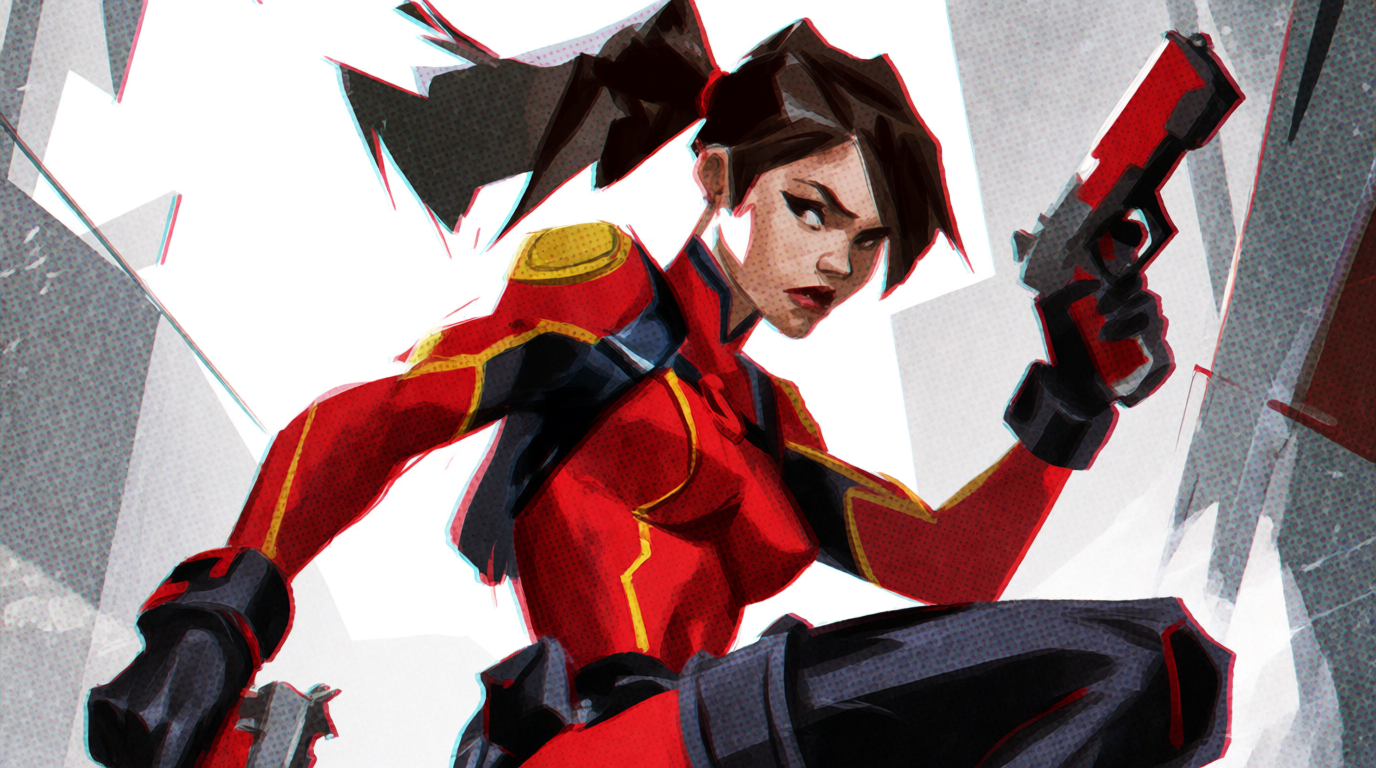
The frame was generated with Krea 2, Krea’s own image model, and animated by Seedance 2.0 from that single still.
Image, Krea 2: a twin-ponytail heroine in a red, black and gold suit, dual pistols raised, caught mid-turn in a dynamic action pose. Pop art digital illustration, halftone shading, bold ink linework, chromatic aberration, high contrast palette, low angle, cinematic framing.

Video, Seedance 2.0: she leaps and fires both pistols, ponytails and coat trailing behind her, light glinting off the barrels. Pop art digital rendering, halftone shading, bold ink outlines, chromatic aberration, sweeping cinematic camera move.
Get a Seedance 2.0 API key
Create a token, add balance, and render your first 1080p clip with audio from your own code.
Open API docsWhat Seedance 2.0 generates
Seedance 2.0 turns a prompt into video, with optional synchronised audio, at up to 4K. It takes a starting frame, an ending frame, and reference media, so you can steer a shot rather than roll the dice on a sentence.
Two things about that list are worth checking against whoever you buy it from. Most hosted versions of this model cap at 720p, so the 1080p and 4K tiers are not a given. And first-and-last-frame control is sometimes offered as a separate endpoint from reference images, which turns one integration into three.
Get an API key
Tokens are created at settings/api-tokens, and only workspace owners and admins can make one. Keep it out of your repository: a leaked video key is somebody else’s render budget.
API calls draw on a separate USD balance topped up at app/api, in preset amounts from $10 to $100 or anything between $5 and $10,000. Run it dry and in-flight jobs still finish while new requests come back 402 Payment Required.
One line in that billing page is worth internalising before you start testing: failed and cancelled jobs are not billed. You pay for completed jobs, so a rejected prompt costs you the wait and nothing else.
The Seedance 2.0 endpoint
POST https://api.krea.ai/generate/video/bytedance/seedance-2
Authorization: Bearer <your key>
prompt is the only required field. The call returns a job, and video takes minutes, so you poll it for a result URL instead of holding the connection open.
Your first request
curl -X POST https://api.krea.ai/generate/video/bytedance/seedance-2 \
  -H "Authorization: Bearer $KREA_API_KEY" \
  -H "Content-Type: application/json" \
  -d '{
    "prompt": "pop art 3D comic book rendering, a masked hero firing glowing laser blasts from both hands, bold ink outlines and halftone print texture, chromatic aberration, dynamic low angle, blue and red colour scheme, hard rim light, energetic camera push in",
    "duration": 5,
    "resolution": "1080p",
    "aspect_ratio": "16:9",
    "generate_audio": true
  }'
That returns a job:
{
  "job_id": "ba33799c-a73d-4911-9928-324ae38c2571",
  "status": "scheduled",
  "type": "videoV2",
  "created_at": "2026-08-18T10:09:15.981Z",
  "completed_at": null
}
Polling the job
Keep the job_id and ask for it until the status settles:
curl https://api.krea.ai/jobs/$JOB_ID \
  -H "Authorization: Bearer $KREA_API_KEY"
It comes back scheduled, then processing, where it spends almost all of its time. You may also see backlogged, queued, or sampling depending on load. When it lands:
{
  "job_id": "ba33799c-a73d-4911-9928-324ae38c2571",
  "status": "completed",
  "completed_at": "2026-08-18T10:10:39.402Z",
  "result": {
    "urls": ["https://app-uploads.krea.ai/public/52d742a0-...-video.mp4"]
  }
}completed, failed, and cancelled are the three endings. Anything else means keep waiting. The job lifecycle reference lists all nine states and asks for a 2 to 5 second interval, which is what the code below uses.
In production, stop polling. Set an X-Webhook-URL header on the generation request and the API posts the full job payload to you when it reaches a terminal state, which is the difference between a worker that sleeps for four minutes and one that does something useful. Webhooks carry no signature, so verify the job_id against a job you started and make the handler idempotent.
Full code example, JavaScript and Python
Submit, poll, print the URL. No SDK, nothing to install:
const KEY = process.env.KREA_API_KEY
const TERMINAL = ["completed", "failed", "cancelled"]

const { job_id } = await fetch(
  "https://api.krea.ai/generate/video/bytedance/seedance-2",
  {
    method: "POST",
    headers: { Authorization: `Bearer ${KEY}`, "Content-Type": "application/json" },
    body: JSON.stringify({
      prompt:
        "pop art 3D comic book rendering, a masked hero firing glowing laser " +
        "blasts from both hands, bold ink outlines and halftone print texture, " +
        "chromatic aberration, dynamic low angle, blue and red colour scheme, " +
        "hard rim light, energetic camera push in",
      duration: 5,
      resolution: "1080p",
      aspect_ratio: "16:9",
      generate_audio: true,
    }),
  },
).then((r) => r.json())

let job
do {
  await new Promise((r) => setTimeout(r, 5000))
  job = await fetch(`https://api.krea.ai/jobs/${job_id}`, {
    headers: { Authorization: `Bearer ${KEY}` },
  }).then((r) => r.json())
  console.log(job.status)
} while (!TERMINAL.includes(job.status))

console.log(job.result.urls[0])
That file, run once, returned a five second 1080p clip with audio. It took just over four minutes and cost about $0.42.
The same thirty lines in Python:
import os, time, requests

KEY = os.environ["KREA_API_KEY"]
HEAD = {"Authorization": f"Bearer {KEY}"}

job = requests.post(
    "https://api.krea.ai/generate/video/bytedance/seedance-2",
    headers=HEAD,
    json={
        "prompt": "pop art 3D comic book rendering, a masked hero firing glowing laser blasts from both hands, bold ink outlines and halftone print texture, chromatic aberration, dynamic low angle, blue and red colour scheme, hard rim light, energetic camera push in",
        "duration": 5,
        "resolution": "1080p",
        "aspect_ratio": "16:9",
        "generate_audio": True,
    },
).json()

while job["status"] not in ("completed", "failed", "cancelled"):
    time.sleep(5)
    job = requests.get(f"https://api.krea.ai/jobs/{job['job_id']}", headers=HEAD).json()
    print(job["status"])

print(job["result"]["urls"][0])
Five seconds between polls is fine. You are waiting minutes.
Audio with generate_audio
Turn your sound on for the clip at the top of this guide. The shots, the impacts, the room around them: all of it came from generate_audio: true and nothing else. No upload, no second pass, no editing.
Left to itself the model will also score the shot, and occasionally add subtitles. Name the sound you want in the prompt, or rule out what you do not want, and you get a track you can keep instead of one you have to strip.
Aspect ratio, 16:9 against 9:16
Same prompt, same everything, aspect_ratio moved from 16:9 to 9:16:
The model composed for the frame it was given rather than cropping the one it had. The wide take reads the canyon and puts the fall off centre; the tall take gives the fall the full height and drops the canyon entirely. Choose the ratio rather than inheriting it, because 16:9 and 9:16 are two different shots.
Start and end frames
Start and end frames are the hard thing to steer by hand. Give Seedance a first frame and a last frame and it fills the middle.
The two images, generated first:

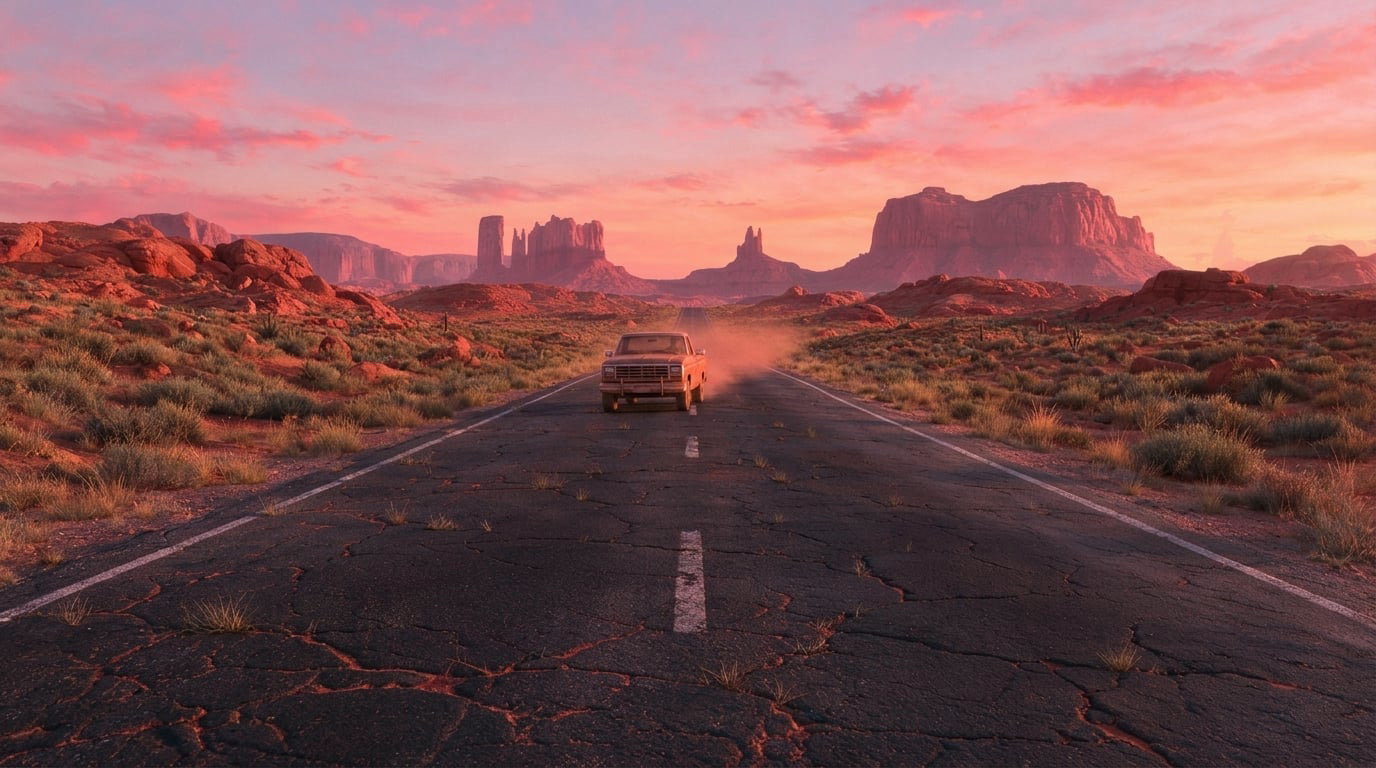
{
  "prompt": "a pickup truck approaches from the horizon and arrives at camera, dust rising behind it, continuous shot",
  "start_image": "https://.../road-dawn.png",
  "end_image": "https://.../road-truck.png",
  "duration": 5,
  "resolution": "1080p",
  "aspect_ratio": "16:9"
}
It starts on the empty road, ends on the frame that has the truck in it, and invents the approach in between. The rock formations, the horizon, the cracks in the asphalt and the dawn light all hold, because they were never regenerated.
That is the part worth copying. The end image was not a second generation from the same prompt, it was an edit of the first image: same photograph, one truck added. Two separate generations of “an empty desert road” give you two different deserts, and Seedance then has to travel between them, which reads as a cut rather than a shot. Make the end frame out of the start frame and the model only has to move one thing.
Both fields take a URL, a base64 data URI, or an asset you uploaded. Send only start_image and you have image to video. The mode follows the inputs you send rather than living at a different URL, so text to video, image to video, and frame to frame are one integration here rather than three.
Character consistency with reference images
reference_images steer identity and style without becoming the first frame, which is what people usually mean when they say “keep the same person”.
One generated character:
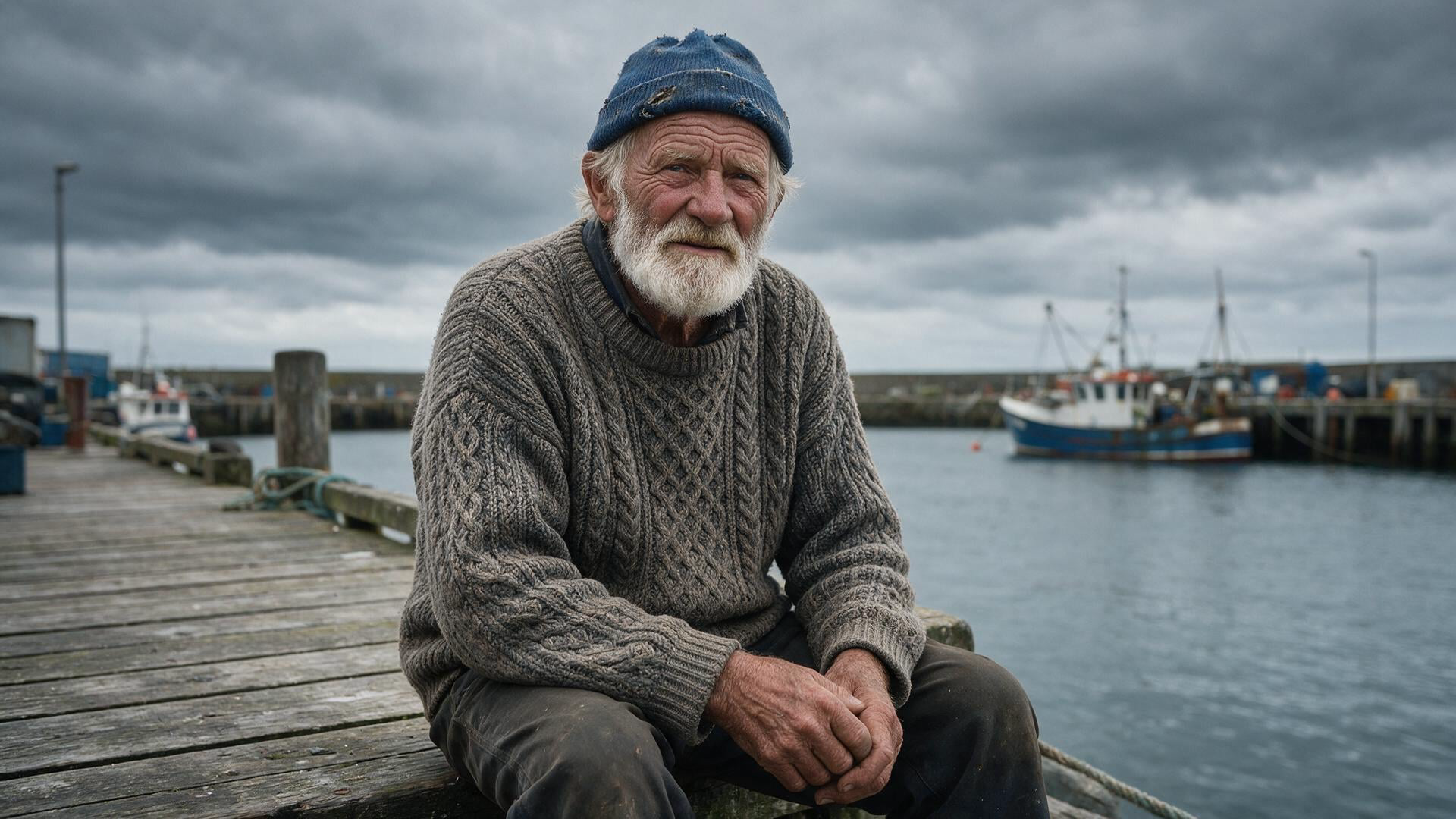
{
  "prompt": "the same fisherman mending nets on a harbour wall at dawn",
  "reference_images": ["https://.../fisherman.png"],
  "duration": 5,
  "resolution": "1080p"
}
Two unrelated scenes, the same reference in each:
The cap, the beard, and the cable knit survive both scene changes. Wardrobe and silhouette carry more reliably than a face does, so build your reference around something the model can hold onto.
Seedance 2.0 takes up to nine reference images, three reference videos, and three reference audio tracks.
Seedance 2.0 API parameters
| Field | Accepts | Default |
|---|---|---|
prompt | string, required | |
duration | 4 to 15 seconds | 5 |
resolution | 480p, 720p, 1080p, 4k | 720p |
aspect_ratio | 16:9, 4:3, 1:1, 3:4, 9:16, 21:9 | 16:9 |
generate_audio | boolean | false |
start_image / end_image | image input | |
reference_images | up to 9 | |
reference_videos | up to 3 | |
reference_audios | up to 3 | |
effects | up to 12 | |
upscale | boolean | false |
enhance_prompt | boolean | false |
seed | integer |
Write the shot, not the subject. Focal length, shot size, light, movement. Every prompt on this page names a lens or a camera move, and that is doing more work than any parameter in the table.
Seedance 2.0 against Seedance 2.5
Seedance 2.0 goes to 1080p and 4K and carries an upscale flag. Seedance 2.5 stops at 1080p and has no upscale at all. What 2.5 buys instead is headroom: 30 second durations against 15, and 30 reference images against 9.
So the version numbers do not order the way you expect. If the deliverable is a high-resolution hero shot, 2.0 is the model. If it is a long, heavily referenced sequence, 2.5 is.
Seedance 2.0, Fast, Mini and 2.5
- Seedance 2.0 for finished work, where you need 4K and synchronised audio.
- Seedance 2.0 Fast while you iterate on prompt and framing, where a quicker, cheaper render answers the question you actually have.
- Seedance 2.0 Mini for volume, where good enough at low cost beats perfect.
- Seedance 2.5 when you need many references or a long shot more than you need pixels.
They are separate paths on the same endpoint shape, so moving between them is one string in the URL and nothing else.
Seedance 2.0 API pricing
Seedance 2.0 starts at $0.0849 per second of finished video, so each five-second clip above lands around $0.42. The six clips on this page cost about $2.55 to make. Seedance 2.0 Fast starts at $0.0677 per second, about twenty percent less. Both are floors: billing is per generation on the compute a request actually consumes, so a 4K clip costs more than a 720p one of the same length.
For context across the catalogue, per second: Grok Imagine from $0.05, Runway Gen-4.5 at $0.126, Kling 3.0 from $0.1764, Veo 3.1 from $0.84.
Two things worth being precise about.
Duration is the cost lever you control. At $0.0849 per second, the difference between a four-second test and a fifteen-second one is roughly $0.93 per attempt. Iterate short, on Fast, and spend the long renders on shots you have already framed.
Seedance 2.0 generation times
Every clip on this page was timed end to end, from POST to a downloadable URL, at 1080p and five seconds in August 2026.
| Clip | Inputs | Time |
|---|---|---|
| Laser hero | prompt, audio on | 3m 41s |
| Waterfall, 16:9 | prompt | 4m 57s |
| Waterfall, 9:16 | prompt | 4m 08s |
| Road | start and end frames | 3m 10s |
| Fisherman, nets | one reference image | 2m 47s |
| Fisherman, boat | one reference image | 3m 02s |
Two things fall out of that table. Three to five minutes is the working range at 1080p, and the spread inside it does not track what you send: the two plain text-to-video clips were the slowest of the six, and the reference-image runs were the fastest. Queue depth moves this number more than your parameters do.
Drop the resolution and the picture changes. The same call at 480p and four seconds on Seedance 2.0 Mini came back in 84 seconds, so test framing on a small model and spend the minutes on a shot you have already chosen.
Design the integration for the wait. Submit, keep the job id, and let the person do something else while it renders. A request thread parked on a poll loop is a thread you pay to hold open for four minutes.
Common Seedance 2.0 API errors
A rejected request is usually the wrong input for the mode you asked for. A video that ignores half the prompt is usually a prompt describing a scene instead of a shot. Music you did not ask for is a prompt problem, not a parameter problem. A 402 means the API balance is empty, and it arrives at submit rather than in the job.
Moderation is the failure that costs you the most time. Naming a specific film or its animation style in the prompt above got the job rejected as content_policy, and that verdict arrived as a failed job three and a half minutes in, not as an error at submit. Describing the look you want, in plain visual terms, passed and rendered the clip at the top of this page. Write the style, not the studio. The refusal cost nothing beyond the wait, since failed jobs are not billed.
Running the Seedance 2.0 API on Krea
Every request on this page went to api.krea.ai. Three pages get you there.
- Create a token at krea.ai/settings/api-tokens. Workspace owners and admins only, so if the button is missing, that is why.
- Add balance at krea.ai/app/api. Presets run $10 to $100, custom amounts $5 to $10,000.
- Send the request to
POST /generate/video/bytedance/seedance-2with the token as a bearer header, then collect the job by pollingGET /jobs/{id}or by settingX-Webhook-URL.
Billing is separate from a Krea web subscription and is topped up on that same API page. Your plan’s compute units belong to the app, the USD balance belongs to the API.
Two things this endpoint gives you that most hosted versions of Seedance 2.0 do not. The clips above are a full 1920x1080, where the common ceiling elsewhere is 720p, and the 4K tier with its upscale flag is exposed as well. The same token also reaches the other 72 models in the API reference, so accessing different video and even image models is a breeze.
Start generating with one POST
One token reaches Seedance 2.0 and 72 other models on the same API.
Get API access