A finished 30 second video ad, one continuous take, generated from two photographs and a script. No stitching, no matching voices across clips, no editing timeline. The actor is an image you supply, the product is an image you supply, and the model keeps both consistent for the length of the take while speaking your words in a voice it generates itself.
This is what Seedance 2.5 changed. Fifteen seconds was the previous ceiling on a single generation, which meant every longer ad was assembled from pieces and every seam was a place for the face, the product or the voice to drift. We ran a full ad through it, start to finish, and everything on this page came out of the steps below.
Key takeaways
- One 30 second generation replaces a stitched sequence, so nothing drifts at the seams where clips used to be joined.
- Two reference images are enough for a spokesperson ad, one actor and one product, with no other footage required.
- Write the script in timed beats to get an ad that fills its 30 seconds, since an untimed prompt is spent in twelve.
- Name the sound you want, because an unspecified track comes back scored like a commercial and stops reading as UGC.
- Renders took 10m 48s to 22m 03s on the day we tested, so a shoot is planned in tens of minutes rather than seconds.
Make a 30-second ad on Krea
Open Seedance 2.5 in the composer, attach two references, and generate one continuous take.
Try Seedance 2.5What you need before you start
Two images, both generated rather than photographed.
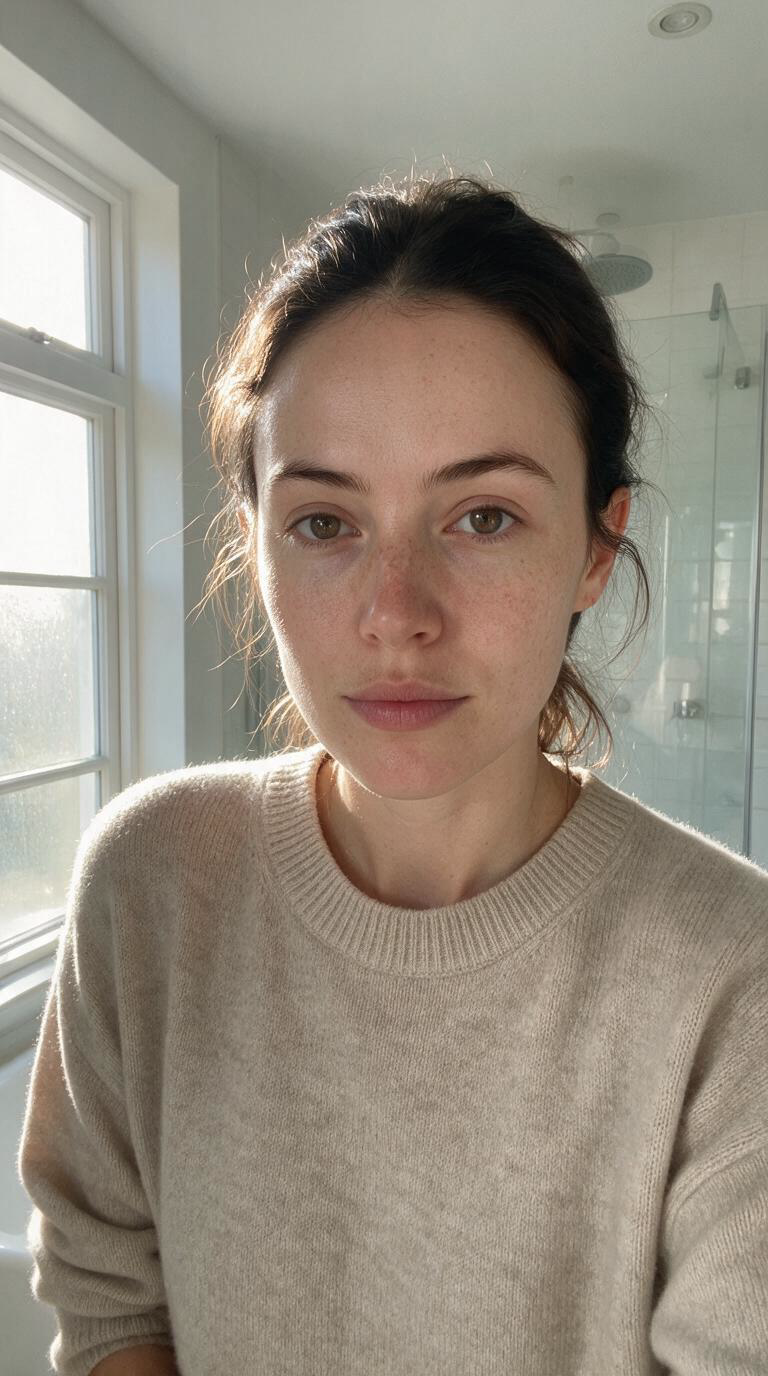
The actor is deliberately unglamorous: bare face, morning light from one window, shot as if on a phone’s front camera. Anything that reads as a studio portrait will produce an ad that reads as an ad.
photorealistic portrait of a 29 year old woman in a bright bathroom, natural morning light from a window on her left, dark hair loosely tied back, bare face, light freckles, plain oatmeal jumper, shot on a phone front camera, no studio lighting, no retouching, no makeup, candid and unpolished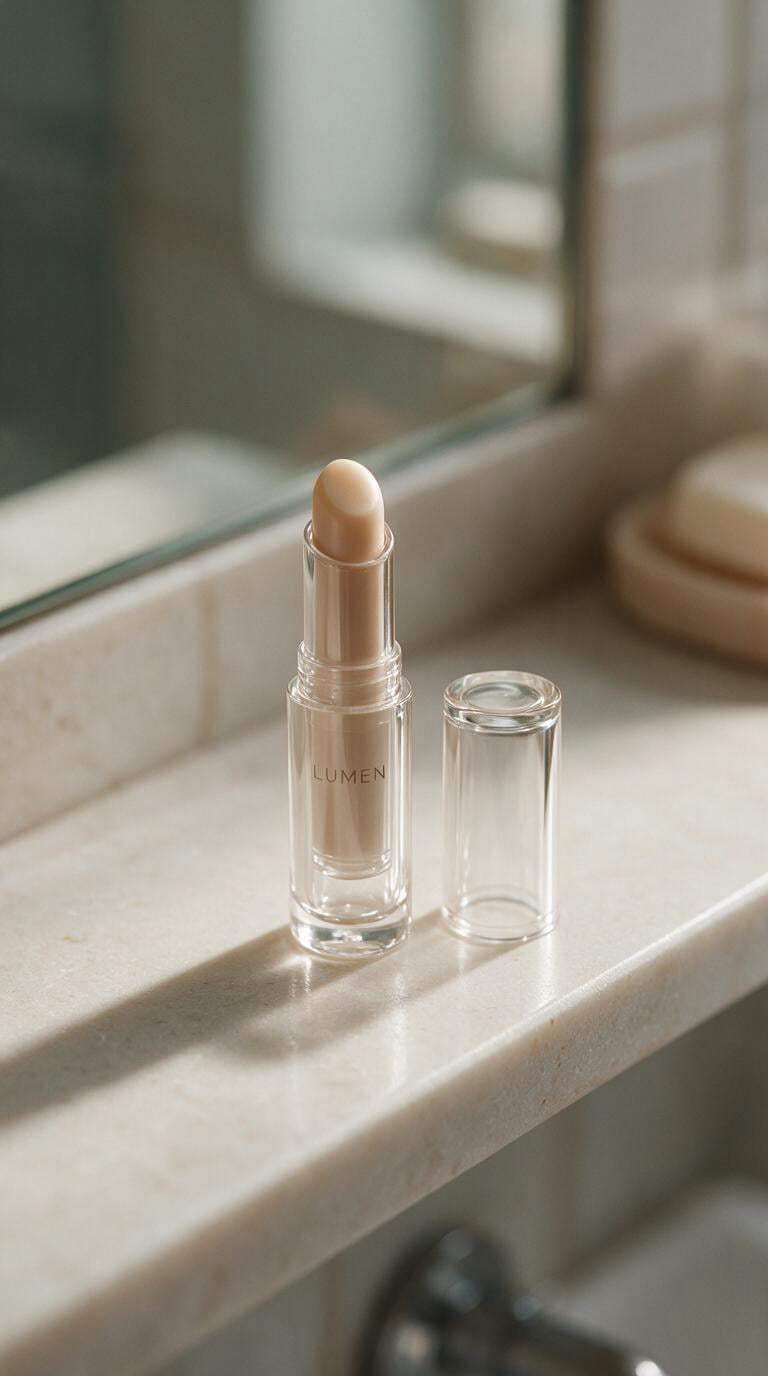
The product is a glass lip balm tube, uncapped, with the cap beside it. One frame carrying the tube, the cap and the balm tip does the work of three, and every later shot refers back to it.
product photograph of a slim glossy clear glass lip balm tube, cap off and resting beside it, the balm wound up slightly to show a smooth satin domed tip, pale stone bathroom shelf, soft natural window light, macro, bright specular highlights on the glass, shallow depth of field, photorealistic, no hands, no peopleBoth were made with Seedream 5 Pro at 768 by 1376, which is the 9:16 shape the ads themselves use. Generating the product rather than photographing it is a choice with a consequence worth stating plainly: the brand on this tube does not exist. For a real campaign the product image is the one asset you should not generate.
The ad, in one generation
Two reference images and one prompt. No cuts, no assembly, and a script the model performs rather than captions.
The woman from the first reference, filmed on her own phone at arm's length, front camera, in a bright bathroom in natural morning light. Candid and unpolished, the framing drifting slightly the way a real handheld selfie video does. One continuous 30 second take, no cuts. She is holding the lip balm from the second reference, and its glass tube keeps its shape, its specular highlights and its lettering throughout.

0 to 9 seconds, the finish. She pulls the glass cap off and sweeps the balm across her lower lip straight from the tube, presses her lips together, then turns her face slightly toward the window so the light catches them. The finish is satin, a soft sheen, never wet or glossy. She says: "The finish is the thing. It goes on satin, not shiny."

9 to 19 seconds, the texture. She holds the uncapped tube up toward the lens so the domed balm tip and the light running down the glass both read clearly, and runs a fingertip across the tip. She says: "And it's smooth, there's no waxy drag, you can't feel it sitting on top."

19 to 30 seconds, the cup test. She caps the tube and sets it down, picks up a plain white mug and drinks from it properly, sets it down, then turns the rim toward the camera to show it clean with no transfer, and looks back to the lens. She says: "And it doesn't come off on a cup. That's the whole reason I keep buying it."

Audio: her voice, close and natural on the phone microphone, unhurried and slightly dry, never salesy. Quiet bathroom room tone, the small click of the glass cap, the soft knock of the mug on the counter. No music.
Thirty seconds, 22m 03s. The face holds, the tube holds, and the three beats land where the prompt put them. This is the shot that used to be three clips and a matching problem.
Writing a script the model can actually perform
Four rules came out of this build, and the order matters.
Time the beats. “0 to 9 seconds, the finish” is not decoration, it is the structure the model paces against. A 30 second prompt written as one paragraph produces a clip that says everything in twelve seconds and then drifts for eighteen.
Pair every claim with the action that proves it. The cup test is the clearest case: the line about transfer means nothing unless a mug is picked up and a clean rim is shown. A claim the camera does not verify is a voiceover, and voiceover is what makes an ad feel written.
Say what the audio is. Every prompt here names the room tone, the specific incidental sounds, and the absence of music. Left to itself the model scores the shot, and a scored UGC ad stops being UGC.
Describe the register, not just the words. “Unhurried and slightly dry, never salesy” is doing as much work as the script. Enthusiasm is where synthetic performances fall apart, and understatement is where they hold.
Optional shots, when you want more control
The ad above is finished. Everything below is coverage you can choose to generate on top of it: a product frame to open on, a macro to cut to, a shorter edit for a placement that will not take thirty seconds. Each is its own generation from the same two references, so nothing here changes the ad you already have.
The product shot, 8 seconds
One reference, one instruction. Useful as a cheap check that the model can hold a label through a camera move before you spend on anything longer, and useful again as an opening frame or a thumbnail.
The lip balm from the reference, its glass tube and separate cap resting on a pale stone bathroom shelf. Slow push in, shallow depth of field, soft natural window light raking from the left across the glass, bright specular highlights running down the curve, the lettering on the tube holding sharp and legible as the camera closes. No hands, no people. Cinematic product photography, 50mm.
Audio: quiet bathroom room tone only. No music, no voice.
Eight seconds, 10m 48s to render. The glass keeps its highlights, the cap stays where it was put, and the lettering survives the push in.
The application macro, 10 seconds
The moment other models break. Holding a product is easy; using one means hands, a face and an object in contact, all of which have to stay themselves while moving. Worth generating when you want a cutdown that opens on the product touching skin.
Close macro on the mouth and hands of the woman from the first reference, natural morning light. She uncaps the glass tube of lip balm from the second reference and applies it straight from its domed tip across her lower lip in one unhurried pass, then presses her lips together. The balm stays satin, never glossy. The tube keeps its glass shape, highlights and lettering exactly as in the reference.
Audio: quiet room tone, the soft click of the glass cap set down on stone. No music, no dialogue.
Ten seconds, 13m 22s to render. Note the finish instruction, satin and never glossy. Left unspecified, generated cosmetics come back wet-looking, which is the single fastest way to make a beauty ad look synthetic.
Making variants at volume, through the API
Everything above is one ad. Testing means twenty, and clicking through the interface twenty times is the wrong tool.
The same generation runs behind one POST:
curl -X POST https://api.krea.ai/generate/video/bytedance/seedance-2-5 \
  -H "Authorization: Bearer $KREA_API_KEY" \
  -H "Content-Type: application/json" \
  -d '{
    "prompt": "<the 30 second beat script>",
    "reference_images": ["https://.../actor.png", "https://.../product.png"],
    "duration": 30,
    "resolution": "1080p",
    "aspect_ratio": "9:16",
    "generate_audio": true
  }'
Those fields are the same decisions the composer exposes, under the same names. The call returns a job id rather than a video, so you poll GET /jobs/{id} for it, or set an X-Webhook-URL header and be told when it lands.
That turns a creative test into a loop. Hold the two references fixed and vary one thing per generation:
- the hook, five openings against the same body
- the register, dry against warm on an identical script
- the proof, the cup test against a texture close-up
- the format, 9:16 against 1:1 for placements that need both
Twenty variants at ten minutes each is one overnight queue, not five days of shooting.
Two things you give up. There is no preview and no pick-the-best-of-four, so you are judging finished renders rather than steering toward them. And the interface’s reference tagging, where an attached image becomes an @ mention you can point at inside the prompt, has no equivalent in the array the API takes, so references are described in the prose instead.
Making this in Krea
The composer is the whole workflow in one row. Set the model to Seedance 2.5, attach the references with Add image, and the attachment becomes an @ mention you can name in the prompt itself, so “the woman from the first reference” can instead be pointed at directly.
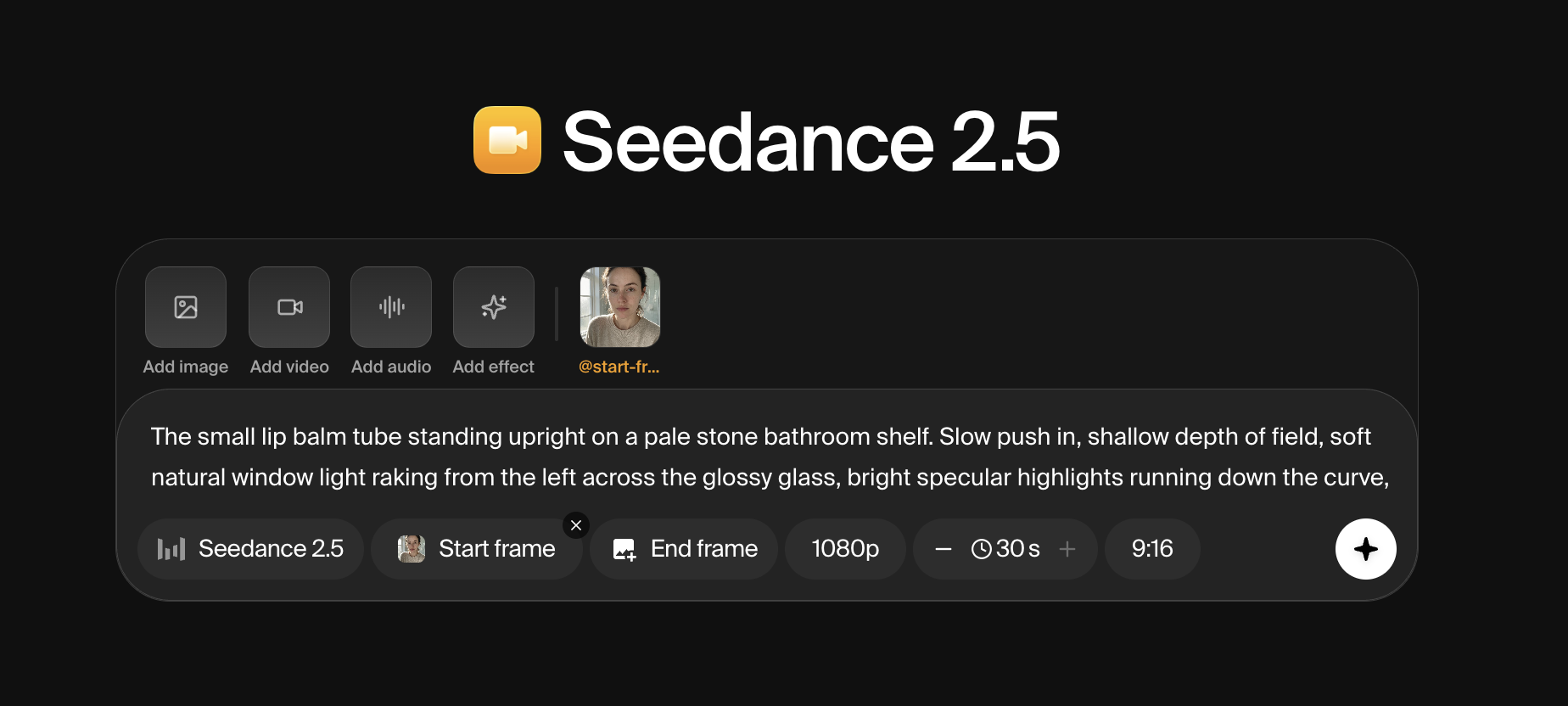
The controls along the bottom are the decisions that matter. Resolution, duration up to 30 seconds, and the aspect ratio sit in a row. Start frame and End frame are there for shots that have to open or land on a specific image. Add audio and Add video take the other reference types, up to 10 of each, which is how a voice from an earlier clip gets reused to keep a spokesperson sounding the same across a campaign.
Tokens for the API live at krea.ai/settings/api-tokens, and API spend draws on a balance topped up separately from a Krea subscription. Both lanes drive the same model. The composer makes one ad and shows it to you; the API makes twenty and leaves you to sort them.
Generate the ad first. It is the whole deliverable in one call, and it tells you inside twenty minutes whether the script and the references are right. The coverage shots are worth queueing only once they are.
Generate your own UGC ad
Two reference images and a timed script are all Seedance 2.5 needs to deliver the take.
Open Seedance 2.5