Seedance 2.5 is ByteDance’s AI video model for generating single-take clips from text and reference media. It produces videos from 4 to 30 seconds in multiple aspect ratios, with optional native audio rendered alongside the picture. Here we hand-select 10 examples to show the most unfiltered runs of this model. The ten real 720p generations test close detail, atmospheric scenes, and complex motion, so you can see what Seedance 2.5 is truly capable of without spending your own credits.
For each example, we run the exact prompt exactly once and include the first video generated. To use them as reference for your own work, preserve the camera clause and action order, then change the subject or surface.
All ten outputs are tested and evaluated by us in August 2026.
Key takeaways
- Seedance 2.5 generates a single continuous take of 4 to 30 seconds at 720p in six frame shapes from 21:9 to vertical 9:16, renders native audio in the same pass, and accepts up to 30 reference images plus video and audio references.
- Seedance 2.5 renders sound native to the visuals: name the sounds in the prompt (rain, track rhythm, a muffled announcement) and they land in the mix, synced to the motion.
- Every clip on this page is the first and only generation of the prompt printed under it, so what you see is what a copied prompt produces, not a curated best-of.
- The reusable part of each prompt is its structure, not its subject: a fixed camera clause, one action per five seconds, and a named payoff carry over when you swap the noun.
How we chose these Seedance 2.5 examples
Each example had to isolate a useful video-generation job rather than rely only on cinematic mood. We wrote and froze all ten prompts before generation. Each prompt received one generation with no rerolls, and all ten completed without refusal.
Comparing each frame strip with its completed video showed which instructions carried through and where the duration ran out. The finished set contains 67 seconds of video, and every clip rendered at 720p. One-pass results show which instructions carried the shot and where the available duration failed. In the wristwatch clip, eight seconds covered the outward motion; the prompted return never began.
Run these Seedance 2.5 prompts on Krea
Open Seedance 2.5 in Krea Video, paste a prompt below, and keep the camera clause fixed while you change the subject.
Open Seedance 2.5Seedance 2.5 examples at a glance
| # | example | best for | controlling prompt variable |
|---|---|---|---|
| 1 | Origami cranes folding themselves | Macro motion with audio | Sequential creases and named paper sounds |
| 2 | Latte rosette from overhead | Liquid control | Locked overhead view and one continuous pour |
| 3 | Celadon glaze on a spinning bowl | Vertical loops | One revolution in a 9:16 frame |
| 4 | Dandelion seedhead | Slow-motion detail | Backlight and a single gust |
| 5 | Bioluminescent jellyfish | Glow and depth | Camera drift with particles at several depths |
| 6 | Ice cave by headlamp | Revealing scale | Moving light source |
| 7 | Night train window | Intimate audio atmosphere | Three named sounds and a temporary reveal |
| 8 | Wheat field storm | Multi-beat storytelling | Numbered shots with one held camera |
| 9 | Wristwatch exploded view | Product motion | Ordered parts and sufficient duration |
| 10 | Marathon lead pack | Crowds and tracking | Low camera, wet road, and sunrise light |
Texture and close-work prompts
These examples test whether Seedance 2.5 preserves fine surface detail during close-range motion.
1. Origami cranes folding themselves - Best for macro motion with same-pass audio
Prompt:
macro shot across a walnut desk, a line of white origami cranes folding themselves from flat squares of paper, creases forming one by one, soft window light, shallow depth of field. Audio: paper creasing and sliding, quiet room toneFormat: 6 seconds | 16:9 | 720p | Audio on
Variation tips: To adapt it: Replace the paper subject or desk surface while keeping the ordered creases and synchronized paper sounds.
“Creases forming one by one” gives Seedance 2.5 an ordered physical action instead of starting with an already folded flock. The shallow depth of field limits competing detail, while the walnut desk separates the white paper from the background. Naming paper creases and slides cues the audio track to match visible contact and movement.
2. A latte rosette, poured from overhead - Best for controlled liquid motion
Prompt:
directly overhead shot of a barista pouring a rosette into a flat white, milk stream folding the pattern petal by petal through crema, ceramic cup on a zinc counter, steam curling into the lens. Audio: the pour, milk froth hiss, cafe murmur far awayFormat: 6 seconds | 16:9 | 720p | Audio on
Variation tips: Make it your own: Keep the overhead camera fixed while changing the latte pattern or café setting.
“Directly overhead” removes ambiguity about the cup geometry and keeps the forming rosette visible. “Petal by petal” controls progression within one pour. The prompt also assigns separate audio roles: the pour follows the visible stream, the froth hiss sits near the cup, and the distant café murmur establishes the room.
3. Celadon glaze over a spinning bowl - Best for a vertical satisfying loop
Prompt:
vertical close shot of a speckled ceramic bowl spinning slowly on a wheel as celadon green glaze pours over the rim, the sheet of glaze wrapping the bowl in one revolution, drips catching studio light. Audio: the wet pour, the wheel's soft bearing humFormat: 6 seconds | 9:16 | 720p | Audio on
Variation tips: Change the glaze color. Replace the ceramic texture. Reverse the pouring side.
The 9:16 frame gives the falling glaze room to travel while keeping the wheel and bowl large in view. “In one revolution” carries the timing. It gives the six-second take a visible starting state and a natural completion point, while the wet pour and bearing hum distinguish fluid motion from the machine beneath it.
4. A dandelion seedhead letting go - Best for backlit slow-motion detail
Prompt:
square macro of a dandelion seedhead against low golden backlight, a gust catches it and the seeds release in ultra slow motion, drifting toward the lens as translucent parachutes, dark field backgroundFormat: 5 seconds | 1:1 | 720p | Audio off
Variation tips: Replace the seedhead. Shift the gust direction. Cool the backlight.
Low golden backlight makes the translucent seed structures readable against the dark field. One gust supplies enough action for five seconds without adding a second event. The seeds travel toward the lens, creating changing depth while the camera remains still.
Light, depth, and atmosphere prompts
These three examples use glow, a moving beam, and reflected city light to establish depth without rapid cuts.
5. A bioluminescent jellyfish bloom - Best for glow, particles, and underwater depth
Prompt:
a bloom of bioluminescent jellyfish drifting upward through black open water, bells pulsing in slow rhythm, trailing tendrils drawing faint blue light spirals, camera drifting alongside, tiny particles catching the glowFormat: 6 seconds | 16:9 | 720p | Audio off
Variation tips: Swap the marine organism. Change the glow hue. Hold the camera still.
The jellyfish rise as their bells pulse and tendrils trail, while the camera drifts alongside. Tiny particles catch the blue glow at different distances. Those points of light mark foreground and background space inside otherwise black water.
6. An ice cave, revealed by headlamp - Best for showing scale with moving light
Prompt:
an explorer in a red shell jacket walks deeper into a glacial ice cave, headlamp beam sweeping across rippled translucent blue walls, breath fogging in the cold air, scale of the cavern revealed as the beam lifts, camera following behindFormat: 6 seconds | 16:9 | 720p | Audio off
Variation tips: Change the jacket color. Replace the cave material. Redirect the beam downward.
The headlamp first illuminates nearby wall texture, then lifts to expose the cavern’s larger volume. The red jacket gives the following camera a stable subject against the blue ice. Breath fog passes through the nearer part of the frame and supplies another depth marker.
7. A night train window - Best for intimate atmosphere and layered rain audio
Prompt:
interior of a night train, rain streaking the window, out-of-focus city lights sliding past as bokeh, a hand reaches up and wipes the condensation to reveal the skyline sharp for a moment before it fogs again. Audio: rain on glass, track rhythm, muffled announcementFormat: 6 seconds | 16:9 | 720p | Audio on
Variation tips: Replace the skyline. Change the wipe pattern. Name a different distant announcement.
The hand gives this six-second take a complete miniature story. It clears the condensation, reveals the skyline, and loses the view when the glass fogs again. Rain belongs to the window, track rhythm implies travel, and the muffled announcement locates the scene inside public transport.
Motion, scale, and story prompts
The final three clips increase the action load from numbered weather beats to mechanical disassembly and a moving crowd.
8. A wheat field storm, directed in three beats - Best for a story in one take
Prompt:
Shot one: golden wheat field under a clear afternoon sky, heads swaying. Shot two: a towering thunderhead builds fast on the horizon, its shadow racing across the field toward camera. Shot three: the first heavy drops hit the lens as the field bends in the gust front. Same field, same camera position throughout. Audio: wind rising, distant thunder arrivingFormat: 12 seconds | 16:9 | 720p | One continuous take
Variation tips: Substitute another weather change. Keep each beat near five seconds. Preserve the same camera position.
The prose labels three events, while “same field, same camera position throughout” prevents them from becoming unrelated scenes. The wheat first sways, the cloud’s shadow then races forward, and heavy drops finally reach the lens. Each beat changes the same frame instead of relocating the camera.
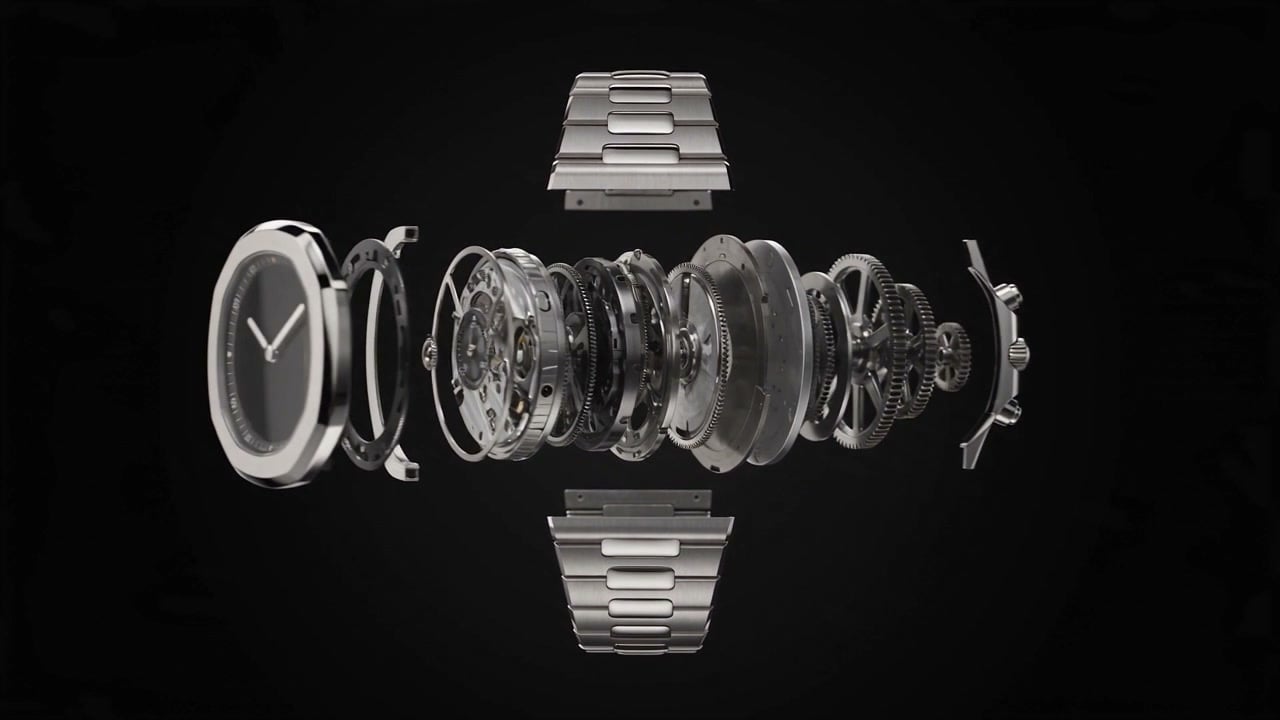
9. A wristwatch opening into its exploded view - Best for ordered product motion
Prompt:
studio product shot on black, a mechanical wristwatch disassembling in midair into a floating exploded view, case, gears, springs and dial hanging in perfect order, then reassembling into the closed watch, hard rim light on brushed steel, slow orbital cameraFormat: 8 seconds | 16:9 | 720p | Audio off
Variation tips: Replace the product. Name its component layers. Extend the duration for a return trip.
The watch remained in an exploded view when the eight-second clip ended. Disassembly, a readable hold, and reassembly already fill the timeline; the orbit adds another moving demand. A longer duration or a stationary camera would leave more time for the return motion.
“In perfect order” still proved useful. It kept the case and internal movement aligned against black, with the dial still legible.
10. The lead pack at sunrise - Best for crowds, tracking, and reflected light
Prompt:
low tracking shot at road level, the lead pack of a city marathon sweeps past camera at sunrise, long shadows raking across wet asphalt, singlets and numbered bibs, a press motorcycle drifting ahead, crowd barriers blurring byFormat: 6 seconds | 16:9 | 720p | Audio off
Variation tips: Replace the race. Raise the tracking camera. Dry the road surface.
A road-level tracking view makes the runners cross the frame with more apparent speed than a distant wide shot. Wet asphalt duplicates the sunrise highlights beneath the pack. The press motorcycle and blurred barriers provide separate speed references around the runners.
How to use these prompts on Krea
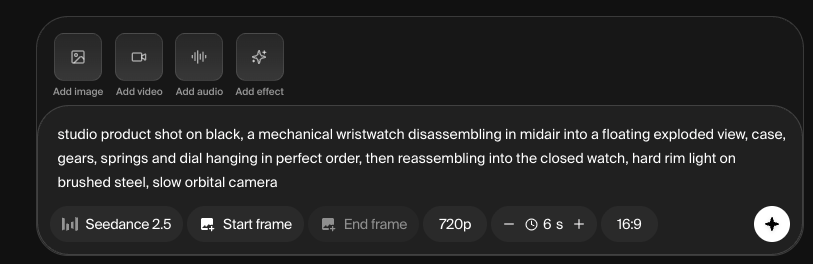
Open Krea Video, select Seedance 2.5, and paste a prompt without rewriting its structural clauses. Choose the duration and aspect ratio before generation. Turn audio on when the prompt names sounds.
Krea’s supports all settings for Seedance 2.5 including aspect ratios from 21:9 to 9:16, and resolutions of 480p or 720p. It also accepts start and end frames, up to 30 reference images, and video or audio references.
Krea is best for browser-based model comparison because you can generate with Seedance 2.5 and other creative models in the same workspace. For a predictable adaptation, swap the subject first. Retain the camera clause, timed action sequence, and sound labels.
Run one copied prompt unchanged, then vary only one control in the second generation. For example, keep the storm camera fixed and replace only the approaching thunderhead with a wall of fog, a dust storm, or a snow squall.
Related reading
- 10 Best Seedance 2.5 Prompts for Cinematic AI Videos (2026)
- What Is Seedance 2.5 and What Can It Do
- Seedance 2.5 vs Kling 3.0: Which AI Video Model Should You Choose?
Frequently asked questions
What is Seedance 2.5, in one sentence?
Do these Seedance 2.5 examples include audio?
How were the “best” examples selected?
How can I adapt one example prompt reliably?
Why does fixing the camera early improve prompt predictability?
Make your own Seedance 2.5 clip
Copy one prompt unchanged, generate once, then vary one control on the second take.
Try Krea Video