Seedance 2.5 and Kling 3.0 are AI video models for generating clips from images and text. Both generate audio in the same pass, support first-and-last-frame control, and cover overlapping image-to-video work. Seedance accepts reference material, while Kling accepts none. Choose Seedance for references and takes up to 30 seconds; choose Kling for timed beats, native 1080p or 4K, faster iteration, and published per-second pricing. This article shows how those differences affect real clips, so you can match the model to the assets, timing, duration, resolution, and budget you have.
We generated every clip in this article on Krea in August 2026, and the limits quoted here were read off Krea’s live model pages and confirmed through real generations.
Key takeaways
- Choose Seedance for recurring characters, products, and locations because it can use images, video, and audio as references.
- Choose Kling for sequences whose transitions must land on assigned beats within a continuous take.
- Seedance makes takes up to 30 seconds, while Kling stops at 15 seconds.
- Kling provides native 1080p and 4K masters with published rates for each finished second.
Compare both models on Krea
Run the same prompt through Seedance 2.5 and Kling 3.0 side by side in one generator.
Open Krea VideoSeedance 2.5 and Kling 3.0 can make different kinds of video
| Dimension | Seedance 2.5 | Kling 3.0 |
|---|---|---|
| Reference material | Up to 30 images, 10 videos, and 10 audio references | None |
| Directing method | One prose prompt; numbered shots work | Multi-prompt timed beats |
| Longest take | 30 seconds | 15 seconds |
| Output tiers | 480p or 720p | Standard 720p, Pro 1080p, true 3840×2160 4K |
| Same-pass audio | Yes | Yes |
| Framing shapes | Six shapes from 21:9 to 9:16 | 16:9 and 9:16 |
| First and last frame | Yes | Yes |
| Measured five-second render time | Roughly 2 to 4 minutes | 51 to 90 seconds |
| Price known before you render? | After the run (metered in compute units) | Yes, posted rates per finished second |
Try Seedance 2.5 on Krea when your brief depends on supplied character, product, location, video, or audio references.
The matched frame test produces two temperaments, not a quality winner
One still, generated with Krea 2, shows a glassblower rolling a molten gather at his furnace. Both models received that opening frame and the same action prompt, with audio enabled and each clip set to five seconds.

Both models preserve the opening composition and keep the workshop intact. Kling holds the turn and brightening gather in a steady, conservative movement.
Seedance carries more of the requested action through the five seconds. The glassblower lifts the pipe toward his lips, moving closer to the requested blow.
Kling rendered this job in 67 seconds. Seedance took 3 minutes 10 seconds. Seedance followed more of the action prompt, while Kling kept the movement steadier, so this generation does not support an overall visual-quality winner.
Kling 3.0 controls the clock while Seedance 2.5 controls the arc in prose
Kling received three four-second beats on the same intersection: empty at dawn, busy at midday, and wet with rain at night. Seedance received those events as numbered shots in one prose prompt. Both takes ran for 12 seconds with audio enabled.
Kling follows the straight-down overhead brief literally. Its three transitions land on the assigned marks.
Seedance also completes the three-part arc on a held intersection, confirming that numbered prose shot lists work. It chooses a higher oblique view and sets its own pace for the changes from dawn to midday and night.
Choose Kling when every beat must start and end on schedule. Choose Seedance when you can direct the arc in prose and let the model pace one continuous take. Seedance can extend this kind of sequence to 30 seconds, while Kling stops at 15 seconds.
Seedance 2.5 can hold supplied identity that Kling 3.0 cannot receive
Seedance received a three-panel character sheet showing a luthier with silver-streaked hair, tortoiseshell glasses, and an indigo apron. The brief placed her at a workbench fitting a violin top.
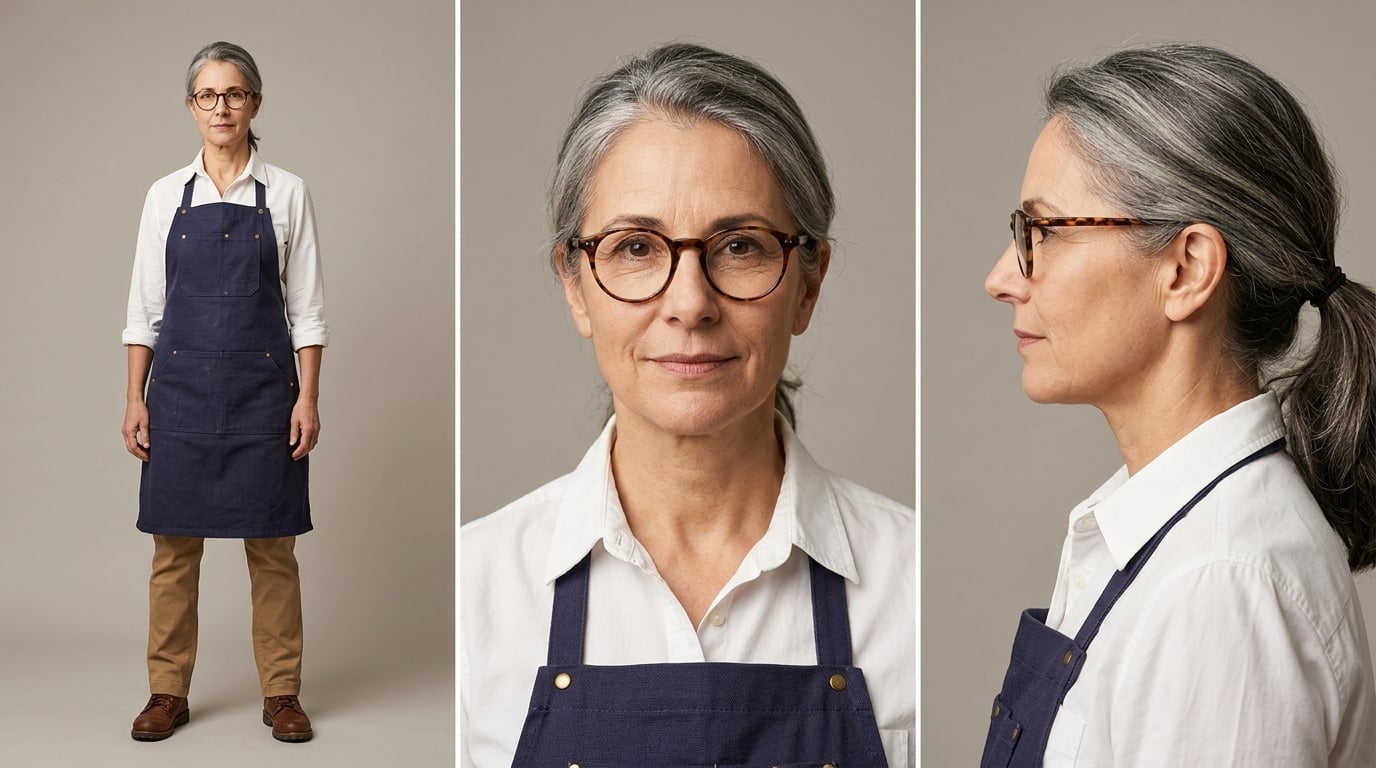
Seedance returns the recognisable luthier in the requested workshop scene. It retains her defining features and clothing while discarding the studio backdrop from the sheet.
Kling cannot receive the character sheet or any other reference material, so this is an input asymmetry rather than a paired generation. Its available identity anchor is the opening frame, which forces the take to begin on the image carrying that identity.
Recurring characters, products, and locations make Seedance the practical choice before aesthetic preference enters the decision.
Kling 3.0 delivers native resolutions that Seedance 2.5 cannot make
Seedance returns 480p or 720p video and nothing above 720p. Kling offers a standard 720p tier, a Pro 1080p tier, and a true 3840×2160 4K tier.
Choose Kling when the generated file must be the native 1080p or 4K master. Seedance fits a workflow that can deliver from a 720p source, including one that uses a separate upscale after generation.
Seedance has the broader selection of frames. Its six shapes span 21:9 through 9:16, while Kling supports only 16:9 and 9:16. Kling wins resolution and master delivery; Seedance wins flexibility for square, cinema, and other frames outside Kling’s two shapes.
Kling 3.0 iterates faster between takes
Kling’s five-second clips took 51 to 90 seconds across our article runs and earlier measured sets. Its 12-second directed take took about two minutes. Seedance took roughly 2 to 4 minutes for clips lasting five to eight seconds, and its 12-second take took about three minutes.
Kling therefore shortens the wait between a framing change and the next result, and the difference compounds across alternates: ten five-second framing passes come back inside a quarter of an hour, where the same ten on Seedance fill most of an hour.
Kling 3.0 posts a price you can compute before you render
The practical pricing difference is whether you can know a clip’s cost before you generate it. With Kling you can: Krea’s API reference posts a fixed dollar rate for each finished second, so the bill is multiplication you do in advance. Ten five-second standard passes are ten times $0.88, about $8.80, known before the first one renders.
- Standard 720p costs $0.1764 per second, or about $0.88 for five seconds before audio.
- Pro 1080p costs $0.2352 per second, or about $1.18 for five seconds before audio.
- The 4K tier costs $0.441 per second, or about $2.21 for five seconds.
Audio adds 50% to the standard and Pro rates. The 4K tier includes audio at no extra charge.
Seedance works the other way around. Krea meters it in compute units, a usage meter with no published dollar rate per second, so there is no formula that turns duration and settings into dollars before you submit. You see what a clip used once it renders, and you budget the next one from your own past runs.
So if you have to quote a budget before rendering, Kling is the one you can do arithmetic on. That is not the same as cheaper: with no published Seedance rate, there is no per-second price to compare. The rates above are API prices; on a Krea subscription, generations draw from your plan’s allowance instead, so the before-you-render arithmetic matters most when you pay per generation. Either way, Krea is the best place to work with both models, because you can generate, compare, and iterate without moving the production between separate tools.
Choose Seedance 2.5 if
- You have character sheets, product shots, or location references that must carry into the generated scene.
- You need one continuous take lasting between 16 and 30 seconds.
- You need a square, cinema, or another shape beyond 16:9 and 9:16.
- A 720p source is sufficient for your delivery workflow.
Choose Kling 3.0 if
- You need transitions to land on assigned beats within the take.
- You need a native 1080p or 3840×2160 4K master.
- You want shorter waits between framing changes and alternate takes.
- You need a published fixed cost for each finished second.
Start from the asset already in hand: bring your references to Seedance, or write a timed beat list for Kling, then make the video on Krea.
Pick your model and render
Bring references to Seedance or timed beats to Kling, without leaving one workflow.
Make a video