RoomGPT is an AI tool for turning a room photo into a themed redesign. You upload a photo, choose a theme, and receive an image that restyles the same room. This article explains how RoomGPT works and compares five alternatives, so you can choose what will handle the next step after your first render.
We ran deep reviews of RoomGPT and its alternatives, including Krea and Spacely AI, in September 2026. We look into each tool’s initial rendering, editing, planning, and shopping features.
Key takeaways
- RoomGPT turns a photo of a room into themed redesigns in seconds through a one-tap flow; it is a whole-room restyler with no per-object edits, material pinning or measurements, and its credit-pack pricing now appears only after login.
- RoomGPT rerolls objects and materials with every generation, so each output becomes a new whole-room concept.
- RoomGPT has no flat fee: you buy credits at $0.15 to $0.30 per design, so the bill tracks how many rooms you generate.
- Krea accepts instructions for individual changes while retaining the architecture and layout shown in our recorded kitchen redesign.
- Planner 5D lets you test whether furniture fits, while MeltFlex helps you find products that reproduce the generated design.
- All five alternatives publish a free allowance, trial, or starting price, giving you a verified basis for comparing entry costs.
The 5 best RoomGPT alternatives
- Krea for control and photoreal results
- REimagine Home for quick photo redesigns with staging
- Spacely AI for adjustable room variations
- Planner 5D for measurable 2D and 3D plans
- MeltFlex for shoppable, layout-aware designs
Restyle a room and keep its layout
Upload a room photo to Krea Image, name the change you want, and keep the architecture intact.
Open Krea ImageWhat makes the best RoomGPT alternative?
- Speed and simplicity: RoomGPT requires a photo and a theme. Tools with instructions, measurements, or object editing require more setup.
- Control after generation: Instructions can name individual changes, while intensity controls and region hints limit where a tool applies them.
- Layout and measurement: A generated image may retain visible architecture, but Planner 5D creates plans with real dimensions.
- Staging and shopping: REimagine Home prepares furnished property images, while MeltFlex connects approved designs to retailer products.
- Price predictability: Flat plans make the bill easy to forecast; RoomGPT’s per-credit model means the cost depends on how many designs you make.
RoomGPT and its alternatives at a glance
| Product | Best for | Standout feature | Pricing |
|---|---|---|---|
| RoomGPT | Instant themed redesigns | Theme picker | Credit packs, $9 for 30 to $29 for 200, one credit per design |
| Krea | Control and photoreal results | Instructions, references, and editing | Free start; from $5.25/month billed annually |
| REimagine Home | Photo redesign and virtual staging | Style and room-type presets | Five free designs; from $19/month |
| Spacely AI | Adjustable variations | Style intensity and region hints | 40 trial credits; Personal at $20/month billed yearly |
| Planner 5D | Measurable plans | Object-level editing in 2D and 3D | Free core; Premium from $4.99/month billed annually |
| MeltFlex | Shoppable designs | Generation that respects the layout | Free watermarked tier; Standard at $31.99/month |
What RoomGPT is and how it works
RoomGPT asks you to upload a room photo and select a theme. It then generates a new image that keeps the basic view while replacing the room’s style. Themes run from 10 to 20+ presets (Modern, Scandinavian, Industrial, Bohemian and Tropical among them), a render takes 15 to 30 seconds, and output tops out around 2,048 pixels on the long edge. Walls and windows mostly survive; reviewers also record windows moving, built-ins warping and, in one tropical theme, half a living-room floor turning into a pool.

RoomGPT pros:
- Produces themed concepts quickly
- Requires few choices before generation
- Works well when the first render is the endpoint
RoomGPT cons:
- Every generation rerolls the whole room
- Lacks measurements, object editing, and furniture shopping
RoomGPT does not let you preserve one cabinet material while replacing another. It also lacks controls for blending themes or editing a selected object. If you request another result, the tool generates the room again rather than revising a fixed part.
The tool also stops before renovation planning. You cannot enter measurements or arrange furniture inside a plan with real dimensions. The generated image does not connect its furniture to products that you can buy.
RoomGPT pricing
RoomGPT has no flat monthly fee. It sells credits, one credit per generated design, so the bill rises with the number of designs you make. Signing up, or logging in with Google, gives 1 to 3 free generations. After that you buy packs:
| Pack | Price | Per credit |
|---|---|---|
| 30 credits | $9 | $0.30 |
| 100 credits | $19 | $0.19 |
| 200 credits | $29 | $0.15 |
The pricing page itself appears only after login, so the way to budget is from your expected volume, one credit per design and the cheapest pack mix that covers it:
| Designs a month | Buy | Monthly cost | Effective per design |
|---|---|---|---|
| Up to 3 | The free credits | $0 | $0 |
| 10 | One 30-credit pack | $9 | $0.90 |
| 30 | One 30-credit pack | $9 | $0.30 |
| 100 | One 100-credit pack | $19 | $0.19 |
| 200 | One 200-credit pack | $29 | $0.15 |
| 500 | Two 200-credit packs and one 100-credit pack | $77 | $0.15 |
Below about 30 designs a month you pay for credits you will not use, and RoomGPT gets cheap per design only at volumes where its whole-room reroll costs you the most retakes. Pack prices as published in September 2026.
Keep RoomGPT on the shortlist when you want one immediate themed concept. Choose another tool if you expect to revise one element, measure the room, or purchase the furniture afterward.
RoomGPT pricing: No monthly plan. 1 to 3 free generations, then credit packs at $9 for 30, $19 for 100, $29 for 200, one credit per design; the pricing page shows after login.
Best RoomGPT alternative for control and photoreal results
Krea
Krea pros:
-
A generous free daily allowance
-
Control down to one element: name the change in words and only that changes, a wall colour, a sofa, a cabinet finish, while the rest of the room stays put; masked edits, image references with an adjustable strength, and style references handle the rest
-
Aesthetics you can choose: photoreal output from Krea 2, plus more than twenty other image models in the same workspace (Google’s Nano Banana 2 and Pro, ByteDance’s Seedream 5 Pro, Flux 1.1 Pro Ultra among them), so the look is a pick, not a lottery
Krea cons:
- Does not create a renovation plan with real dimensions
- You describe changes in words instead of tapping a preset, so the interaction can be less intuitive than having built-in graphical controls
- Not shoppable: the furniture in a render is not linked to products, so if the design has to use real pieces you bring their photos in as references yourself
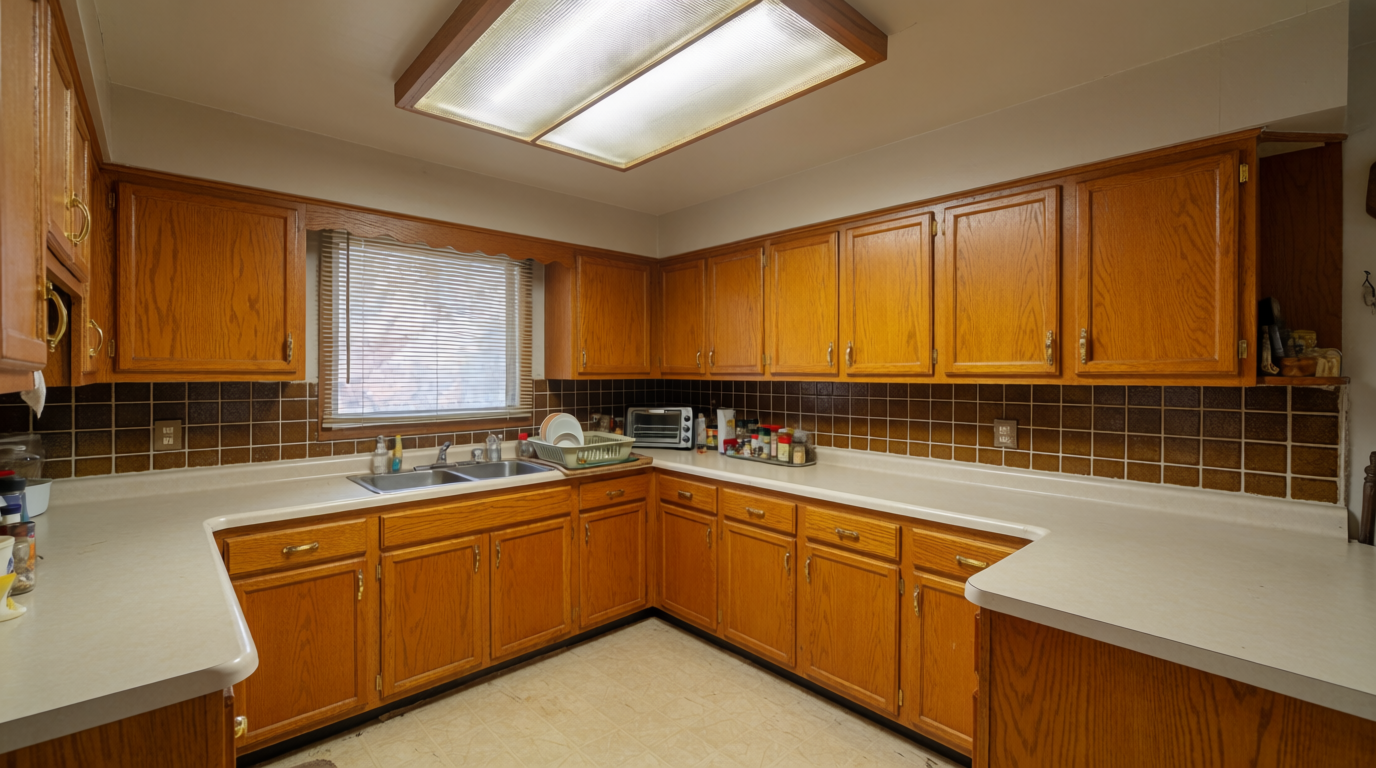
We used an instruction edit to change a dated kitchen from the 1990s into a modern coastal design. The original room had honey-oak cabinets and a fluorescent box light.
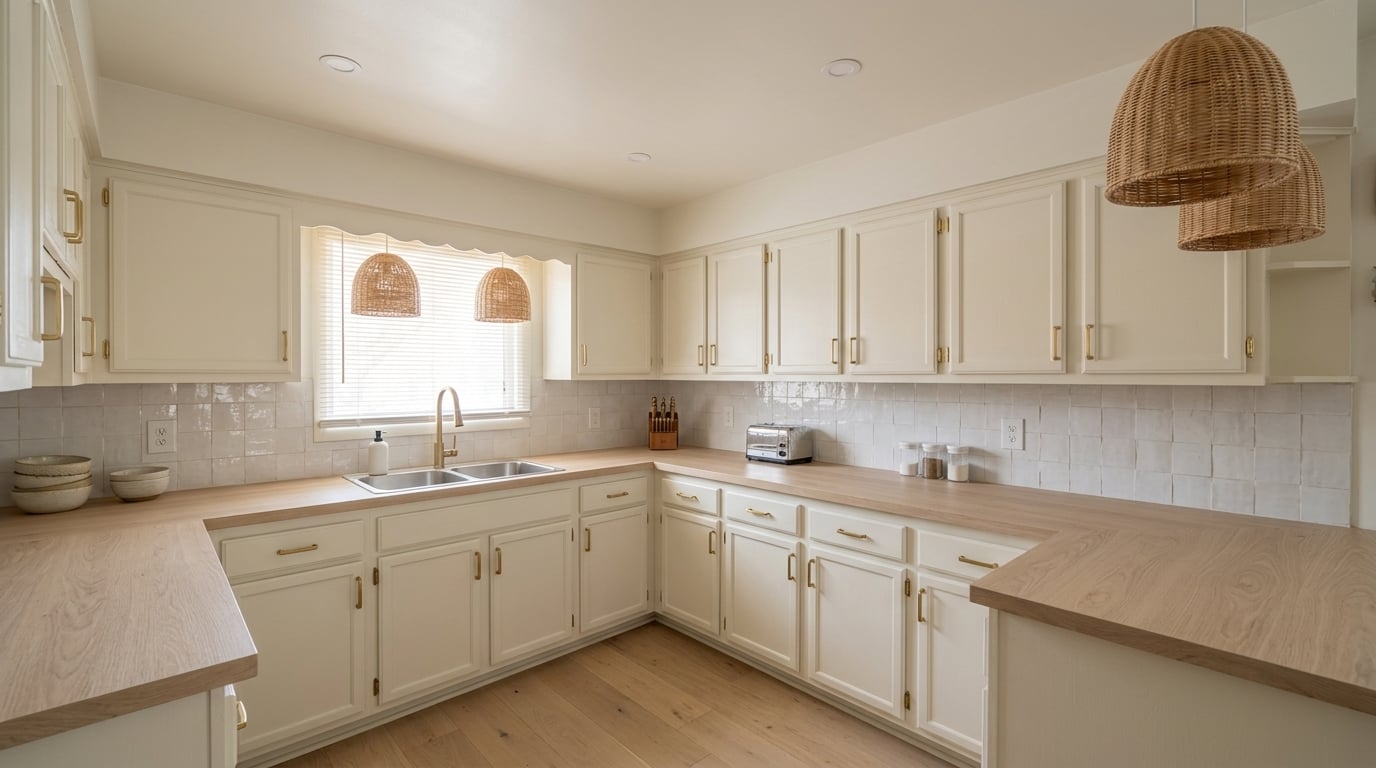
The edited room replaced the cabinets with soft white fronts. It added a zellige backsplash, woven pendant lights, and pale oak counters. The walls, windows, and main kitchen layout stayed in place.
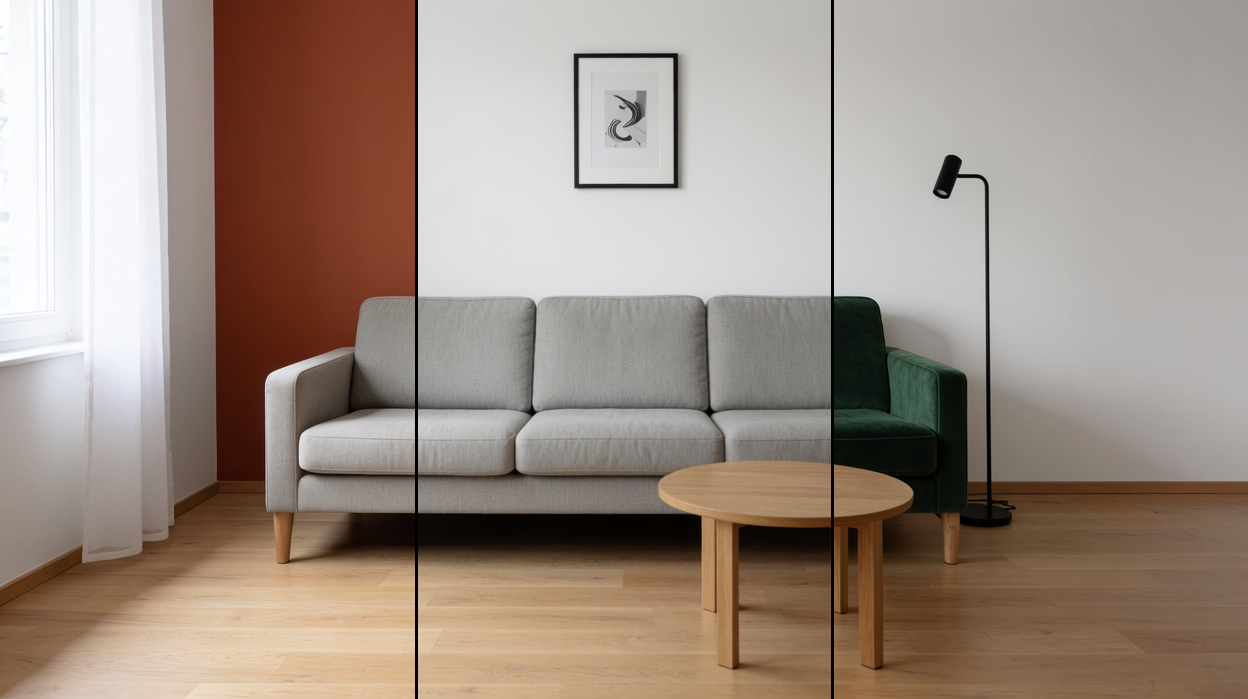
The second test is the one RoomGPT cannot pass: change one thing and nothing else. We started from a plain living room and gave Krea one instruction at a time.
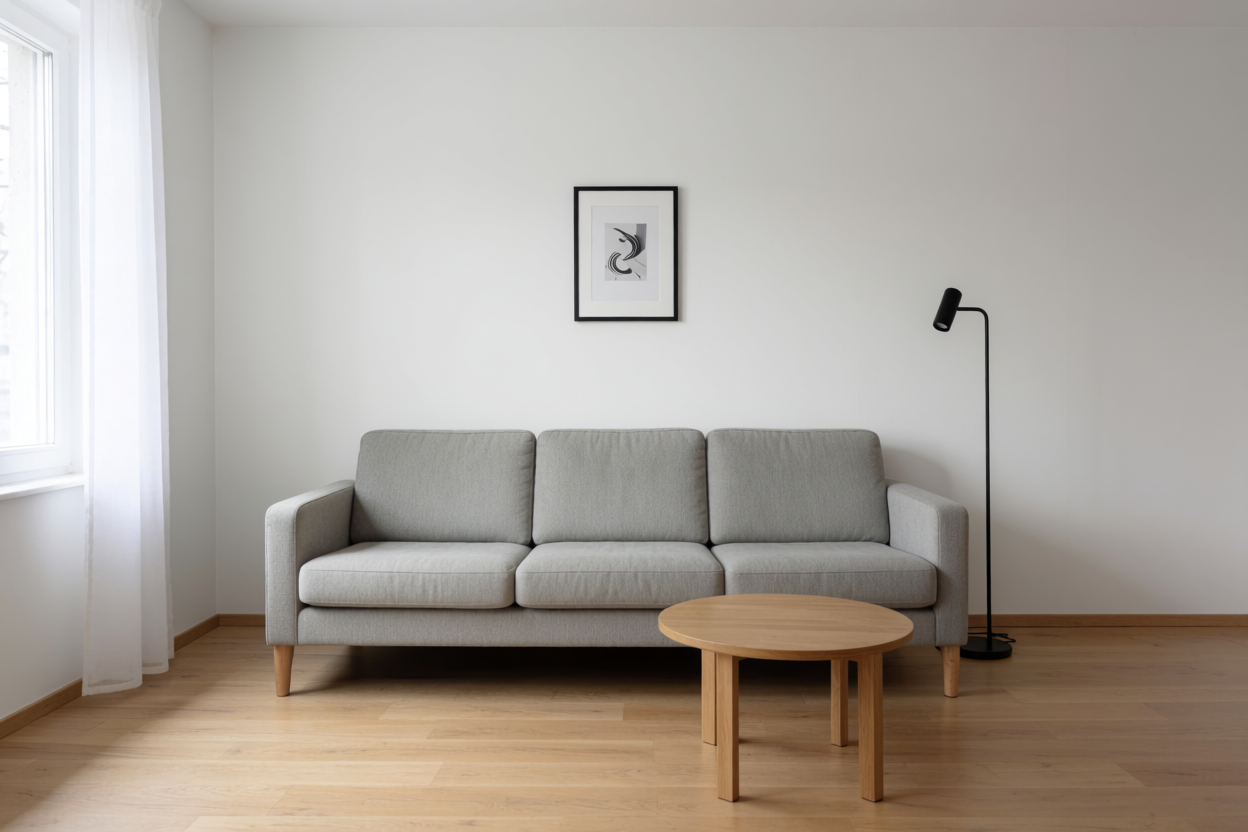
Instruction one: “Paint the wall behind the sofa a deep warm terracotta. Change nothing else.” The sofa, frame, lamp, table, floor and light are untouched.
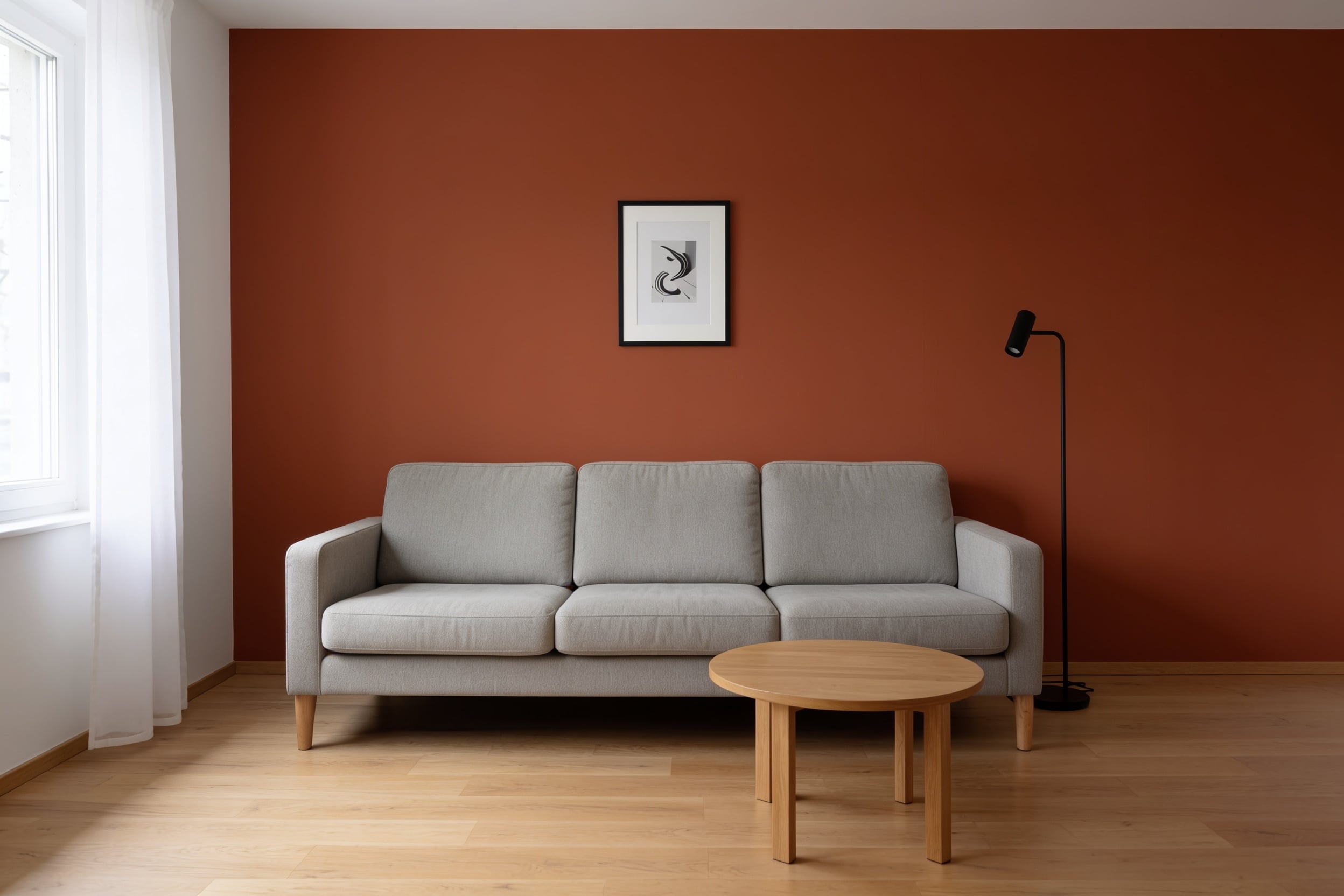
Instruction two, back on the original: “Replace the grey fabric sofa with a forest-green velvet sofa of the same shape and size. Change nothing else.”
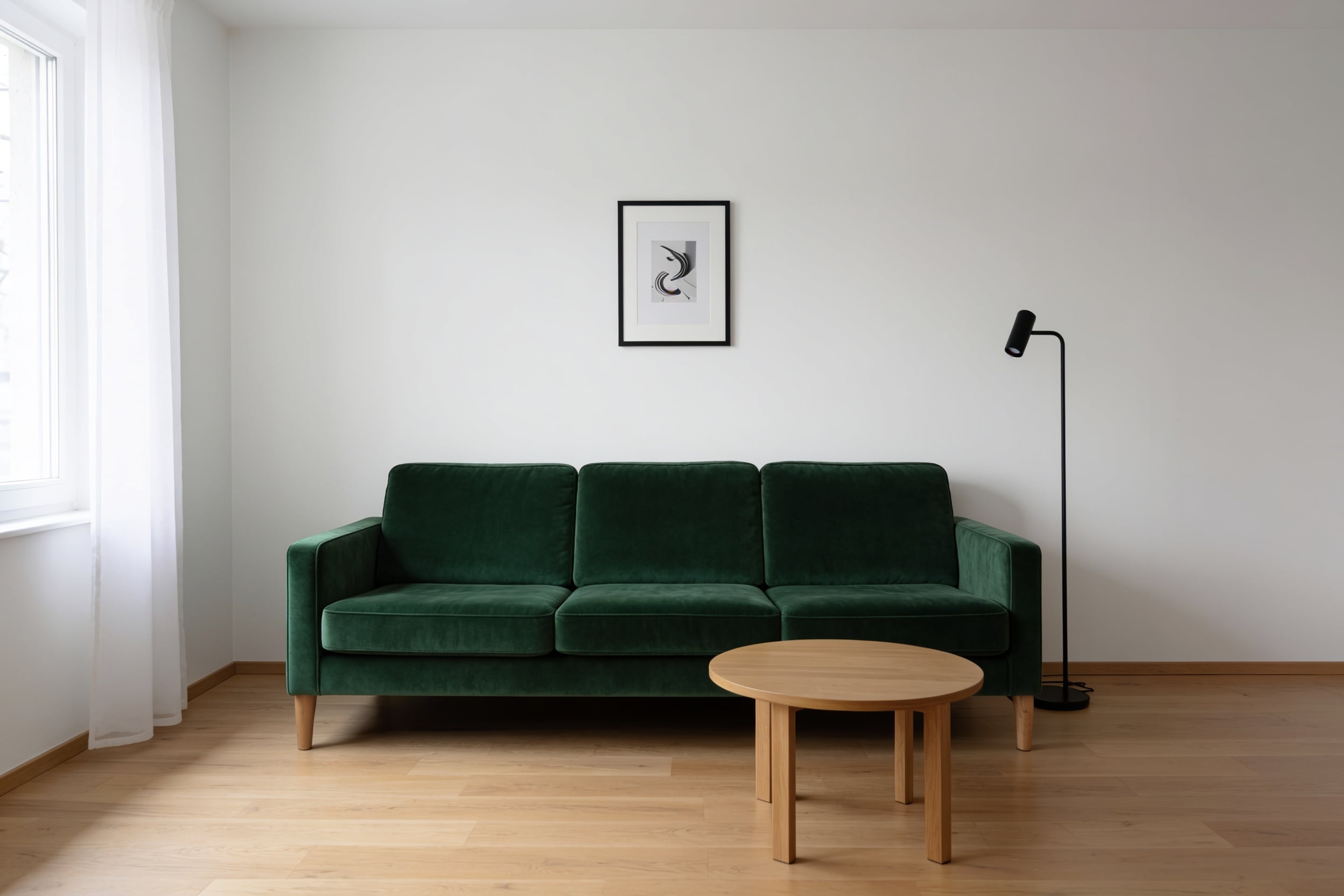
That is the difference in kind. A theme picker gives you a new room each time; an instruction gives you the room you have with one decision made.
Krea’s image tool supports instructions for changing specific surfaces, finishes, and fixtures. References and further editing provide more direction after the initial generation. RoomGPT instead asks you to choose a theme and rerolls the entire room.
Krea is best suited to redesigns that need another pass on one finish, fixture or surface, and to anyone who cares which model made the picture. It retains visual continuity without requiring you to build a measured floor plan.
Krea price: Free start; plans from $5.25/month billed annually; Pro costs $21/month.
Best RoomGPT alternative for quick photo redesigns with staging
REimagine Home
REimagine Home pros:
- Five solutions from one upload: Virtual Staging, Redesign Furnished Rooms, Empty Your Space, Landscaping, Render Exterior Structures
- Five free designs at signup, on the same AI as the paid plans
- On Pro, a Design Companion chat: exploring costs nothing, a visualization costs 1 credit, a render with real shoppable products costs 2
REimagine Home cons:
- Essential runs on the legacy tools: no conversation, no reference photos, no real products, no incremental edits
- Users report occasional misplaced or warped furniture
The flow is four choices. Upload a photo (JPG, PNG or HEIC up to 25 MB), pick a solution, set the space type and a design theme or let the AI choose, add optional specifics such as “armchair, ottoman and lamp”, and press Generate design. The before/after arrives in a few seconds.
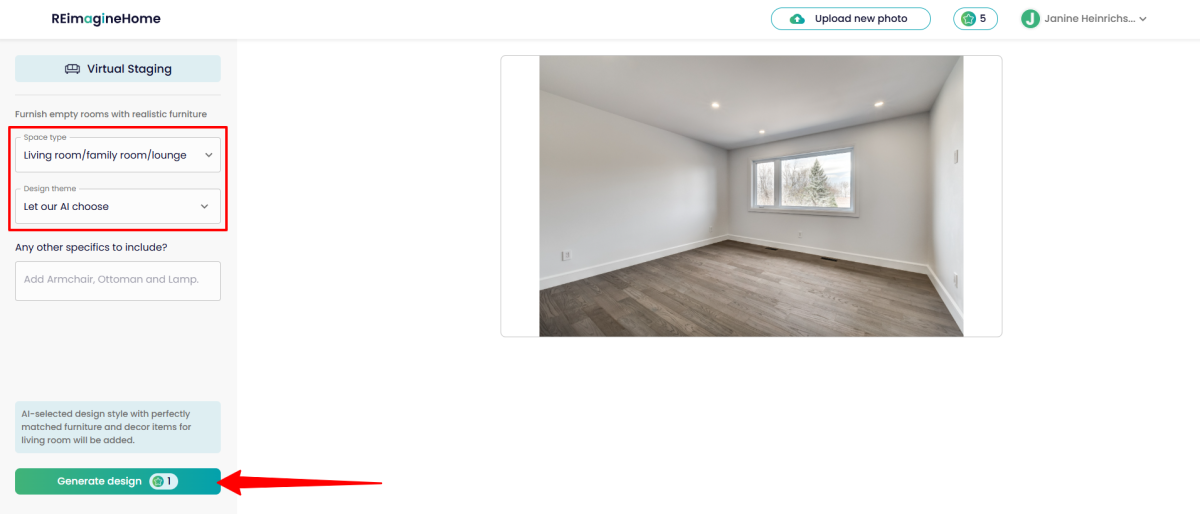
That panel is where it sits next to RoomGPT: presets, not instructions. Pro is where it pulls away. The Design Companion puts a chat on the left and your photo on the right with an Annotate button, so you can circle the corner you mean, ask for one change and keep the rest, and spend nothing until you commit to a render. Real-product matching turns the staged image into furniture you can source, which is why agents use it for listings.
REimagine Home price: Five free designs; Essential $19/month for 30 credits; Pro $36/month for 200 credits with the conversational flow and real-product matching; Advanced $59 for 400; Agency $119 for 900.
Best RoomGPT alternative for adjustable room variations
Spacely AI
Spacely AI pros:
- Four render modes, Realistic Render, Creative Render, Style Transfer and Auto Furnish, plus lighting tools that change the mood without a full regeneration
- Creative Render exposes material references with a weight slider and a placement field (“wall, floor, cabinet”), style intensity, and Fast, Standard or Pro quality
- Runs inside SketchUp as a native extension; 40 trial credits on the full feature set, no card
Spacely AI cons:
- The published prices are annual rates; Personal bills $240 up front
- 4K output (Enhance Quality) is reserved for Studio and Business
Spacely is built for people who already work in a modeller. Pick a mode, choose a style (“Moonless Night” in the panel below), type the direction, drop in up to five material references with a weight and a note on where they go, pick the quality tier, and generate. Renders land on an Infinite Canvas where the variations sit side by side.
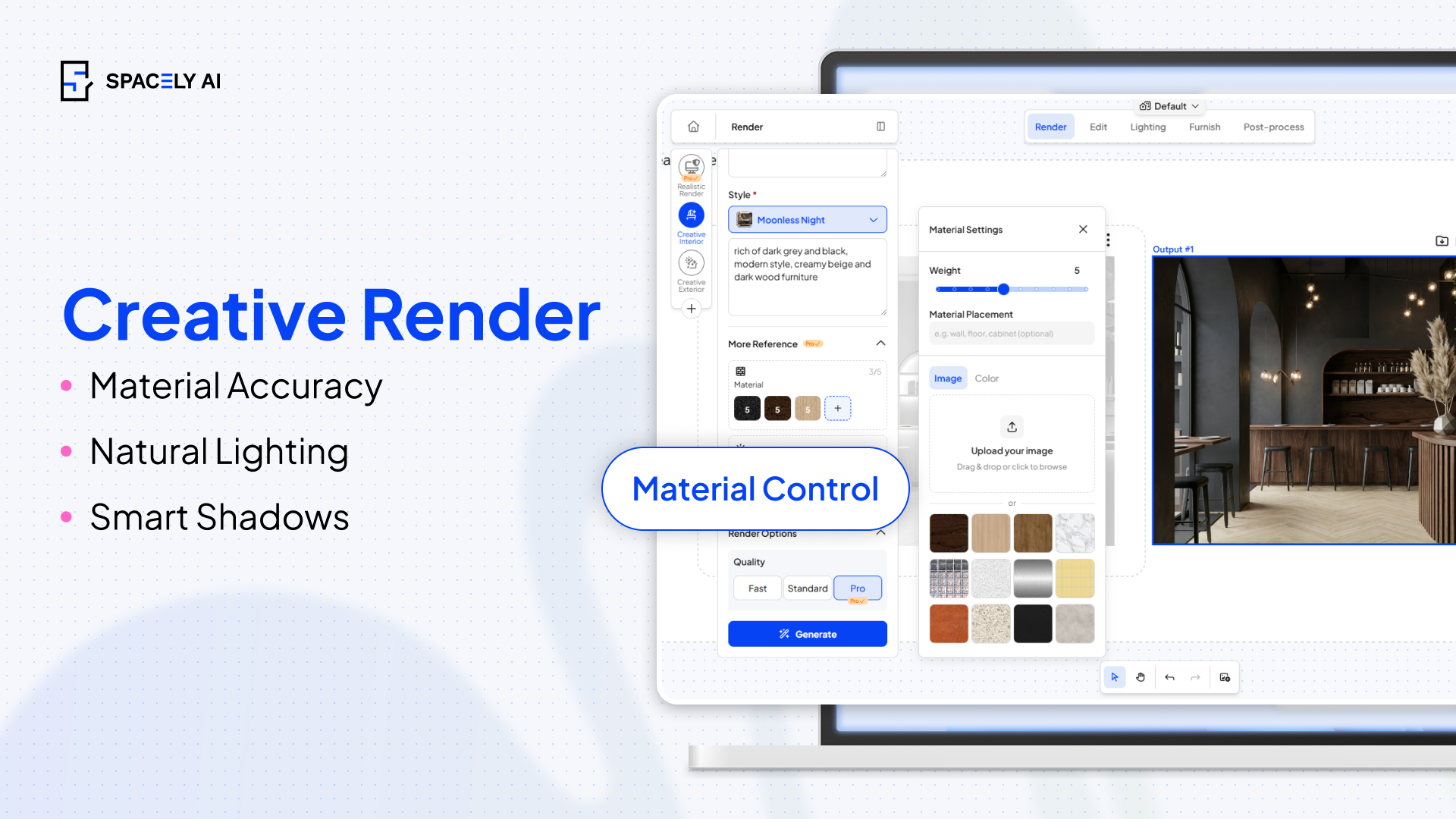
The difference from RoomGPT is granular but real: intensity, materials and placement are dials, so a second run is a variation, not a reroll. The difference from Krea is that Spacely still re-renders the scene each time rather than editing one region in place. The SketchUp extension says who this is for: a designer who has the model and wants a client-ready look on it.
Spacely AI price: 40 trial credits with full features; Personal costs $20/month billed as $240 yearly; top-ups start at $9.
Best RoomGPT alternative for measurable 2D and 3D plans
Planner 5D
Planner 5D pros:
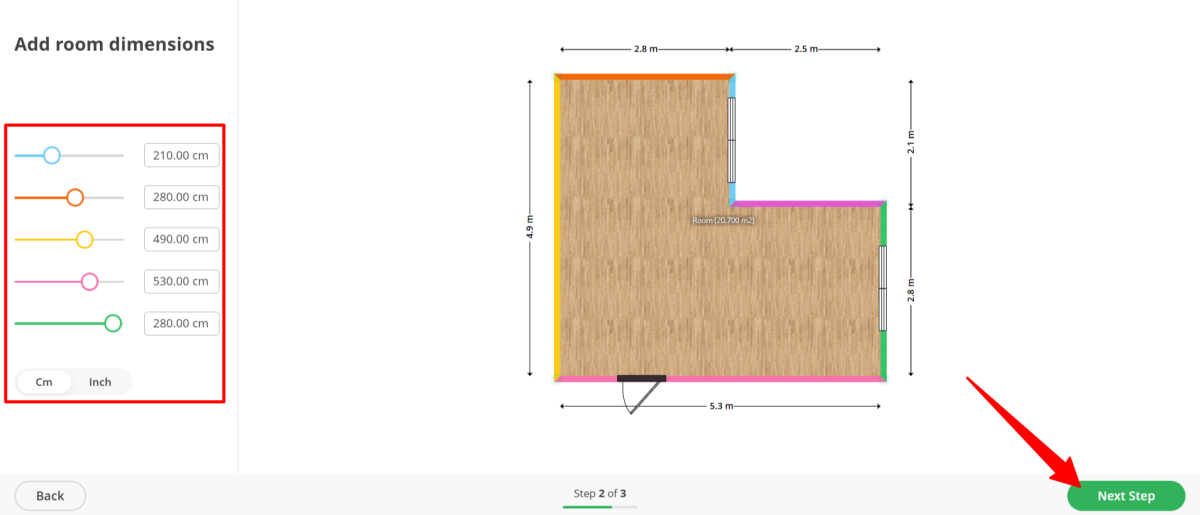
- The Smart Wizard builds a room in three steps, shape, dimensions in centimetres or inches, then type and style, so the plan carries real measurements from the first screen
- A catalogue of more than 8,000 items to drag, rotate, flip and copy in 2D, then a switch to 3D
- Renders at Draft, HD, Full HD, Quad HD or 4K with sun position and scene lighting controls; 360 walkthroughs and a shopping-list cost estimate
Planner 5D cons:
- It does not restyle your photo; you rebuild the room as a model, which takes an evening
- The web version slows on large projects and material control is basic
Planner 5D answers the question the photo tools cannot: does it fit. Start a project, choose the Smart Wizard, pick a room shape, set each wall length, then choose room type and style and let it place furniture. Every object can be moved and measured, and the floor-plan reader raises a photographed sketch into 3D walls in seconds.
Rendering is its own step: pick angle and aspect, choose quality up to 4K, set ceiling lights and sun position, and wait a few minutes. Reviewers found the light and shadow convincing and the bugs mostly around furniture colours. Pair it with an image tool rather than choosing between them: direct the look elsewhere, then prove the layout here.
Planner 5D price: Free planning core; Premium costs $4.99/month billed annually at $59.99/year, or $19.99 month to month, with the AI design generator, floor-plan upload and the full catalogue; Professional $33.33/month billed annually with unlimited 4K renders, 360 walkthroughs and CAD export.
Best RoomGPT alternative for shoppable, layout-aware designs
MeltFlex
MeltFlex pros:
- Upload, pick a room type and one of 25+ styles, set a budget from $3,000 to $20,000, and get a furnished room in about 20 seconds
- Every piece in the render is a live product with a price: IKEA on the free tier, then Amazon, Wayfair, Walmart, Costco, Pottery Barn, West Elm, Rooms To Go and Ashley on paid plans
- Keeps the walls, windows and proportions from your photo; also turns a 2D floor plan into a 3D render
MeltFlex cons:
- Free renders carry a watermark and shop IKEA only
- Like RoomGPT, each run regenerates the whole room; there is no single-object edit
MeltFlex is RoomGPT with a receipt. The budget slider is the unusual control: it limits the furniture the model may place to products in that price band, so the picture and the shopping list are the same object.
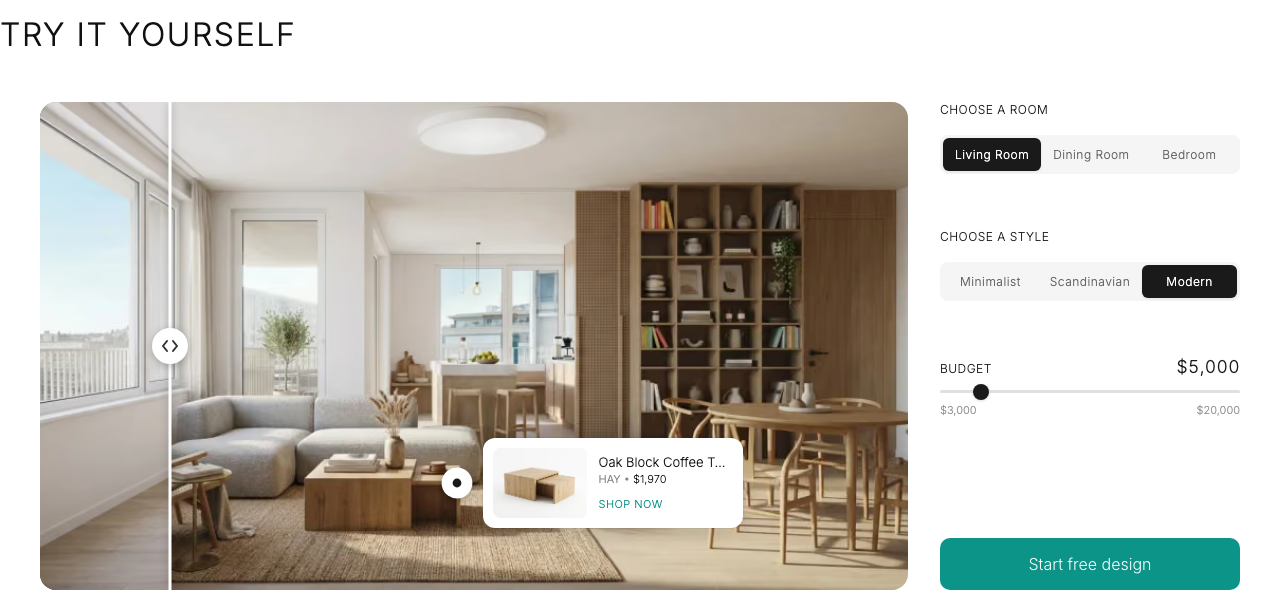
Choose it when the point of the exercise is a furnished room you can order, not a look to keep refining. Standard covers up to 100 renders a cycle and opens the full catalogue; Pro up to 190.
MeltFlex price: Free watermarked tier with IKEA-only shopping; Standard costs $31.99/month for about 100 renders and the full retailer catalogue.
Which room redesign tool should you pick?
RoomGPT fits when you want one immediate themed concept and expect no further editing. Krea is strongest for targeted edits, REimagine Home for staging, and Spacely AI for tunable variations. Planner 5D handles real dimensions, while MeltFlex continues from the approved image into furniture shopping.
Identify what must happen after the first render, then trial the tool built for that next step.
Sources
- Google AI Overview for “RoomGPT pricing”, September 2026 (credit-based model, 1 to 3 free generations, packs of 30, 100 and 200 credits); RoomGPT’s own pricing page is visible only after login.
- Vizcraft and First Chair hands-on RoomGPT reviews, 2026 (theme count, 15 to 30 second renders, 2,048 px output, geometry preserved and the failures observed).
- Unite.AI hands-on reviews of REimagine Home and Planner 5D, 2025 (the step-by-step flows and the two interface screenshots reproduced above).
- REimagine Home pricing page and Design Companion documentation; Spacely AI’s Q1 2026 product update and SketchUp extension tutorial; Planner 5D’s product pages; MeltFlex’s create and subscription pages; Krea’s Krea Edit announcement and interior-design workflow guide.
- Krea, REimagine Home, Spacely AI, Planner 5D and MeltFlex pricing pages, captured late August 2026 and re-checked September 2026.
Related reading
- 8 Best AI Interior Design Tools in 2026, Compared
- 6 Ways to Use AI for Interior Design in 2026
- Interior design with Krea 2
Frequently asked questions
Is RoomGPT free, and how much does it cost?
What does RoomGPT do best?
Can RoomGPT preserve specific elements (like keeping cabinets or layout) between generations?
Which alternative is best if I want more control after the first render?
Which alternative helps me measure or plan furniture placement?
Which alternative connects designs to shoppable items?
Try the RoomGPT alternative with control
Krea keeps your room's geometry from the reference image and applies only the change you ask for.
Try Krea Image