Seedance 2.5 is ByteDance’s video-generation model for text-to-video, image-to-video, and reference-guided video, with optional audio generated alongside the picture. Seedance 2.5 is available on Krea for text-led generation and reference-guided generation.
The important change is not a longer list of settings. The reported roughly 20% gain in prompt adherence still leaves identity-dependent work reliant on supplied character sheets, product photographs, and location references.
Seedance 2.5 assigns separate input roles to identity, clip endpoints, and on-screen action. References preserve identity, while prompts describe the on-screen action. Start and end frames control the clip’s boundaries. Seedance 2.5 is most useful when specific people, products, and locations must persist across a longer generation, because Krea expands the reference and duration ceilings while keeping the prompt focused on action.
Key takeaways
- Use separate reference assets for each face, product, and location so fixed assets remain recognizable throughout generation.
- Seedance 2.5 provides multimodal reference capacity for up to 50 assets in a single Krea API request.
- Choose Seedance 2.0 when native 1080p or 4K output matters more than a 30-second clip or larger reference capacity.
- Name each shot in a long prompt so the model has an explicit sequence of events and framing changes to follow.
Try Seedance 2.5 on Krea
Generate reference-guided video with up to 30 references and 30-second takes.
Try Seedance 2.5What Is Seedance 2.5 Used For?
Seedance 2.5 combines motion generation and optional native audio in one video request. Its generate_audio control can produce an audio track in the same pass as the picture, rather than requiring sound to be synced afterward. That makes it useful when room tone, foley, or lip movement belongs to the shot itself.
Krea’s model page also describes an extended beta mode that can reach 180 seconds. Standard request limits matter more for routine production, yet the beta mode points toward longer-form generation rather than isolated short clips.
Seedance 2.5 also provides a targeted correction path for local defects. Krea’s model page and Framite’s review describe region-level editing for a face, object, or background without regenerating the complete clip. When the defect is confined to one part of a scene, revision can focus on that region instead of restarting the sequence.
Seedance 2.5’s Actual Limits on Krea
Krea’s API gives Seedance 2.5 its largest increase in reference capacity and standard clip length. The model accepts up to 30 reference_images, 10 reference_videos, and 10 reference_audios in one request, for 50 multimodal references overall. Its duration ranges from 4 to 30 seconds, and its native render tiers are 480p and 720p. Those limits let you keep a larger set of visual and sound inputs within one sequence rather than dividing continuity-sensitive work into many smaller clips.
You can use these controls to set a clip’s framing and reproduce a generation. Seedance 2.5 supports six aspect ratios, including 16:9, 1:1, and 9:16. Composition controls include one start_image, one end_image, and an integer seed. You can also attach up to 12 named image or video effects and turn enhance_prompt on or off. Only prompt is required; generate_audio defaults to false and every other field has a default. You can therefore lock a clip’s boundaries and repeat an experiment while the prompt directs the movement and event.
The comparison with Seedance 2.0 is a trade between working headroom and native resolution. Krea’s Seedance 2.0 schema supports 15 references in total, with clip durations from 4 to 15 seconds. Seedance 2.0 adds native 1080p and 4K output, with an upscale flag that can take a finished clip to 8K — see our guide to the best AI video enhancers for how dedicated upscaling tools compare. It shares the same aspect-ratio and audio controls, and it also supports start and end images. Choose 2.5 when continuity across more inputs or more time sets the constraint; choose 2.0 when native 1080p or 4K delivery sets it.
How Reference-Guided Generation Works in Seedance 2.5
Text Defines the Event, Not the Exact Assets
A detailed scene prompt can create the right type of scene without creating the exact character, product, or location you intend. A text-only Seedance 2.5 prompt describing a woman in a green field jacket entering a rainy neon noodle bar produced a different woman in an American-style diner with vinyl stools and a plain grey tumbler. The prompt supplied mood and action while leaving the woman, bar, and mug without identity constraints.
Give Each Fixed Asset Its Own Reference
A multi-angle character sheet gives the model identity information that prose cannot reliably preserve. The character reference is a three-panel sheet with full-body, front, and right-profile views. The woman is defined by her moss-green field jacket. Those views give the model useful coverage when she turns or appears at different shot distances.
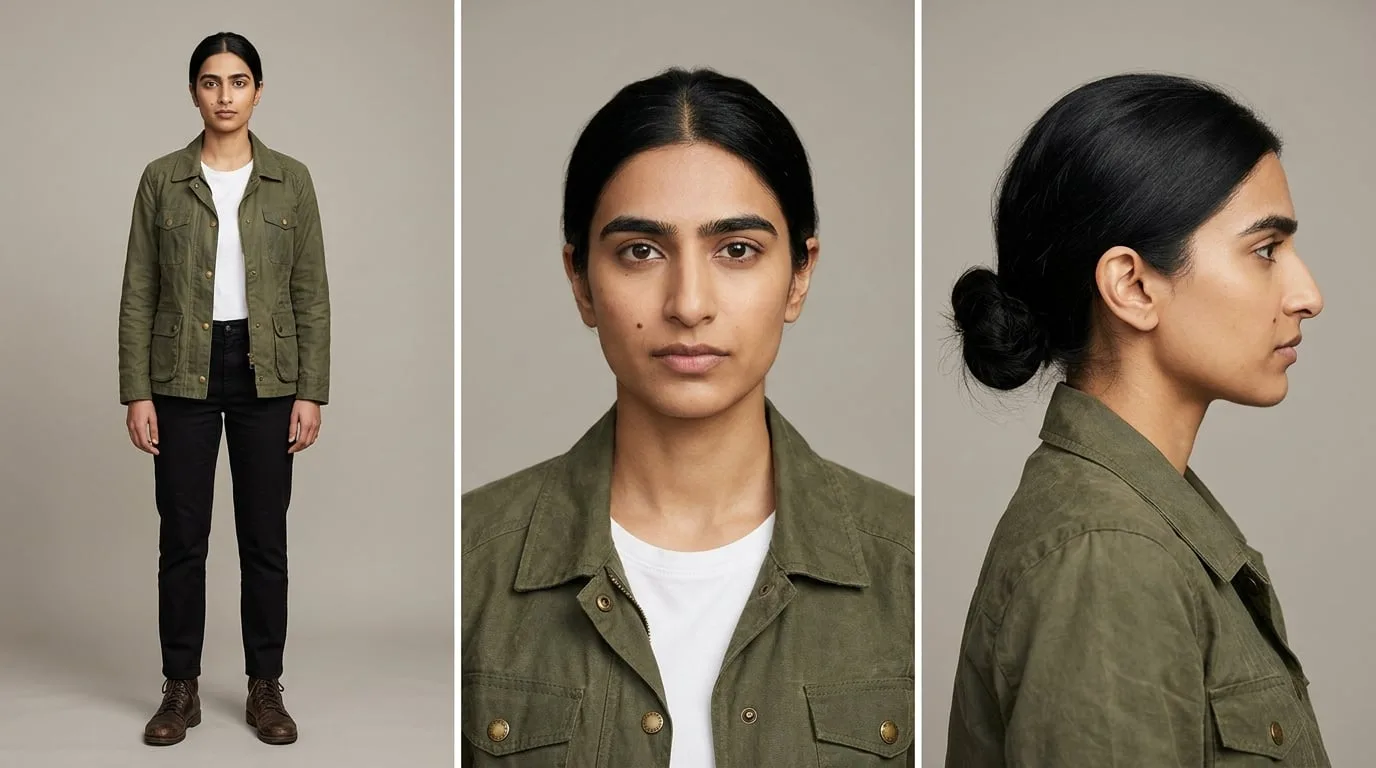
The character reference constrained the character alone, while the bar and mug remained unconstrained. With only the character sheet attached to the same prompt, Seedance 2.5 preserved her face, hairline, and green field jacket while producing a generic bar and a plain white mug. The practical rule follows directly: if an asset’s specifics matter, give that asset its own input.
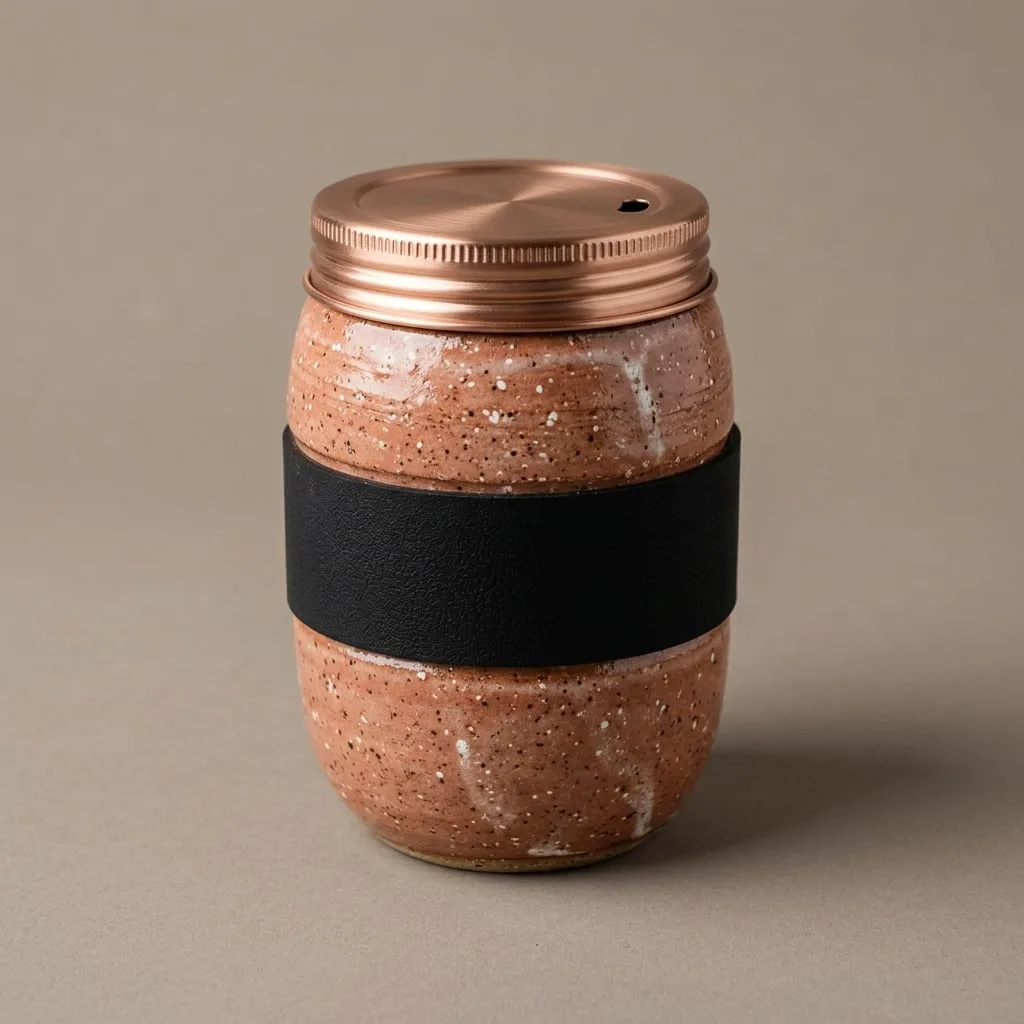
A product needs a separate reference when its material, form, and packaging details are part of the deliverable. Here, the product input is a studio image of a speckled terracotta travel mug with a brushed copper screw lid and matte black silicone grip band. Supplying the image turns the mug into a visual constraint instead of asking the prompt to reconstruct several small details.
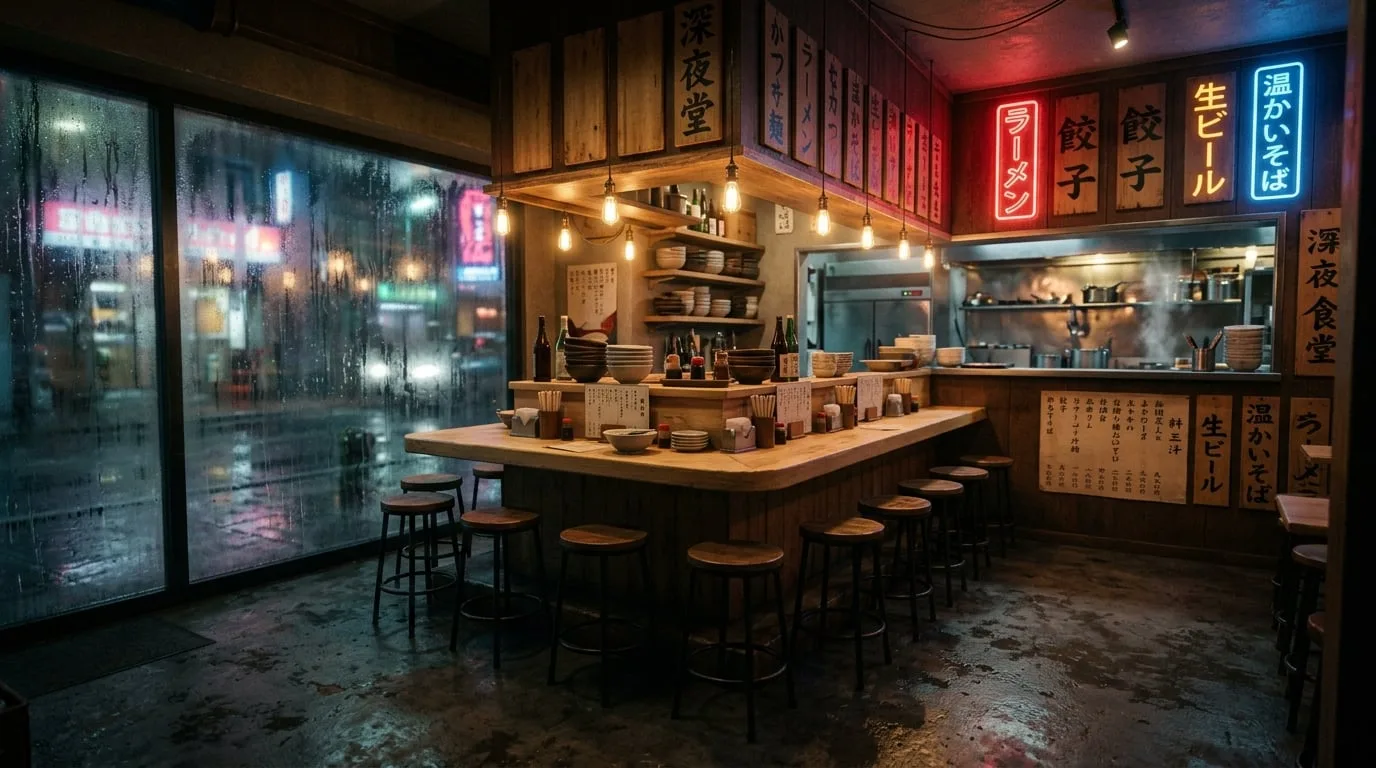
A location reference fixes the physical setting so the prompt can direct the event inside it. The location is an empty late-night noodle bar defined by a pale wood counter, red-and-blue neon signage, and rain on the front window. Once the room is supplied, the text can focus on the entrance, movement, and interaction.
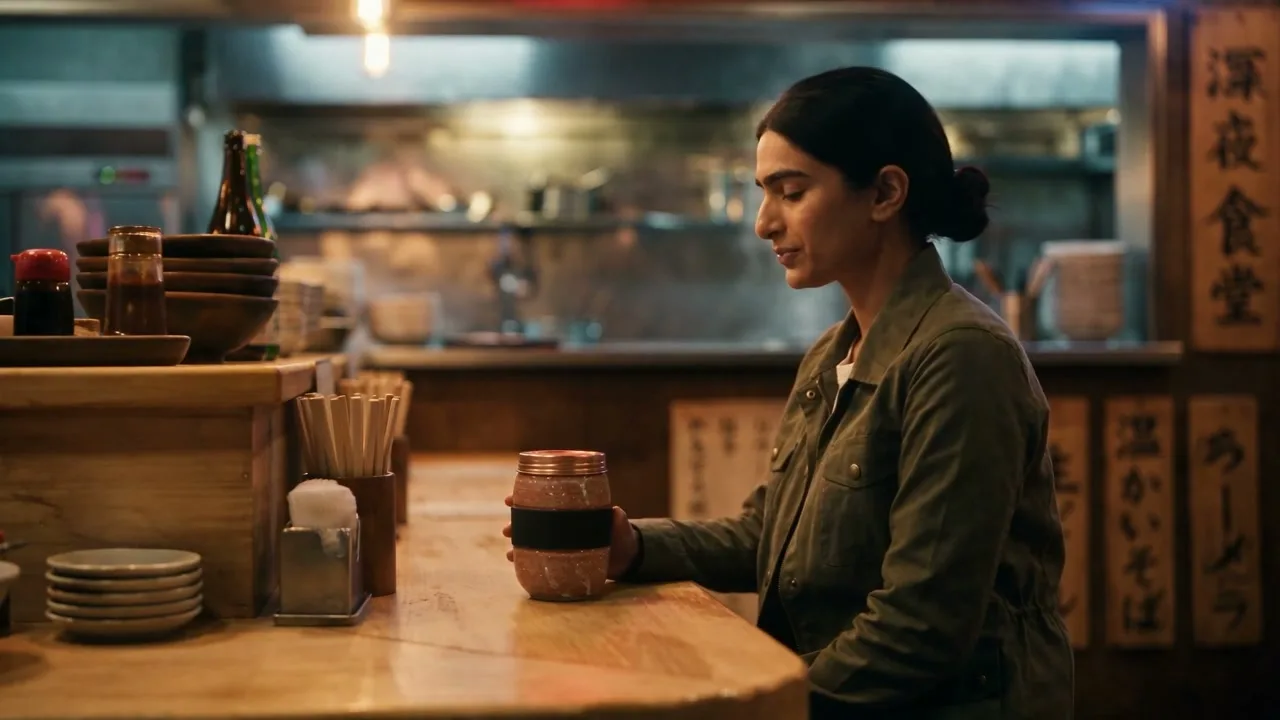
Three targeted references can preserve a character, product, and setting together in one generation. In an eight-second Seedance 2.5 generation using all three inputs, the recognizable woman places the terracotta mug, including its copper lid and black grip band, on the counter of the neon, rain-streaked noodle bar. The gain comes from assigning every non-negotiable element a source asset.
That three-reference result does not make Seedance 2.5 automatically more faithful than Seedance 2.0. The same prompt and three references run through Seedance 2.0 also retained the woman, mug, and noodle bar at eight seconds. At this modest scale, both models hold the required assets; 2.5 becomes the better fit when a project exceeds Seedance 2.0’s reference-image or duration ceiling.
Start and End Images Control the Destination
Frame inputs set a clip’s visual boundaries, while references preserve its assets. The end-frame input here is an edited version of the noodle bar at mid-morning, with neon off and rain gone, while the counter, stools, and camera position remain unchanged. Use this pair when the destination of a transformation matters as much as the opening composition.
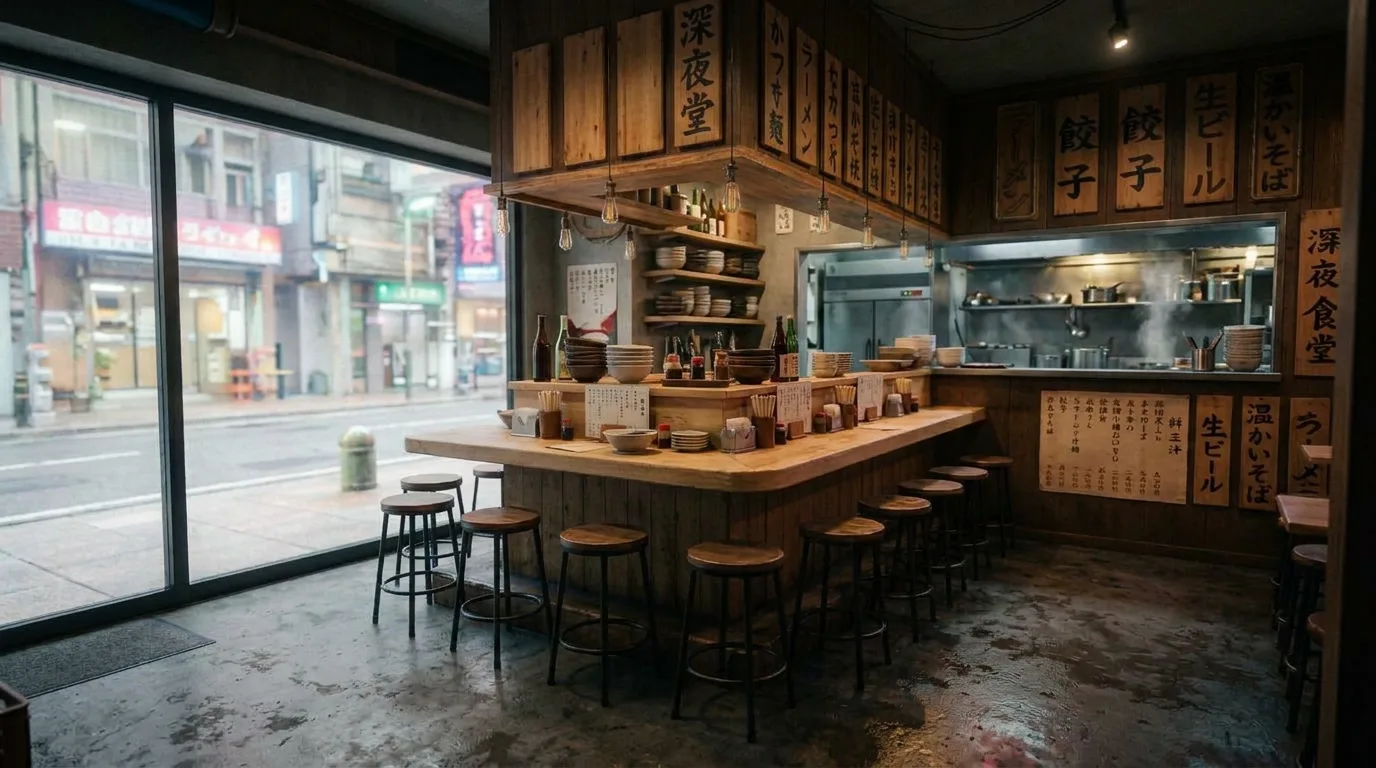
A pinned first and last frame gives Seedance 2.5 an explicit visual journey to generate between. With the night bar set as start_image, the morning bar set as end_image, and a locked-off prompt describing rain stopping and daylight rising, the model generated the transition without people in frame. This approach fits time-of-day changes, reveals, and before-and-after scenes because the ending is specified rather than invented.
Audio and Shot Lists Extend the Same Logic
Audio is a request-level choice that needs no change to the references. A generation with audio enabled and the character and product references attached shows the woman lifting the copper lid off the mug, with rain and room tone beneath the action.
A long generation needs an explicit shot progression to become a sequence rather than an extended moment. The 20-second Seedance 2.5 request included three references and audio. Its four numbered shots move from a wide entry through a medium counter view and a close-up of the lid to a final wide view from behind. Numbering gives the model an order to follow while the references carry the woman, mug, and room across changes in framing.
Who Should Use Seedance 2.5?
Ad teams can generate campaign cuts around the same SKU while keeping the product and presenter recognizable. A product reference prevents packaging from drifting while a team generates several cuts around the same SKU. That matters when recognition of the item is more valuable than a newly invented object in every version.
Filmmakers and previs teams can use Seedance 2.5 to carry a character through a location and across planned shots. Its 30-second standard duration can accommodate four to five shots in one generation when the prompt names each shot. Multi-shot generations reduce handoffs that can introduce visual mismatches between planned shots.
Ecommerce teams can use a single product image to stage the same item in several contexts. A 30-second generation can reduce the clip joins where product, costume, or set continuity drifts. The return is highest when a fixed SKU or visual identity matters more than generating a different-looking product for each setting.
Seedance 2.5 Limitations to Plan Around
Render resolution is the clearest reason to choose Seedance 2.0 instead. Although Seedance 2.5 provides more reference and duration headroom, choose Seedance 2.0 when native 1080p or 4K output and its built-in upscale path outweigh those gains. Reference capacity does not override the delivery requirement.
The five- to eight-second Seedance 2.5 renders in this sequence took roughly two to three and a half minutes each, and a weak output means paying that cycle again. Small text and fine logo details remain weak points, while wardrobe and props hold more reliably. Budget time for reruns and write clear numbered shots, because a long vague prompt produces a long vague clip — see tested Seedance 2.5 examples and prompts for structures worth copying.
How to Get Started With Seedance 2.5 on Krea
Seedance 2.5 is available on Krea’s model page, in the Krea video generator, and through POST /generate/video/bytedance/seedance-2-5 in Krea’s API. Krea’s video documentation covers start and end frames and identifies models with native audio.
Start with one simple scene and attach a reference for the one thing that cannot drift. Keep the prompt focused on action, then add a reference or motion control for the element that drifts in the output.
When the woman, terracotta mug, and rain-lit noodle bar all need to remain the same across a sequence, assign each one a reference before asking the model to move them. References provide fixed identities; the prompt directs the action in each shot.
Start your first generation
Attach one reference for the thing that cannot drift, then direct the action.
Open Seedance 2.5