Designing a poster with AI splits into two real paths, and picking the wrong one wastes an hour. Path one: you don’t have a photo or artwork yet, so you want AI to invent the whole scene — a concert crowd, a movie planet, a festival illustration — from a text prompt. Path two: you have the words and the event details, and you just need a clean layout with a text box, fast. This guide compares five tools across both paths — Krea, Canva, Adobe Express, PosterMyWall, and VistaCreate — with real prices, real prompts, and the specific job each one is built for.
The best AI poster design tools at a glance
| # | Tool | Best for | Price model (Sep 2026) | Free route |
|---|---|---|---|---|
| 1 | Krea | Original poster art generated from a prompt | Free plan; paid from $9/mo | 100 compute units/day |
| 2 | Canva | Drag-and-drop poster templates | Free forever; Pro $18/mo or $144/yr | Full free tier, no credit card |
| 3 | Adobe Express | Free one-off poster with clean templates | Free; Premium $9.99/mo | Free with an Adobe account |
| 4 | PosterMyWall | Poster- and flyer-specific templates, print + social sizing | Free (watermarked); Premium ~$13/mo | Free tier, watermarked exports |
| 5 | VistaCreate | Budget Canva alternative, template-based | Free (Starter); Pro $10/mo (up to 10 seats) | Full free tier, no credit card |
Generate original poster art from a prompt
Skip the template search — describe the poster you want and Krea 2 generates the artwork in seconds.
Try Krea 2How we chose and tested
Prices and plan details below come from each vendor’s own pricing page as of September 2026: Krea pricing, Canva pricing, Adobe Express pricing, PosterMyWall pricing, and VistaCreate plans. Every poster image in this post is a raw, single Krea 2 generation from the exact prompt printed beside it — no retouching, no text added afterward, no cherry-picking. None of the images here came from a competitor tool; Canva, Adobe Express, PosterMyWall, and VistaCreate are template editors, not image generators, so their sections describe the click path instead.
To test how each approach handles a real poster brief, we started with a prompt that needs bold, legible display type baked into the scene — the hardest case for any image model:
bold concert poster design for an indie rock band called Night Static, dramatic neon purple and orange stage lighting, large distressed display typography spelling NIGHT STATIC across the top, silhouette of a guitarist on stage, grainy film texture, high contrast, 1980s gig poster aesthetic
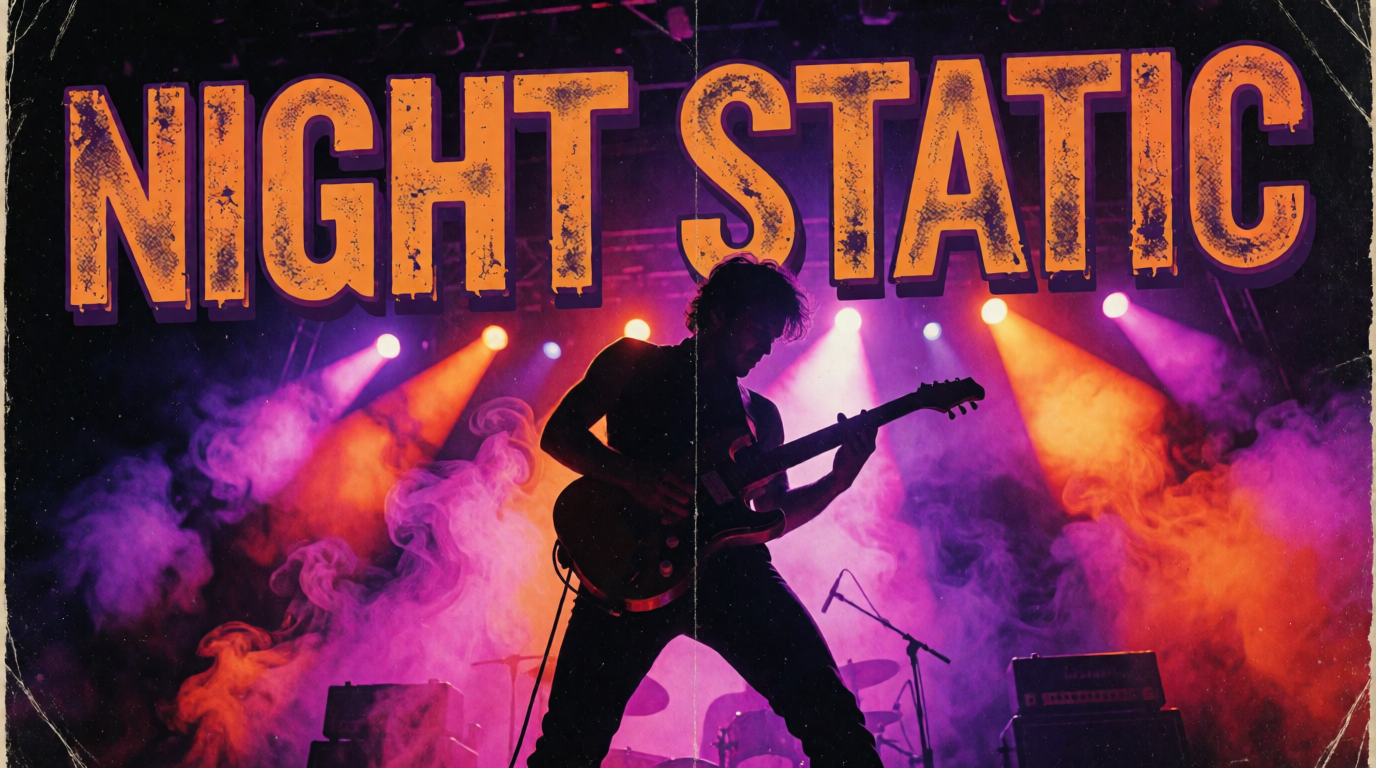
Variation tip: name the band or event and the lighting color pair (“neon purple and orange,” “teal and magenta”) and keep the rest of the prompt fixed — color pair and typography style do the most work.
What makes a poster actually work
- Hierarchy. One headline, one supporting line, one call to action. A poster read from six feet away needs one idea, not five.
- Contrast. Text has to survive a glance. Light type on dark art, or a solid color block behind small text, beats a busy background every time.
- Generate vs. template. If the art doesn’t exist yet, generating it is faster than searching a template library for a close match. If the words and layout matter more than the art, a template with a text box wins.
- Print vs. social. A gig poster going on a wall needs print resolution and bleed margins; an Instagram poster just needs the right pixel dimensions. Check which each tool targets before you commit.
How do I design a poster?
The fastest path depends on whether you’re starting from a blank page or from an event’s details. Starting from a blank page: describe the scene you want in a prompt (subject, lighting, color palette, and the words you want on it) and generate it — that’s the Krea 2 route below. Starting from details you already have — date, time, venue, a sponsor logo — pick a poster template sized for your output (print or social) and drop your text into the existing layout; that’s the Canva, Adobe Express, PosterMyWall, and VistaCreate route. Either way, export at the resolution your final use needs: screen posters need far less than a printed one, and our image upscaler guide covers getting print-ready resolution out of a generated image.
1. Krea — original poster art from a prompt
Krea 2 generates the full scene — subject, lighting, color palette, and headline typography — from one text prompt, so there’s no template search when the art you need doesn’t exist as a template. A movie-style poster is one prompt:
dramatic sci-fi movie poster, lone astronaut standing before a massive red gas giant planet, epic scale, moody cinematic lighting, bold minimalist title typography at the bottom reading DRIFT, space dust particles, teal and orange color grade
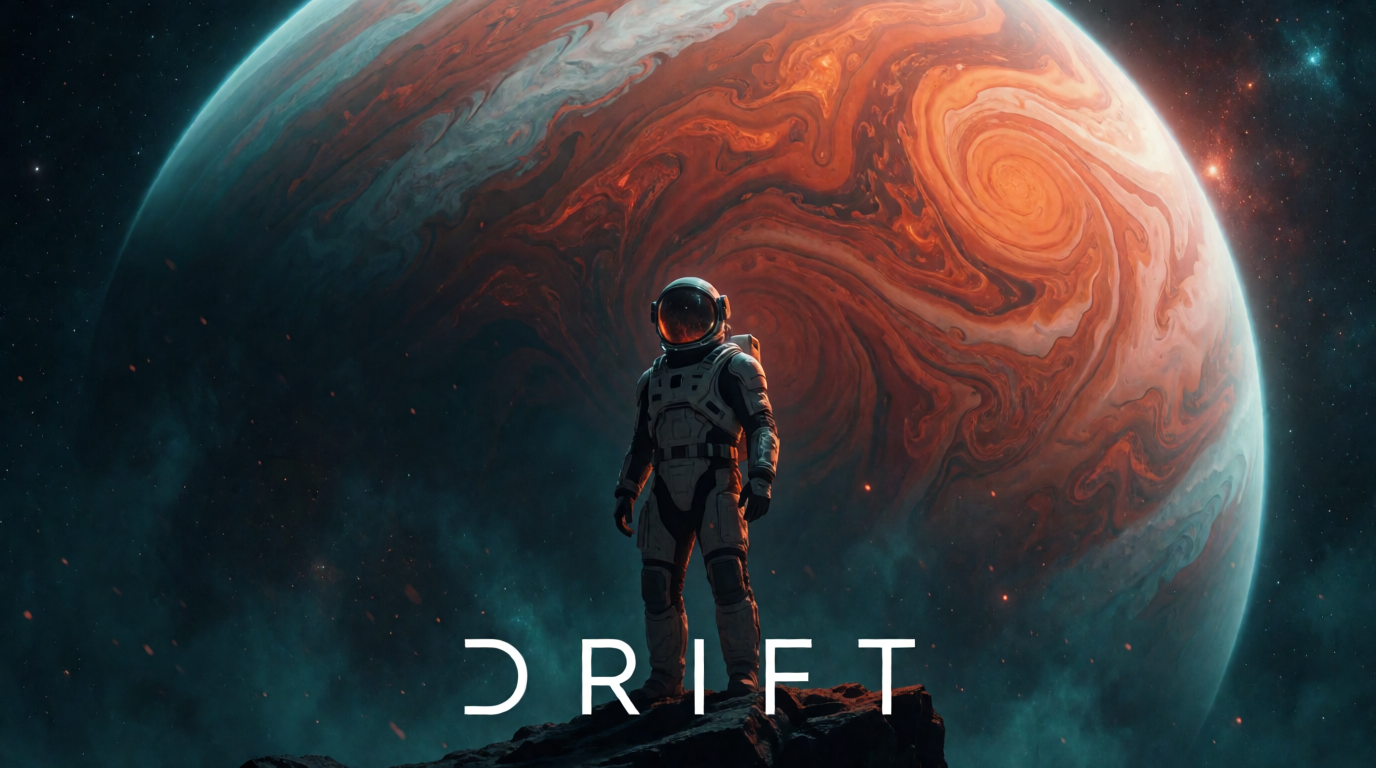
Variation tip: keep “bold minimalist title typography” fixed and swap only the scene and the title word — short one-word titles render more reliably than full sentences.
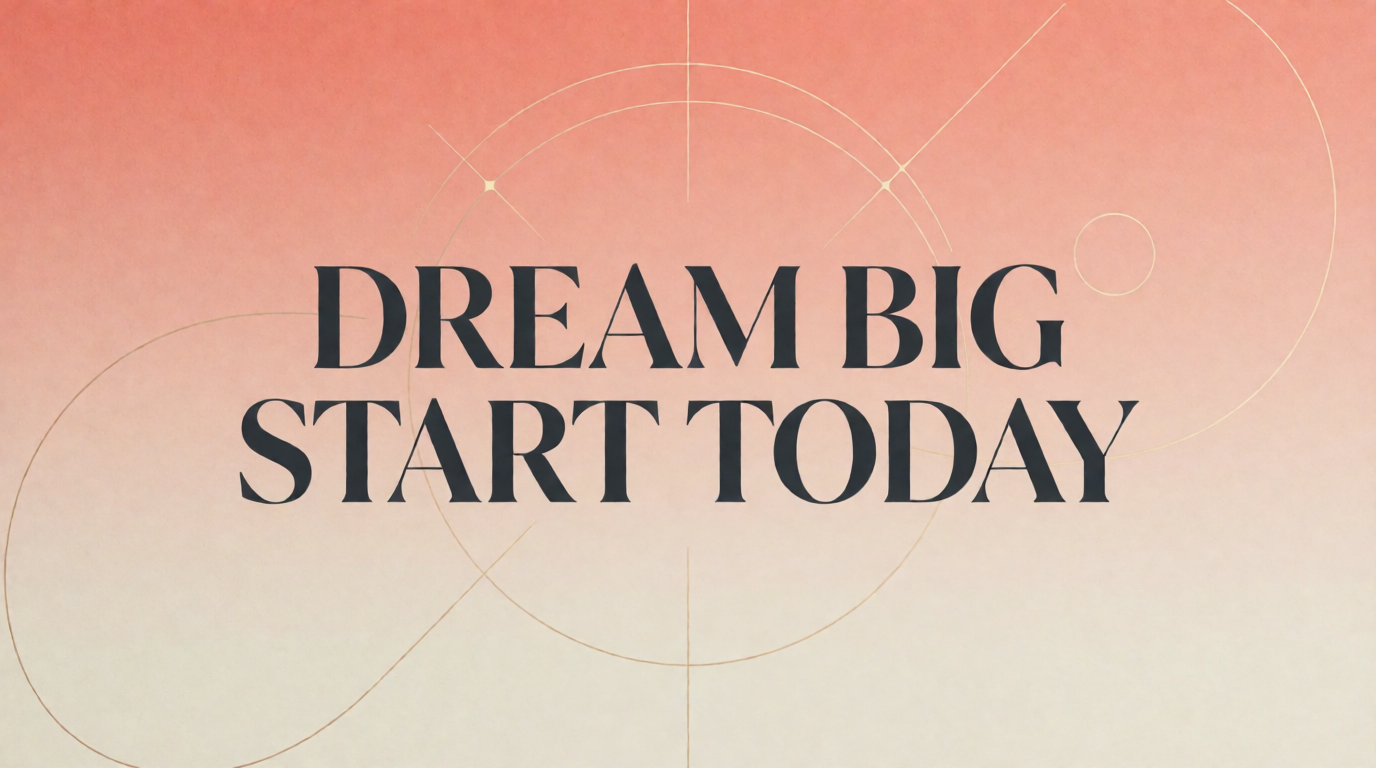
Simpler poster styles work the same way. A minimalist motivational poster leans on typography and color instead of a rendered scene:
minimalist motivational poster with large bold serif typography reading DREAM BIG START TODAY centered on a soft gradient background from warm coral to cream, thin geometric line accents, clean modern layout, plenty of negative space
Krea’s free plan includes 100 compute units per day for Krea 2 generation and basic upscaling to 2K, but it does not include video, 3D, or the commercial license (pricing). Paid plans start at Basic, $9/month for 5,000 compute units, which adds the commercial license needed to sell or publicly distribute a poster; Pro is $35/month for 20,000 units. Once you have the art, Edit can add or refine a headline as a layer, and the Enhancer upscales it for print — the same pipeline covered in our AI ads guide.
Where it stops: Krea generates the artwork, but it is not a layout tool — there’s no drag-and-drop text box, no saved brand kit, and no one-click resize from a print poster to an Instagram story. Small body copy (an address, a ticket link) also renders less reliably than a short bold headline; for posters with a lot of fine print, generate the art in Krea, then drop text over it in a layout tool, picking a real typeface from our free font guide instead of trying to render it with the model.
Try poster art generation on Krea — the free plan covers testing prompts before you commit to a paid tier.
2. Canva — the default drag-and-drop poster maker
Canva is the template-first route: search “poster,” pick a size (18×24 in print, A3, or a square social format), and drop text and photos into a pre-built layout. The free plan is genuinely free forever — no credit card, no trial clock — with a smaller template and stock library than Pro (see what Canva’s free plan and Canva AI actually include). Canva Pro is $18/month or $144/year (about $12/month effective), and adds the full premium template library, background remover, brand kit, and one-click resize across formats. Canva Teams (formerly Business) runs $25/user/month for shared brand controls across a group.
Settings recipe:
Search “poster” → pick a template near your final size → replace the placeholder photo → edit the headline text box → Resize to add a matching social version → Download as PDF (print) or PNG (social).
Variation tip: use Canva’s Resize feature to generate a second version of the same poster at a social aspect ratio instead of redesigning it from scratch.
Where it stops: premium templates, the background remover, and brand kits sit behind Pro, so a fully free poster leans on the smaller free template set. And because every poster starts from a template, two campaigns in the same category often end up looking related — there’s no way to generate genuinely original artwork inside Canva itself.
3. Adobe Express — the best free one-off poster
Adobe Express’s poster maker gives a full transparent-background-capable, watermark-free download on the free plan: pick a template, edit the text, export. Free includes 100,000+ templates, 5GB of storage, and one connected social account per network. Premium is $9.99/month with no annual commitment required, and adds 250 generative credits per month, the full premium template and Adobe Stock library (200M+ assets), and advanced editing tools like AI background generation inside the poster canvas.
Settings recipe:
Open the poster maker → search or filter by size (print or social) → swap the template photo → edit headline and body text boxes → Download PNG or PDF.
Variation tip: Premium’s built-in generative fill can extend or restyle the template background without leaving the poster editor — useful when a stock photo is close but not quite right.
Where it stops: the free plan’s generative tools are limited, and only one social account per network connects without Premium — fine for a single poster, thin for anyone publishing a poster campaign across several channels.
4. PosterMyWall — built specifically for posters and flyers
PosterMyWall is the most poster-literal tool on this list: templates are organized by event type (concerts, sales, church events, birthday parties, restaurant specials), and every template ships pre-sized for both a print poster and a matching social post. The free plan lets you design and try the AI tools, but exports carry a watermark. Premium runs about $13/month (near $9/month billed annually) for watermark-free downloads, scheduling, and 100 AI credits; Premium Plus is about $30/month (near $21/month annually) and adds unlimited social accounts and more AI credits.
Settings recipe:
Browse templates by event type → pick a size (poster or matching social post) → edit text and swap photos → use the built-in AI image tool for a background if needed → Download (watermark-free requires Premium).
Variation tip: build the print-size version first, then use the “resize to other formats” option to generate the social version instead of starting a second design.
Where it stops: the free plan’s watermark makes it unusable for anything you’ll actually print or post publicly, and the design toolkit is shallower than Canva’s outside of the poster-specific niche — it’s a poster-and-flyer tool first, not a general design suite.
5. VistaCreate — the budget Canva alternative
VistaCreate (formerly Crello) covers the same drag-and-drop ground as Canva at a lower price: the free Starter plan includes 100,000+ templates and 1 million+ stock photos, videos, and vectors, with 10GB of storage and one brand kit. Pro is $10/month and covers up to 10 seats, unlocking 200,000+ templates, 170 million+ stock assets, unlimited brand kits, and unlimited storage, with a 14-day free trial.
Settings recipe:
Search “poster” in templates → pick a size → replace photo and text placeholders → use the AI background remover or AI image generator for a custom element → Download PNG or PDF.
Variation tip: Pro’s per-seat pricing (one Pro seat covers up to 10 people) makes it noticeably cheaper than Canva Teams for a small club or event committee sharing one design account.
Where it stops: the brand and integration ecosystem is smaller than Canva’s — fewer third-party app integrations, a smaller community template marketplace — so teams that need those extras still land on Canva despite the higher price.
What are some poster examples?
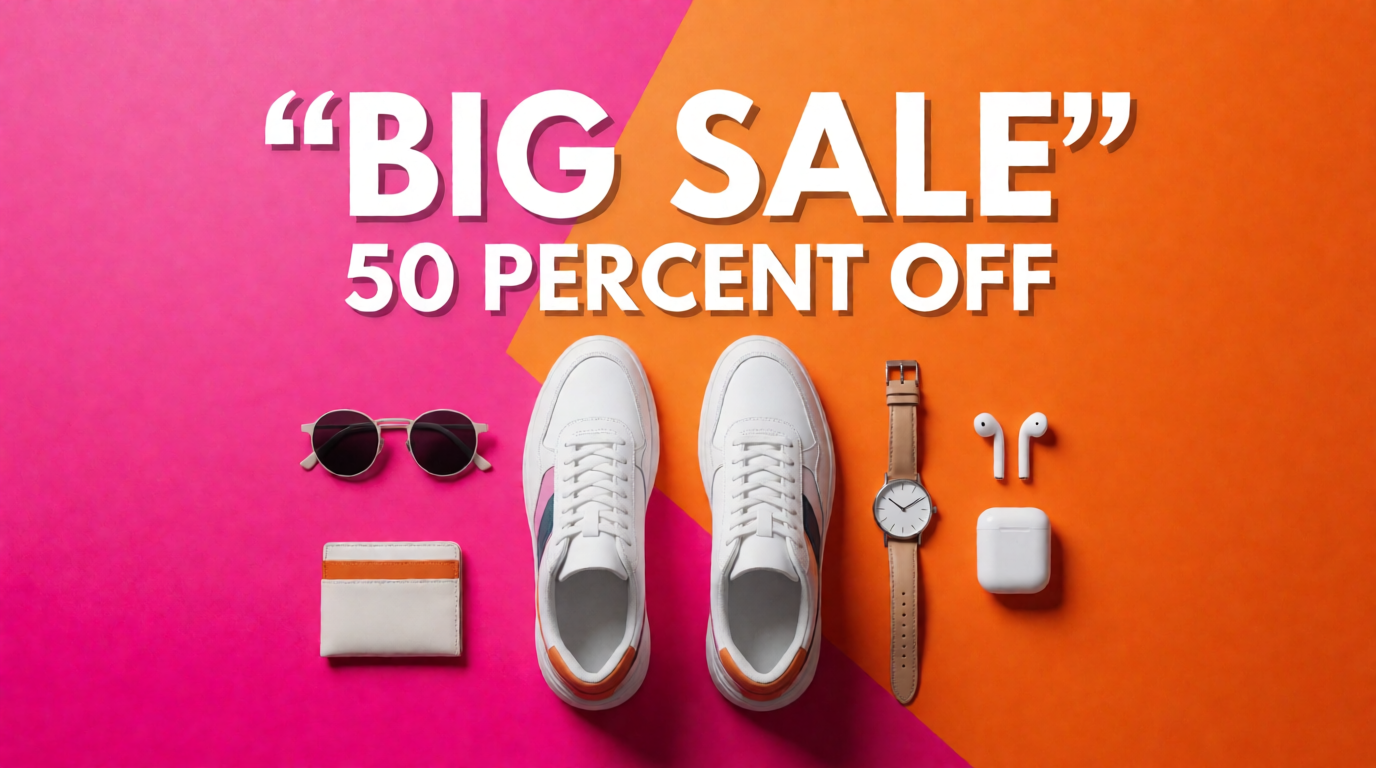
Different poster jobs call for different visual languages. A gig poster leans on grain and neon; a community flyer leans on flat, friendly illustration; a retail poster leans on bold typography and product photography. Here are three examples generated the same way as the images above — one prompt, one raw Krea 2 output:
Poster style examples
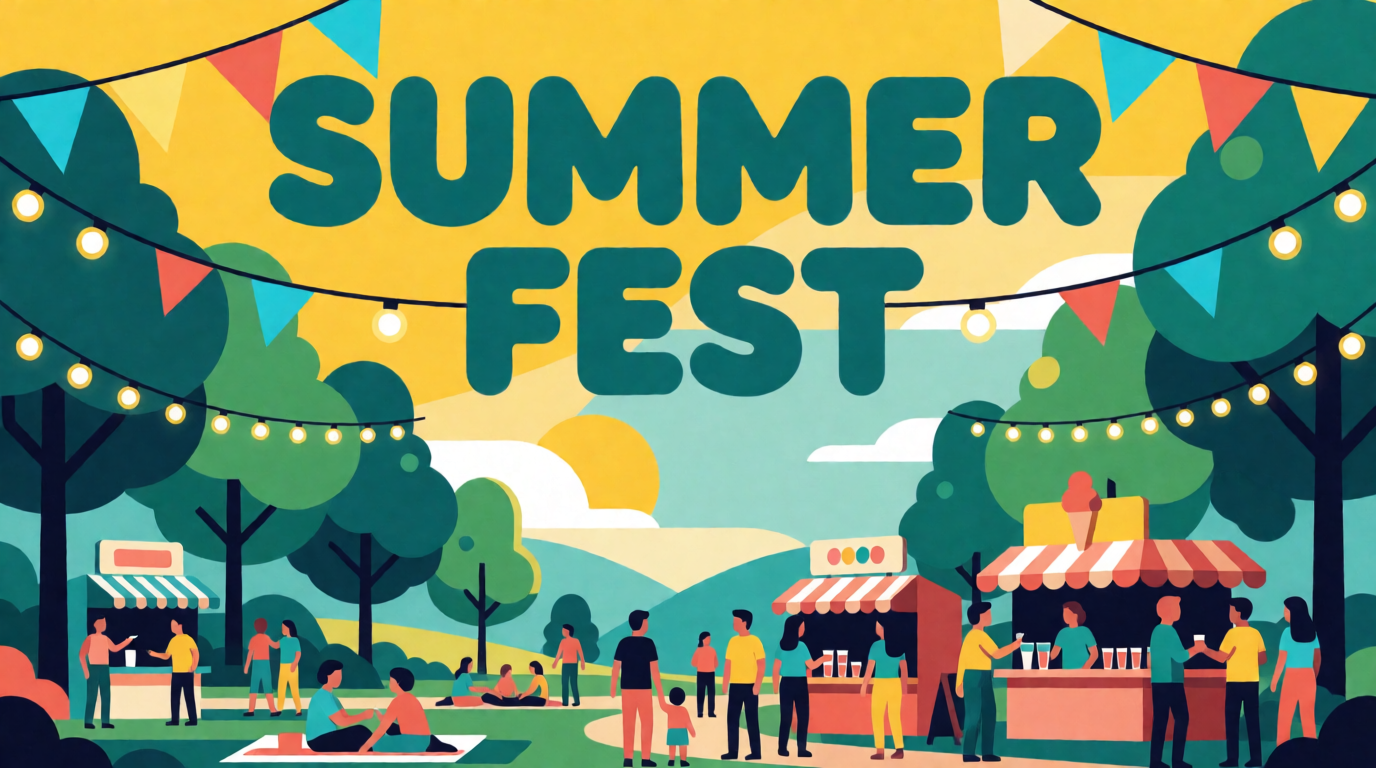
The festival poster’s prompt:
colorful community summer festival poster, flat illustration style, string lights and bunting flags, a park scene with families and food stalls, bold rounded typography reading SUMMER FEST across the top, bright yellow and teal palette, playful modern flat design
The retail poster’s prompt:
modern retail sale poster design, bold typography reading BIG SALE 50 PERCENT OFF, product flat-lay of sneakers and accessories on a bright gradient background, dynamic diagonal color blocks in pink and orange, clean e-commerce marketing style
Variation tip: for either style, naming the exact headline words in quotes inside the prompt gets closer to legible type than describing the message abstractly (“a sale announcement”).
For inspiration on color choices before you write a prompt, our aesthetic color palette guide breaks down five palettes that read well at poster scale, and our moodboard guide covers collecting reference images before you generate.
How do I post a poster online, and what about print?
Export settings differ by destination. For print, most copy shops want a PDF at 300 DPI with the poster’s exact final size (18×24 in, A2, A3), plus a small bleed margin if the design runs to the edge — Canva, Adobe Express, and PosterMyWall all offer a print-ready PDF export option, and PosterMyWall’s format-specific templates set the bleed automatically. For posting online — a story, a feed post, an event page — export a PNG or JPG sized to the platform (1080×1350 for an Instagram portrait post, 1200×630 for a shared link preview) rather than shrinking the print file, since print-resolution files are needlessly large and can crop oddly on a phone screen. If the source art came from Krea, the Enhancer can upscale a web-resolution generation up to print size without redoing the prompt.
Which poster tool should you use? Pick by job
- The art doesn’t exist as a template yet: Krea — generate the scene from a prompt, then add a layout in Edit.
- You have the event details and want a fast, clean layout: Canva — the largest free template library and one-click resize.
- One free poster, no subscription, no watermark: Adobe Express — full-resolution download on the free plan.
- A poster and a matching flyer or social post, same design: PosterMyWall — built around that exact pairing.
- Canva-style templates on a tighter budget, shared with a small group: VistaCreate — $10/month covers up to 10 seats.
Whichever route fits, the two tools combine well: generate original art in Krea 2 for anything a template can’t match, and finish the layout, text, and multi-format export in a template tool. Our Canva alternatives roundup and free AI image generators guide cover the wider landscape if none of these five is quite the fit.
Frequently asked questions
How can I design a poster?
How do I design a nice poster?
Can I design a poster without design experience?
What are poster examples?
How do I post a poster online?
Is there a free way to make an AI poster?
Generate the poster art, then lay out the text
Start with a prompt in Krea 2, refine it in Edit, and upscale for print in the Enhancer.
Start designing